
Become a MacRumors Supporter for $50/year with no ads, ability to filter front page stories, and private forums.

jwroycechoi

macrumors newbie
Original poster
I got the email from Apple saying that i was chosen one of the public beta tester of OS X Yosemite, just in case i set up a new partition to install this beta version.
But after installing the OS in new partition, i tried to go back to my previous Mavericks settings by pressing on 'option' key while rebooting, and saw that the disk did not exist. Frustrated, but i managed to find the original disk in the booting disk selection corner in the System Preference panels. So i just decided to install Yosemite in the original disk and wipe out the additional partition that i created.
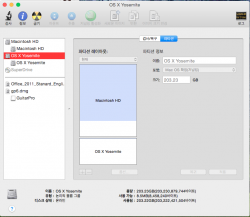
HOWEVER!!! i cannot delete this partition now. Don't have a clue why, but when i go into my disk utility, i see this image.

1. the '-' button is not active
2. I am guessing that i need help on how to delete the logical volume group "OS X Yosemite" in the picture


Need help from u guys! How can i delete the logical volume group???
 

Attachments
  • ???? 2014-08-01 ?? 4.00.47.png
    ???? 2014-08-01 ?? 4.00.47.png
    104 KB · Views: 115
Last edited:
I got the email from Apple saying that i was chosen one of the public beta tester of OS X Yosemite, just in case i set up a new partition to install this beta version.
But after installing the OS in new partition, i tried to go back to my previous Mavericks settings by pressing on 'option' key while rebooting, and saw that the disk did not exist. Frustrated, but i managed to find the original disk in the booting disk selection corner in the System Preference panels. So i just decided to install Yosemite in the original disk and wipe out the additional partition that i created.
HOWEVER!!! i cannot delete this partition now. Don't have a clue why, but when i go into my disk utility, i see this image.

1. the '-' button is not active
2. I am guessing that i need help on how to delete the logical volume group "OS X Yosemite" in the picture


Need help from u guys! How can i delete the logical volume group???

no picture is attached
 
You are currently in Yosemite and you are trying to tell it to delete itself. It can't. Boot into the restore partition and do it from there.

Thxs for your reply,
Currently i'm using "Macintosh HD" and the "OS X Yosemite" volume is the one i made up to install the new OS
Unfortunately, I tried the restore partition, and tried the disk utility there, but couldn't do it 🙁
 
Easy fix

I got the email from Apple saying that i was chosen one of the public beta tester of OS X Yosemite, just in case i set up a new partition to install this beta version.
But after installing the OS in new partition, i tried to go back to my previous Mavericks settings by pressing on 'option' key while rebooting, and saw that the disk did not exist. Frustrated, but i managed to find the original disk in the booting disk selection corner in the System Preference panels. So i just decided to install Yosemite in the original disk and wipe out the additional partition that i created.
HOWEVER!!! i cannot delete this partition now. Don't have a clue why, but when i go into my disk utility, i see this image.

1. the '-' button is not active
2. I am guessing that i need help on how to delete the logical volume group "OS X Yosemite" in the picture


Need help from u guys! How can i delete the logical volume group???


I can't seem to click the "-" (minus) button in Disk Utility to delete this second partition. I have tried in recovery mode, and tried ejecting the partition, but no joy. What am I missing?

Image

I know this is an old article, but this recently happened to me and the easiest way to get rid of the Yosemite partition is to:

1) Boot your other OS, mine was Mavericks
2) Open Disk Utility
3) Select the Yosemite partition
4) Select the erase tab, erase it
5) Select the main drive and go to the partition tab, where you can then delete the Yosemite partition and resize it back to the original size.

Hope that helps!
 
Register on MacRumors! This sidebar will go away, and you'll see fewer ads.