Become a MacRumors Supporter for $50/year with no ads, ability to filter front page stories, and private forums.

Ozman712

macrumors member
Original poster
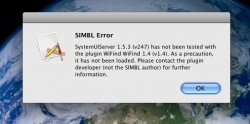
I installed WiFind way back probably a year ago. I never used it so I didn't buy it after the free trial ended. Once I migrated over to Leopard I started getting this error. It went away after awhile, but it is back with this new Leopard update. I cannot find any of this plugins components where I think they would be. Can someone help me with this one?

Thanks
Oz
 

Attachments

  • Picture 1.jpg
    Picture 1.jpg
    39.5 KB · Views: 104
Just remove the plugin (which will be in /Library/Application Support/SIMBL/plugins or in the equivalent in your home directory).
 
Same problem, removing plugin did not work.

Apologies for the bump, but I'm having the same problem - only removing the plugin does not remove the error dialog box.

I have removed the files from the SIMBL/Plugins folder, as well as the Input Manager folders, following these instructions:

http://phaseportrait.blogspot.com/2007/09/removing-wifind.html

I'm still getting the same box as the OP did in his screenshot.

I would just reinstall Leopard and be done with it but a Time Machine backup would reinstall Wifind all over again. Aagh!
 
Apologies for the bump, but I'm having the same problem - only removing the plugin does not remove the error dialog box.

I have removed the files from the SIMBL/Plugins folder, as well as the Input Manager folders, following these instructions:

http://phaseportrait.blogspot.com/2007/09/removing-wifind.html

I'm still getting the same box as the OP did in his screenshot.

I would just reinstall Leopard and be done with it but a Time Machine backup would reinstall Wifind all over again. Aagh!

Try removing SIMBL itself from /Library/InputManagers (that's the main system library, not the one in your user folder). That will, however, disable ALL of your SIMBL plugins (not necessarily a bad thing - SIMBL can be a source of flakiness). You'll need to logout or reboot afterwards for it to go away entirely.
 
Register on MacRumors! This sidebar will go away, and you'll see fewer ads.