

Please tell me how to partition a hard drive, so I can boot a my Leopard image-file from a separate partition. Thanks in advance to anyone of you, who has enough patience & time to guide me through to complete this common task.
I did the follow things so far to make a separate partition for my disk-image (Leopard Installer):
1. Launched Disk-Utility on Tiger 10.4.11 OS X.
2. Clicked on my hard-drive (149.1 GB).
3. Selected "Partition" in that menu (seen above the Volume Information).
4. Selected "2 Partitions" from the "Volume Scheme drop-down menu".
--here's where I noticed the problem--
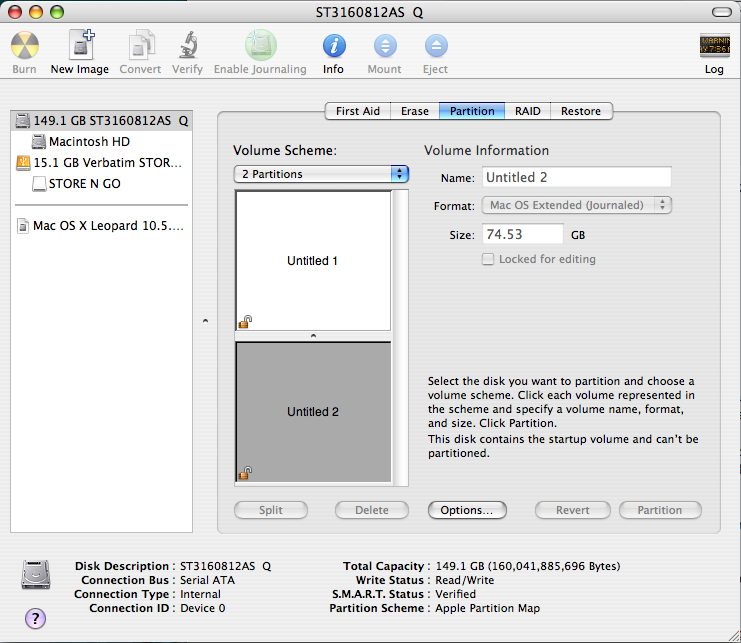
I noticed all of the options I need to choose between are "grayed-out", here (what should I do to make the partition at least 8GB or larger now?):
I did the follow things so far to make a separate partition for my disk-image (Leopard Installer):
1. Launched Disk-Utility on Tiger 10.4.11 OS X.
2. Clicked on my hard-drive (149.1 GB).
3. Selected "Partition" in that menu (seen above the Volume Information).
4. Selected "2 Partitions" from the "Volume Scheme drop-down menu".
--here's where I noticed the problem--
I noticed all of the options I need to choose between are "grayed-out", here (what should I do to make the partition at least 8GB or larger now?):
