Become a MacRumors Supporter for $50/year with no ads, ability to filter front page stories, and private forums.

berisen

macrumors newbie
Original poster
I'm having a hard time deciding what configuration to go with so I would be very grateful for any input 🙂

I'm a nature photographer and is doing a lot of work in Lightroom and Premiere primarily. Doing a lot of video in 4K (and sometimes I shoot in 8K) and my current setup struggles with this sometimes, especially video editing. (M1 Pro 16").

I'm leaning towards getting the 14" M5 Pro with 18/20 CPU and 64GB ram and also the nano texture screen. This seems like the perfect setup but do I really need 64GB ram for my work? This is my biggest concern. I don't think that memory is limiting me today with 32GB so 48GB should be fine I guess but since I won't replace this laptop for many years it also feels a bit dumb to not go with 64GB.

Also, will the battery life be much worse in the 14" compared to the 16"? Anything else that's better in the 16" vs 14"?

If I was to go with the 16" I would probably need to go down to 48GB and use the regular screen in order of make it fit budget wise.

Would live to hear your thoughts! 🙂 Thanks!
 
When I was researching my laptop I noticed the 16” laptops (as you noted) have more battery life. They also have more power to provide to the SoC and with better cooling due to larger air volume, the SoC won’t slow down as quickly or as much as in the 14” model.

I was playing with my new 14” laptop last night and using istat menus to max out the fan speed, I got noticeably better results in cinebench 2026 benchmarking compared to running the fans at their default settings.

I’ve had 15+” laptops for forever so went with the 14” even though I knew the SoC would take a performance hit. But I’m not making money from my laptop so this may be more of a concern for you if you’re looking to get the absolute best performance from whatever SoC you select.

I can’t answer your RAM question. Hopefully another Lightroom / Premiere user can answer that question for you.
 
  • Like
Reactions: berisen
Presume nano on the screen because you will be taking it places / possibly outside? The 16" weighs a ton , which isn't an issue if docked at home mostly but a royal pain to lug it around.
 
  • Like
Reactions: berisen
I'm having a hard time deciding what configuration to go with so I would be very grateful for any input 🙂

I'm a nature photographer and is doing a lot of work in Lightroom and Premiere primarily. Doing a lot of video in 4K (and sometimes I shoot in 8K) and my current setup struggles with this sometimes, especially video editing. (M1 Pro 16").

I'm leaning towards getting the 14" M5 Pro with 18/20 CPU and 64GB ram and also the nano texture screen. This seems like the perfect setup but do I really need 64GB ram for my work? This is my biggest concern. I don't think that memory is limiting me today with 32GB so 48GB should be fine I guess but since I won't replace this laptop for many years it also feels a bit dumb to not go with 64GB.

Also, will the battery life be much worse in the 14" compared to the 16"? Anything else that's better in the 16" vs 14"?

If I was to go with the 16" I would probably need to go down to 48GB and use the regular screen in order of make it fit budget wise.

Would live to hear your thoughts! 🙂 Thanks!
I do not think you need 64GB. I upgraded from the same M1 Pro you have to an M5 Pro with 48 GB and I haven't come close to using up all of the memory.

I am also a photographer (amateur) and I open up 100's of 45mp RAW photos in DxO and there are no memory limits. I shot over 2,000 RAW photos (45mp each) at the Boston Marathon this week, and when I open all of them in the thumbnail browser of DxO, it uses up less than 3 GB of memory. With my M1 machine, I would need to break them into a few folders, because over 750 photos or so, the RAW browser would choke. Not that it's a big deal to break these images into a few folders, but it gives you an idea of the greater power.

I think the only way to use up 48 or 64GB of RAM is to use Docker or another virtual machine program to spawn multiple instances of operating systems, or to run LLMs. But I do not foresee video and photo editing using up more than 48 GB on one of these machines. That's my opinion, anyway. I would be happy to run some tests for you, although I use DxO and DaVinci, not Adobe, and I'd rather not install the Adobe demos on my machine because Adobe puts files everywhere all over the hard disk.
 
  • Like
Reactions: berisen
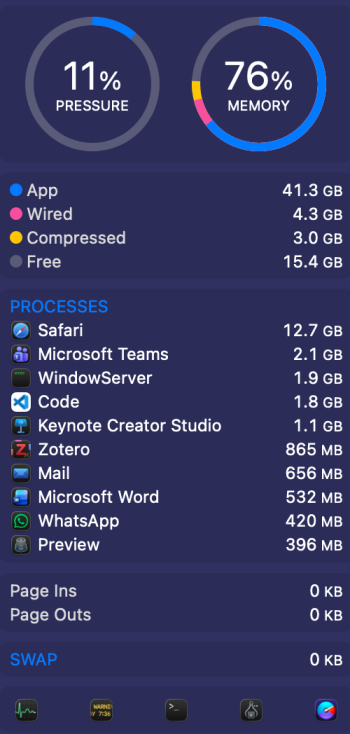
I am not a pro photographer or video editor, I am a teacher. In my workflow I hardly ever "need" more than 24GB of RAM. I bought a 14 M5 Pro 18/20 64GB/2TB/nano. Why you may ask:
1 - Nano screen was mandatory for me. When I bought it I never saw one but now that I have it I will never go back to glossy
2 - RAM price hike. I selected the configuration with the most RAM I could afford, the prices are going to soar even more (look at Surface prices)
3 - I've had a 16 Pro and a 15 Air previously. I loved the screen size of the 16 Pro, hated the footprint and specially the weight on my back. The Air is the sweet spot in terms of screen space, but screen quality and case stability suffers. Although the Air has better case stability than the wedged Air it is still no match for Pro
4 - The supposed new Ultra is going to be pricier and at least 6 months away (or more). I will be enjoying my computer for that time and more
5 - Better be safe than sorry 😊

We only live once. For me it is a tool for working but since I love my work it is also a "pleasure item". I need to feel good about what I am working with and love to have headroom at all times. As I mentioned a 24GB RAM version would be enough today. However, macOS uses as much RAM as it has, not used RAM is wasted RAM. I attached a screenshot of the current RAM state for context.

My advice: go as much as you can afford unless you will be trading when the next big thing comes. As for 14 vs 16 I can use (and carry) an external 4K USB-C monitor for the weight difference from 14 and 16 and get much more productivity and screen real estate if needed. I found out I clearly prefer using multiple monitors to have a single "big" laptop monitor.

Hope I helped somehow.
 

Attachments

  • Screenshot 2026-04-27 at 17.06.08.png
    Screenshot 2026-04-27 at 17.06.08.png
    186.9 KB · Views: 105
Thank you all for your help! I think I am a bit closer to some sort of decision but things keeps popping up all the time 😛

My latest rabbit hole I’ve been going down is Nano or glossy screen. I have no place nearby where I can actually try it out for myself so I’ve been trying to read as many reviews and comments about this but it feels like a very divided topic! Some people clam to love it and would never go back to glossy again and some seems to be missing out on deep black and vibrant colors.

What’s your opinion about the nano screen? I will be doing mainly photo and video editing in the computer so that’s the most important thing for me.
 
Last edited:
Thank you all for your help! I think I am a bit closer to some sort of decision men things keeps popping up all the time 😛

My latest rabbit hole I’ve been going through is Nano or glossy screen. I have no place nearby where I can actually try it out for myself so I’ve been trying to read as many reviews and comments about this but it feels like a very divided topic! Some people clam to love it and would never go back to glossy again and some seems to be missing out on deep black and vibrant colors.

What’s your opinion about the nano screen? I will be doing mainly photo and video editing in the computer so that’s the most important thing for me.
For me it is a no-brainer the nano screen. Even more if you do photographic/graphical/video work. The only thing I was afraid was durability due to the supposed imperative use of the cloth and careful with liquids, do not use water, etc. I can say that the screen is more resistant to dirt simply because it is not so visible. When working I think its clean but only when I switch to off I find specks form my speaking on classes. When I need to clean it I use isopropyl alcohol and the cloth. No issues so far, very happy. Count me in the "not returning to glossy" side of things.
 
  • Like
Reactions: berisen
For me it is a no-brainer the nano screen. Even more if you do photographic/graphical/video work. The only thing I was afraid was durability due to the supposed imperative use of the cloth and careful with liquids, do not use water, etc. I can say that the screen is more resistant to dirt simply because it is not so visible. When working I think its clean but only when I switch to off I find specks form my speaking on classes. When I need to clean it I use isopropyl alcohol and the cloth. No issues so far, very happy. Count me in the "not returning to glossy" side of things.
Thanks! Sound good. You are not feeling that colors appears to be dull or damped somehow and not as crisp and vibrant as on the glossy screens? That’s my only concern really.
 
Thanks! Sound good. You are not feeling that colors appears to be dull or damped somehow and not as crisp and vibrant as on the glossy screens? That’s my only concern really.
That is a very good question. For me the glossy screens pop the color artificially. I'm writing with a second matte screen monitor next to me and for me the colors on the integrated panel are perfect. If you place one next to the other the brilliancy of the glossy would seem to popup the color more.
I also read on some reviews that the text seems blurry. It is by no means true. The text is crisp.
I dint had the chance to try nano screen before buying, had the same concerns as you, together with the blurred text concern.
 
Register on MacRumors! This sidebar will go away, and you'll see fewer ads.