

Hey guys, I just got my first Mac today, (an early 2013 13" Retina MBP) and I've run into some trouble while trying to set up bootcamp.
I got through the boot camp assistant and to the Windows installation dialog no problem, but when it was done with copying all the files, after the restart my screen looked like this:
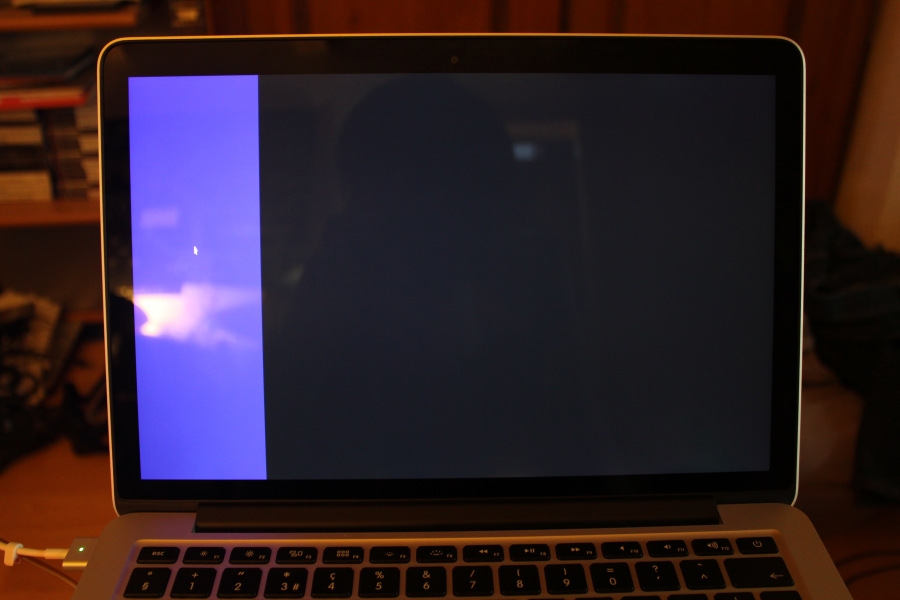
I can move the cursor within this purple stripe, but it does not seem to react to any keyboard input. I've let it sit like this for over an hour now, so if it was still installing Windows, it should definitely be done by now.
Is there any way I can fix this myself? For now I'd be happy to just be able to boot back into OSX. Or do I have to take a trip to the Mac store?
I got through the boot camp assistant and to the Windows installation dialog no problem, but when it was done with copying all the files, after the restart my screen looked like this:
I can move the cursor within this purple stripe, but it does not seem to react to any keyboard input. I've let it sit like this for over an hour now, so if it was still installing Windows, it should definitely be done by now.
Is there any way I can fix this myself? For now I'd be happy to just be able to boot back into OSX. Or do I have to take a trip to the Mac store?
Last edited: