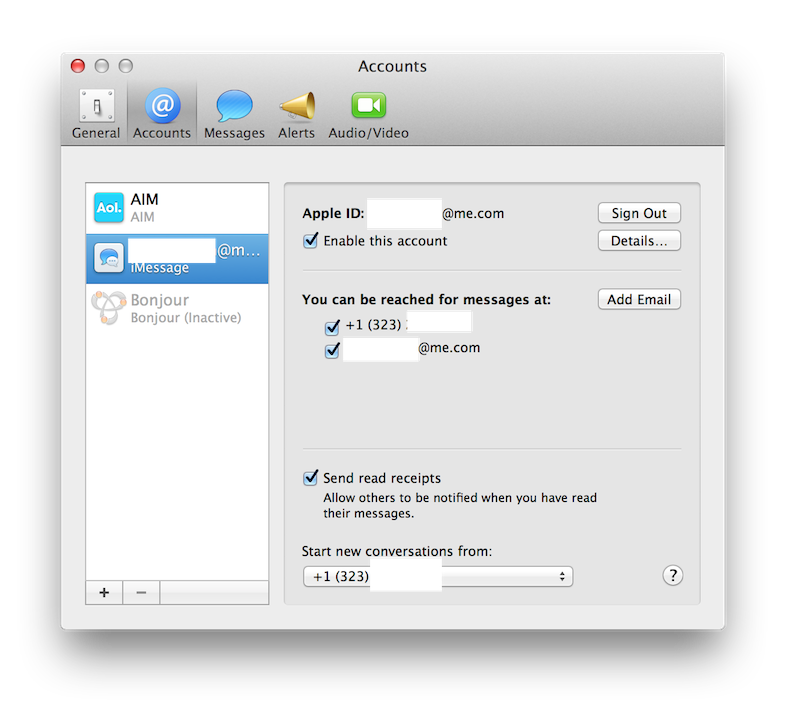
I've upgraded now to OS X Mountain Lion and I still don't see here any feature which describes the option to add my phone number to iMessage, can someone guide me please?
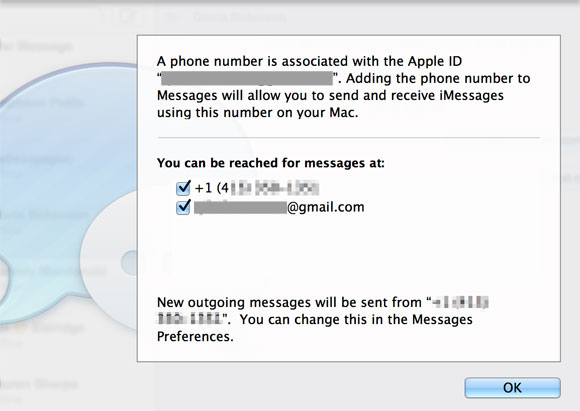
You don't have to. Your phone number is already associated with your Apple ID. Start iMessage and it will tell you that it's going to use your phone number and allow you to uncheck the option.
Download iOS 6 then just turn off iMessage on your device then back on.
Make sure you have your number has the primary sender/receiver then make sure you have your Apple ID on there. Log in with your Apple ID on iMessage on your computer
You need to set up iMessage again on your iOS device after updating to iOS 6 first, then you will see the options show up in your Messages app on your computer.
Here's what your iMessage settings window should look like after setting up your iOS 6 device:
You need to set up iMessage again on your iOS device after updating to iOS 6 first, then you will see the options show up in your Messages app on your computer.
I turned off iMessages on my iPhone, waited a minute, then turned it back on, and I got a pop-up on my Mac asking if I want to associate my phone number with my apple id for use with iMessage and FaceTime.
I have no idea what's going on. On my iOS 6 iPhone I can't add my iCloud email. I use my iCloud email for iMessage on my Mac. So it seems there's no way I can sync my phone number with my iCloud email/Mac. This is the most infuriating issue at the moment. WTF 😕