M macbooknewbie12 macrumors newbie Original poster Nov 25, 2009 #1 Is there a way to compress them to fit them into a single dvd. Its annoying to cut them into parts and into several dvds. Is there a program or wad that does that? Thanks alot😀
Is there a way to compress them to fit them into a single dvd. Its annoying to cut them into parts and into several dvds. Is there a program or wad that does that? Thanks alot😀
r.j.s Moderator emeritus Nov 25, 2009 #2 iDVD will do it, but you need to tweak the quality settings in Preferences.
M macbooknewbie12 macrumors newbie Original poster Nov 26, 2009 #3 r.j.s said: iDVD will do it, but you need to tweak the quality settings in Preferences. Click to expand... meaning that alot of quality will be lost?
r.j.s said: iDVD will do it, but you need to tweak the quality settings in Preferences. Click to expand... meaning that alot of quality will be lost?
yayitsezekiel macrumors 6502a Nov 26, 2009 #4 i'd recommend downloading handbrake and converting it to a 4.5 gb file. that way you have some space to work with, and it still looks decent
i'd recommend downloading handbrake and converting it to a 4.5 gb file. that way you have some space to work with, and it still looks decent
r.j.s Moderator emeritus Nov 26, 2009 #5 yayitsezekiel said: i'd recommend downloading handbrake and converting it to a 4.5 gb file. that way you have some space to work with, and it still looks decent Click to expand... You're still going to have to convert it again to burn to DVD, so may as well skip that middle step.
yayitsezekiel said: i'd recommend downloading handbrake and converting it to a 4.5 gb file. that way you have some space to work with, and it still looks decent Click to expand... You're still going to have to convert it again to burn to DVD, so may as well skip that middle step.
M macbooknewbie12 macrumors newbie Original poster Nov 26, 2009 #6 r.j.s said: iDVD will do it, but you need to tweak the quality settings in Preferences. Click to expand... i have tweaked the settings. Its still larger than 4.7gb?
r.j.s said: iDVD will do it, but you need to tweak the quality settings in Preferences. Click to expand... i have tweaked the settings. Its still larger than 4.7gb?
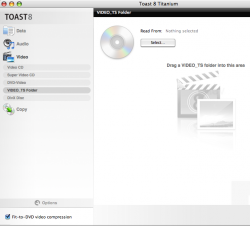
E ewilson6 macrumors 6502 Nov 26, 2009 #7 Buy Toast Titanium it has a simple option for this, look in the bottom left corner! Attachments Picture 1.png 153.2 KB · Views: 93
rhett7660 macrumors G5 Nov 26, 2009 #8 You could always by a dvd 9 or dvd 18 disk! http://www.newegg.com/Product/ProductList.aspx?Submit=ENE&N=2010100071 1087508108&name=8.5GB
You could always by a dvd 9 or dvd 18 disk! http://www.newegg.com/Product/ProductList.aspx?Submit=ENE&N=2010100071 1087508108&name=8.5GB