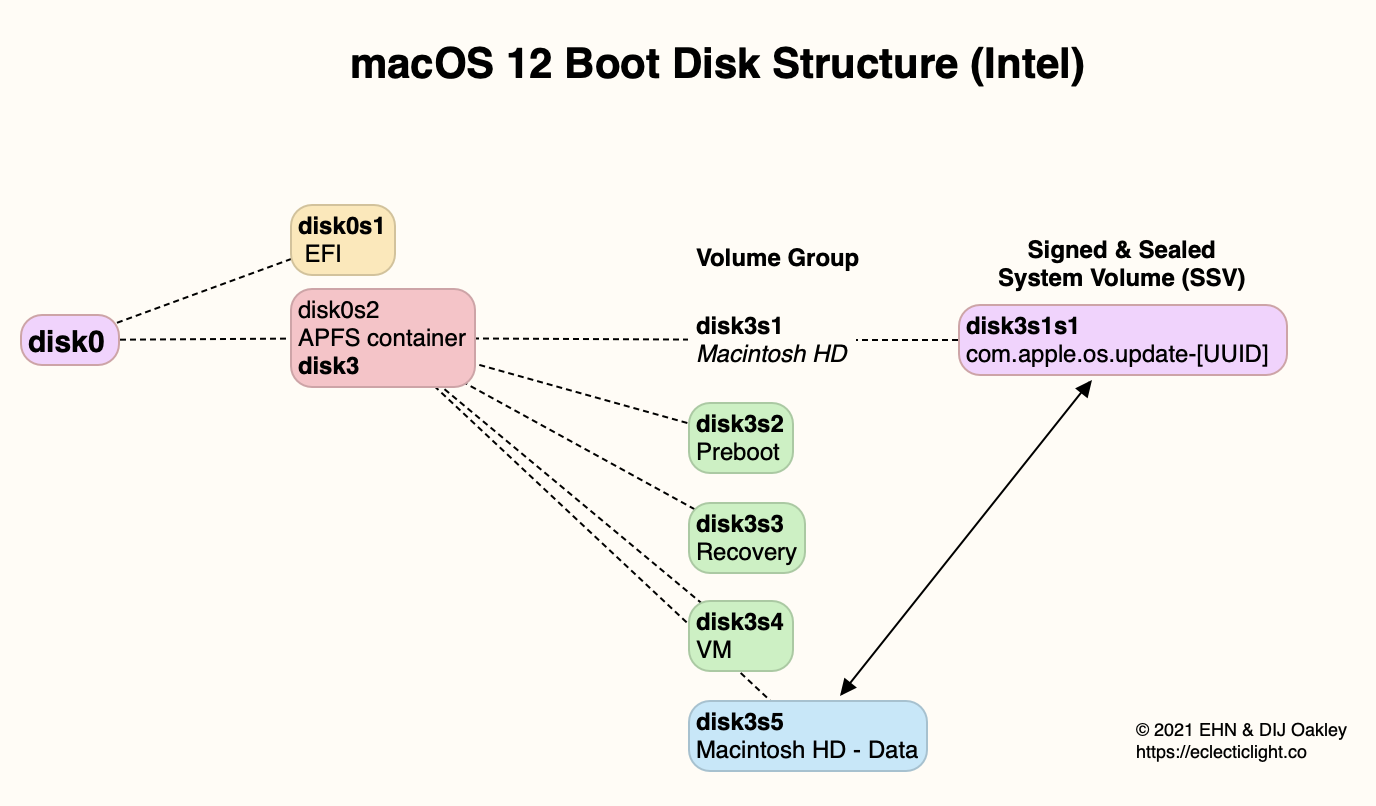
It looks like the normal "container" for the user-accessible part of the drive with Monterey running. That's called "Macintosh HD - Data".
The container "Macintosh HD" is the "sealed system volume" where the OS resides, and is not accessible to the user.
In the finder, all you'll see is a drive icon named "Macintosh HD".
The two containers are "blended together".
But when you save/delete things from the drive (at least the one you see on the desktop), you are REALLY saving/deleting them from "Macintosh HD - Data".
Ultimately, it’s for security. Data is stored apart from the operating system. The OS is on a signed and sealed, read only volume. And the computer is booted from a snapshot of that.
it is on show all volumes, just more there than im used to seeing even with show all. getting ready to do a nvme and ssd swap and it had been a while since i looked at it, probably since i put monterey on it