H helloimD4NNY macrumors regular Original poster Jul 9, 2011 #1 I have a clip that's 40ish seconds long. At 23 seconds I want the video to "pause" for 4 seconds then continue playing. How do I achieve this?

I have a clip that's 40ish seconds long. At 23 seconds I want the video to "pause" for 4 seconds then continue playing. How do I achieve this?
C cgbier macrumors 6502a Jul 9, 2011 #2 Put in a gap clip (formerly known as "slug") of four seconds. Ripplestraining has a short explanation on what it is in their free video.
Put in a gap clip (formerly known as "slug") of four seconds. Ripplestraining has a short explanation on what it is in their free video.
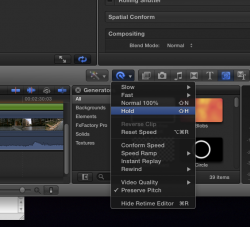
T TheNightPhoenix macrumors 6502 Jul 11, 2011 #3 Sorry but you all seem to be making this harder then it is. There is a very simple way of doing this. Find the Frame and press "Shift H" or choose "hold" form the timing menu.. (see screen shot) Then adjust the hold frame length. Job Done. Attachments Hold.png 166.4 KB · Views: 142
Sorry but you all seem to be making this harder then it is. There is a very simple way of doing this. Find the Frame and press "Shift H" or choose "hold" form the timing menu.. (see screen shot) Then adjust the hold frame length. Job Done.