Become a MacRumors Supporter for $50/year with no ads, ability to filter front page stories, and private forums.

Maynerd

macrumors regular
Original poster
Holy smokes I don't know why this is so hard to figure out. I have an HP C3180 printer and it prints color. I don't want to use up the color cartridge. I only want to print black and white printouts. How do I set this on my mac?

HELP!
 
Man I wish I could really help you out with this but I'm in the same boat as you.
I can tell you this though, you have to do it from Print Set Up on you computer.
I know this is absolutely no help but I noticed no one has replied yet.
 
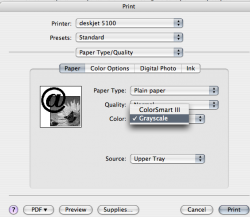
File>Print>Paper Type/Quality>Color>Grayscale

Not sure if there's a permanent setting for this like there is in Windows. I use a draft quality, grayscale setting on my suck*** windows 98 machine and HP inkjet printers at work.

Picture 2.png
 
File>Print>Paper Type/Quality>Color>Grayscale

Not sure if there's a permanent setting for this like there is in Windows. I use a draft quality, grayscale setting on my suck*** windows 98 machine and HP inkjet printers at work.

View attachment 66757

Yes I just figured this out. You can save a preference and just choose that every time you print. One extra click I guess. It would be nice if you could set a global default for it though.
 
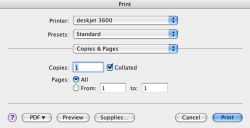
Odd, when I tried to print, I don't get the Type/Quality option.
 

Attachments

  • Picture 1.png
    Picture 1.png
    30.8 KB · Views: 693
Odd, when I tried to print, I don't get the Type/Quality option.

You need to go to the pulldown for copies&pages then choose paper type/quality and I found it there. You can then save a setting and choose it from the first screen in the future.
 
Odd, when I tried to print, I don't get the Type/Quality option.
Click your copies and pages, then adjust from there. This has worked for my Canon printers and as far as my Epson I think the printer has a few options that Canon doesn't (I think 😎 ) but not sure.
 
For some HP printers you can simply remove the color cartridge, close the cartridge latch (if any) and the printer will adjust accordingly.
 
You need to go to the pulldown for copies&pages then choose paper type/quality and I found it there. You can then save a setting and choose it from the first screen in the future.

True. Once you have changed settings, select Presets for an option to save as a newly named preset.
 
print b/w default

I am new to this
but would really like to know how to set my printer to grayscale as a global setting for all users the printer is hp3180 on imac os10.5.2
am getting tired of buying expensive color
thanx
dwbro124@comcast.net
 
Register on MacRumors! This sidebar will go away, and you'll see fewer ads.