Become a MacRumors Supporter for $50/year with no ads, ability to filter front page stories, and private forums.
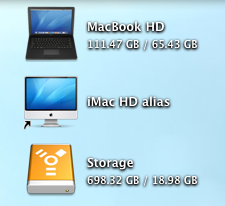
How come some peoples "show item info" has "..." and others shows the full amount of disk space available.

When i check "show item info" i get the ... where it show the amout of free space.

Thanks

All has to do with resolution and grid spacing (grid spacing being an option under the view options for the desktop). Mine just had the "..." but upon maxing out grid spacing, does not have the "..." but instead shows the entirety of my drive information.
 
All has to do with resolution and grid spacing (grid spacing being an option under the view options for the desktop). Mine just had the "..." but upon maxing out grid spacing, does not have the "..." but instead shows the entirety of my drive information.

Also, even with maxed out spacing, you might need to decrease the font size to get it to show up I have noticed.
 
Also, even with maxed out spacing, you might need to decrease the font size to get it to show up I have noticed.

Ah, yes indeed. I take it for granted that I like small font to begin with. haha. I have always had mine set to 10 pt font. 😛
 
cbster said:
How come some peoples "show item info" has "..." and others shows the full amount of disk space available.

When i check "show item info" i get the ... where it show the amout of free space.

Thanks
Three reasons...

- Make the icons bigger and the full info will be revealed. If the icon is too small then the details will be truncated due to lack of space, or

- Change the size of the type, or

- If you don't want to make the icons bigger or text smaller, you can edit the file which contains the info and eliminate the word 'free' altogether.

Locate the following file:

System/Library/CoreServices/Finder.app/Contents/Resources/English.lproj/Localizable.strings

Search for: IV9

The full line should read: "IV9" = ", ^0 free";

Delete the word free, so you get: "IV9" = ", ^0";

You can also customize the how the drive size and free space are separated by changing the comma with something else, like:

"IV9" = " | ^0";
"IV9" = " / ^0";
"IV9" = " - ^0";
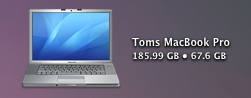
"IV9" = " • ^0";

Etc.

Mine...

Icons.png
 
I put my icons on the right hand side of the screen. Is it possible to move the text to the left instead of having it on the right? 😕
 
i just upgraded to snow leopard, and they no longer let you edit the Localizable.strings file, anyone got any idea how to do it yet?
 
System/Library/CoreServices/Finder.app/Contents/Resources/English.lproj/Localizable.strings

I opened Localizable.strings in TextEdit, but after changing the IV9 line, it said I don't have appropriate access privileges to save it.

Any help?

Thanks.

🙂
 
Register on MacRumors! This sidebar will go away, and you'll see fewer ads.