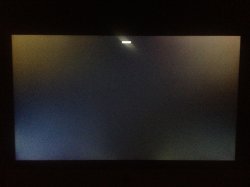
I think it's completely up to what you are willing to accept. My screen looks like this (50% and 100% brightness). There is definitely a bleed in the bottom left corner. 50% of people I asked for advice told me to get an exchange, 50% told me to calm down and to get used to it because it's within tolerance and many iMacs will have this particular issue.
You can't, I am not sure about what I am going to say now, could be wrong, some/many inputs output jacks have a switch build in, as soon as you insert the headphones it will disable the other output, this could also be the case on the iMac, if this is the case there is no solution.
Well, actually there is, get a USB audio device like the griffin one, it has both in and outputs but not both at the same time.
How much you want to accept I guess, apple has a policy on dead pixels but I don't think they have one for screen bleeding. My 2011 has very small bleeding in the bottom right, but not enough to be noticeable on a daily basis.
what about alt (or maybe cmd) clicking on the audio/volume icon, in the top right menu? Works for me when switching from speakers to usb headphones and vice versa.