Become a MacRumors Supporter for $50/year with no ads, ability to filter front page stories, and private forums.

jebbe

macrumors 6502
Original poster
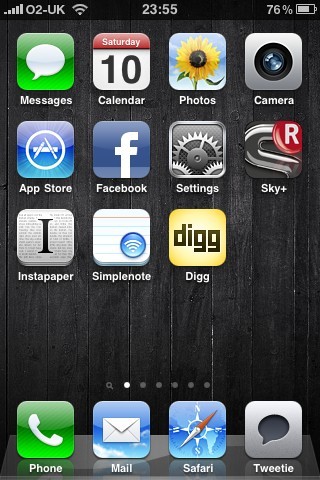
Maybe I'm missing something or something is wrong with mine but how do you change your iPhone Homescreen Background or does this happen to be a 3GS only feature?

When I go to set my background it doesn't give me an option to set for both homescreen and lockscreen or one of each.
 
It's probably a 3GS feature only. Why would they add all the goodies to old hardware?

Homescreen wallpaper will not be a 3GS only feature, think logically.

Folders can be implemented and works fine on the 3G, which uses more power than a static 480x320 image.

The 3G already has lock screen wallpapers and images behind the interface when taking a call.

I doubt Apple would have included the new 3D dock on the 3G if it wasn't getting the full new UI.

And again, we're talking about a 480x320 still image. Multitasking will sell phones, changable backgrounds is not groundbreaking in terms of a new feature as nice as it is.

The current bets is aimed, obviously, more at the 3GS.
 
well i cant find the button on my 3gs or 3g but my 3gs came with a background pre installed while my 3g didnt.
 
I'm having trouble changing wallpapers also.

I saw a screenshot giving two options on an image - "Set as lockscreen" and "Set as homescreen"

I've got 4.0 running on an iPhone 3GS and I only get "Set as wallpaper"

I'm scared of trying to get further than "cancel/set" incase I lose the bubbles...

I've seen a video of 4.0 running with a different pic on lock and homescreen but can't do it... Any ideas folks?

R,
 
I'm having trouble changing wallpapers also.

I saw a screenshot giving two options on an image - "Set as lockscreen" and "Set as homescreen"

I've got 4.0 running on an iPhone 3GS and I only get "Set as wallpaper"

I'm scared of trying to get further than "cancel/set" incase I lose the bubbles...

I've seen a video of 4.0 running with a different pic on lock and homescreen but can't do it... Any ideas folks?

R,

On 3GS, click set and you will be given three options:

Set as Home Screen
Set as Lock Screen
Set as Both

Simples 😉
 
On 3GS, click set and you will be given three options:

Set as Home Screen
Set as Lock Screen
Set as Both

Simples 😉

I couldn't resist, bit the bullet and found that in the end!

Oddly though, it still doesn't work.

I select the photo I want, 'Set Lock Screen' (and I've tried 'Set Home Screen' AND 'Set Both')
I get the 'Setting Wallpaper' sign, then it shows a tick.

Nothing... Anyone else seeing this issue?
 
Just found it!

I can't change any wallpaper when using 'Photos' but if I go to 'Settings' and change wallpaper there, it works!

mynewhomescreen.jpg


Must just be a bug 😀
 
I noticed this and it was frustrating to work out... But as mentioned if you do it via Settings it works - It is a known bug for this beta that you can not do it via "Photos"
 
I can't change my homescreen any way, I've tried every "solution" out there and nothing works. So I'm assuming it's just a bug cause I can't even change my lockscreen. If I reset all my settings I get the rain drops lockscreen background but can't change it to anything else other then a black background.
 
Register on MacRumors! This sidebar will go away, and you'll see fewer ads.