
Become a MacRumors Supporter for $50/year with no ads, ability to filter front page stories, and private forums.

rph105

macrumors 6502
Original poster
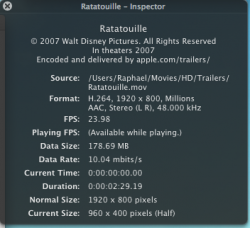
ok i downloaded a trailer off apple.com/trailers in 1080p HD, looked at the quality and it runs pefect, i done a screenshot of the properties, listed below, can anyone tell me the settings to convert a .mkv to a .mov, exactly the way apple has done it???
 

Attachments

  • Picture 2.png
    Picture 2.png
    85.2 KB · Views: 113
ok i downloaded a trailer off apple.com/trailers in 1080p HD, looked at the quality and it runs pefect, i done a screenshot of the properties, listed below, can anyone tell me the settings to convert a .mkv to a .mov, exactly the way apple has done it???

OK first, stop using mkv files. It's a solution looking for a problem. Second, Apple's files look so good becasue they 1) have the "source" video in a high quality codec starting out. and 2) they use a professional encoder like Compressor, or Sorenson ( unlikely but it's an example ) to encode it. You will get reaosnable results yourself if you encode this with the right settings, but it will never look as good as Apple's without having access to the original source.
 
OK first, stop using mkv files. It's a solution looking for a problem. Second, Apple's files look so good becasue they 1) have the "source" video in a high quality codec starting out. and 2) they use a professional encoder like Compressor, or Sorenson ( unlikely but it's an example ) to encode it. You will get reaosnable results yourself if you encode this with the right settings, but it will never look as good as Apple's without having access to the original source.

well have u got some alternative ways?
 
well have u got some alternative ways?

Did you not read what I wrote?

Get a high quality version of the footage you want to encode ( ProRES422, DVCPro50 or DVCProHD, DNxHD etc ) , encode with Compressor. Done.

If you can't do this, simply take the best footage you have in a codec readable by OS X and export it as H.264 with a high bitrate ( you said you want quality, not small file size, right? )

No codec is ever going to make video look *better* than what you currently have. It's only going to make it look worse, and/or yeild a smaller file size.

If you have trouble exporting your video, google is your friend for finding tutorials. I don't think it can get much easier with quicktime. but I'll start you off: Click on the "export" menu, then click on the drop-down and select "movie to quicktime movie" and then click options. There's how to access the different video codecs. You'll want H.264 .

Good luck.
 
Register on MacRumors! This sidebar will go away, and you'll see fewer ads.