



On the Apple Watch, there are Mail and Messages app features that make it possible for you to actually respond to email and messages right from Apple Watch. Apple Watch owners can use voice dictation, send an emoji, or respond with a preset default reply to an incoming message or email without the need to open up a phone.

Apple provides room for about 20 default replies for Messages and about a dozen for Mail. Facebook provides six. You are not confined to the premade responses, however, and you can customize them to say whatever you'd like.
We've got a quick tutorial explaining how to customize your quick responses to fit your personality. The steps are very similar for customizing default responses in all three apps.
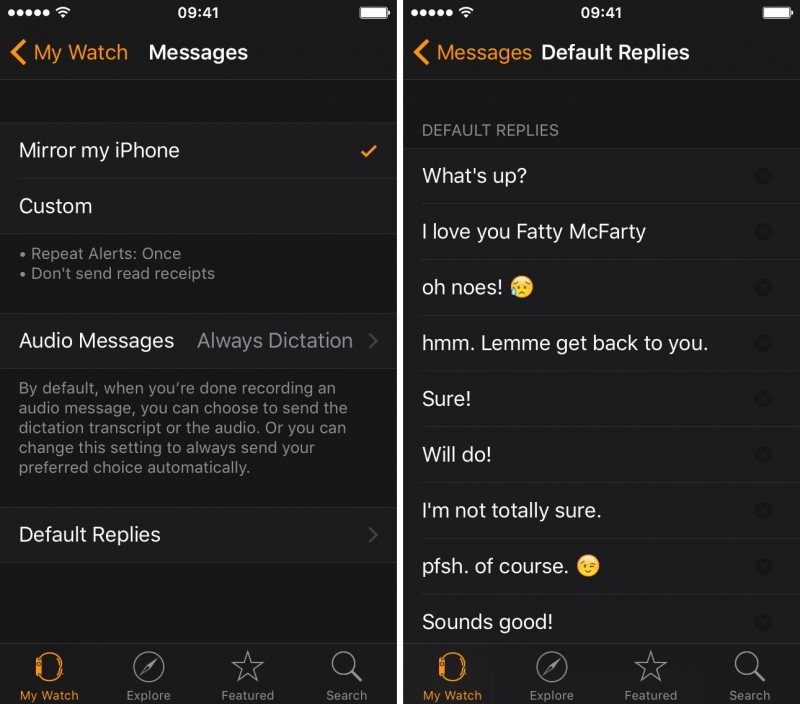
Messages
- On iPhone, open the Apple Watch app and navigate to the My Watch tab.
- Select Messages from the menu.
- Tap "Default Replies."
- Tap a premade response and replace it with your own.

Click here to read more...
Article Link: How to Customize Default Replies on Apple Watch


