
Become a MacRumors Supporter for $50/year with no ads, ability to filter front page stories, and private forums.

macrlz9

macrumors 6502a
Original poster
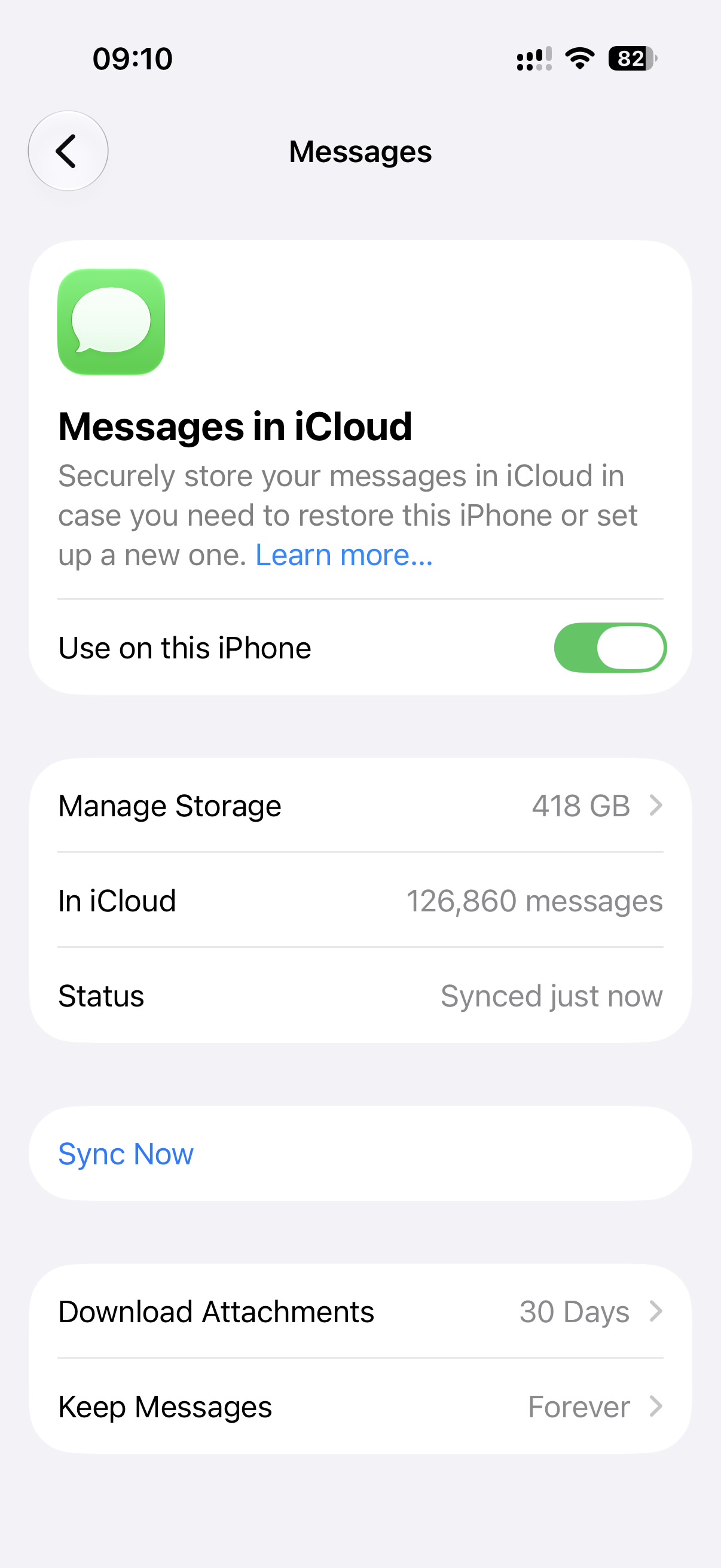
I have three devices synced with Messages in iCloud: iPhone, iPad, and Mac. My iCloud storage shows 418GB used by Messages, with 126,860 messages in iCloud.
IMG_8929.jpeg
IMG_8931.jpeg


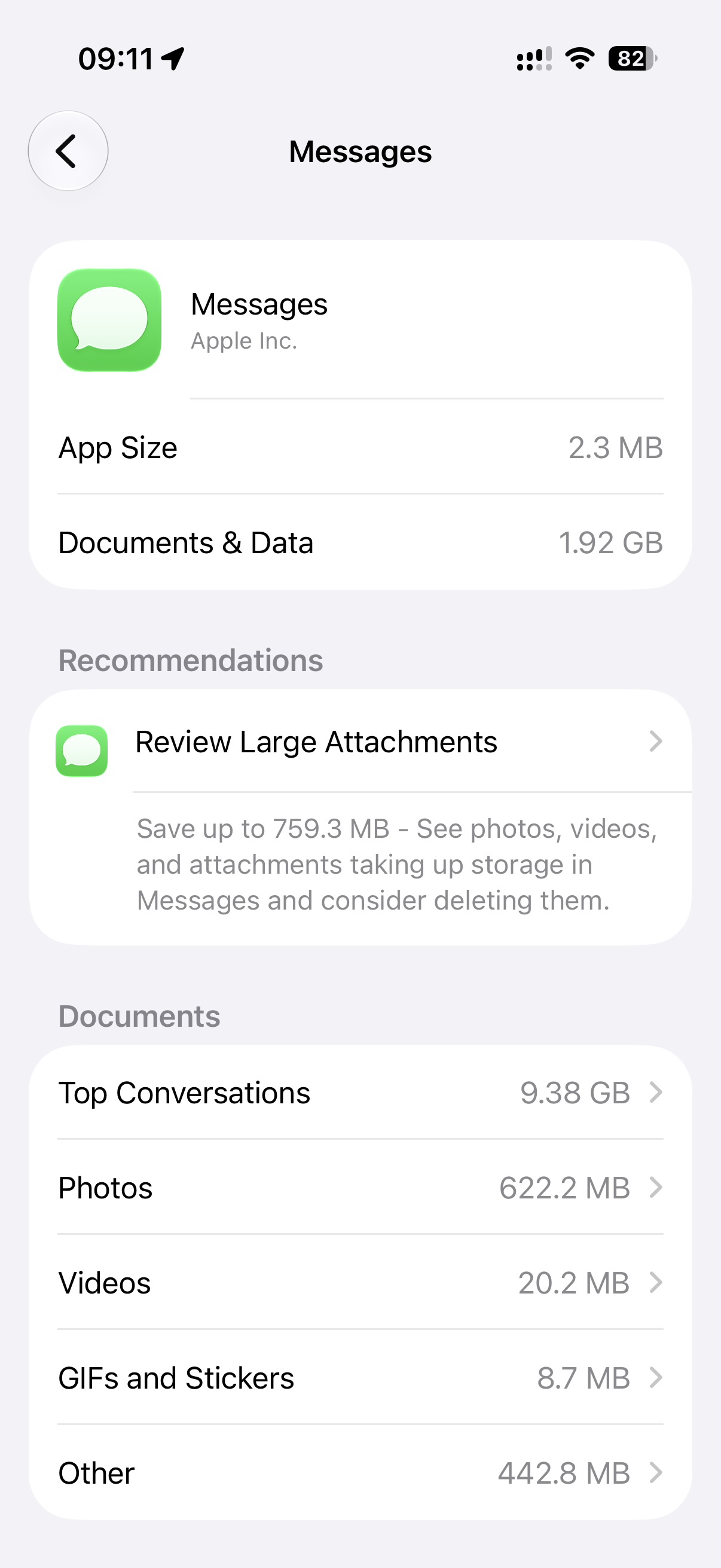
The problem: none of my three devices show anywhere near that amount stored locally.
  • iPhone: Documents & Data for Messages is 1.92GB.
  • iPad: Documents & Data for Messages is 3.74GB.
  • Mac: Storage panel shows Messages at 56.74GB.
So the 418GB clearly exists somewhere in iCloud, but no single device's UI gives me a way to see or manage the full amount — each one only shows me its own small local cache.

What I'm trying to figure out:
  1. Is there any way to view/manage the full 418GB from one place, rather than whatever fragment each device happens to have cached?
  2. If I delete attachments on one device, do deletions sync to iCloud and the other devices?
  3. If deletions sync back to iCloud, macOS has a 'download all' option. If I click the download attachments button and then delete them from storage, will that sync back to iCloud? – I don't have enough storage on my Mac to do that but maybe I can delete as they download.
(See macOS screenshot below)
Screenshot 2026-07-14 at 09.24.00.png


I don't want to lose my text history (Keep Messages is set to Forever and I need to be able to search old conversations) — I just want the photo/video bloat gone! I was hoping with all the improvements in OS 27, deleting Messages attachments in iCloud would be one of them.
 
Last edited:
I see in your screenshot you have it set to download attachments for only the last 30 days. So that's why your iPhone does not have all 418 GB.

Is there any way to view/manage the full 418GB from one place, rather than whatever fragment each device happens to have cached?
I don't think so, I don't think there's a web UI for Messages as that typically contains more sensitive data.
If I delete attachments on one device, do deletions sync to iCloud and the other devices?
It should.
If deletions sync back to iCloud, macOS has a 'download all' option. If I click the download attachments button and then delete them from storage, will that sync back to iCloud? – I don't have enough storage on my Mac to do that but maybe I can delete as they download.
I would recommend starting on your Mac and deleting all the photos, waiting for it to sync, then getting more to download and so on.
I don't want to lose my text history (Keep Messages is set to Forever and I need to be able to search old conversations) — I just want the photo/video bloat gone!
This is why it's important to clean stuff up regularly. When someone sends your a photo or video, you should either save it into your photo library, or delete it.
 
You can check and clean the iCloudMessages " chat.db " database at your risks with sqllite3 command in Terminal or SQL Editor of your choice on your Mac.

Do backup before doing anything ! (~/Library/Messages/)

I don't give you a tutorial for that, it's a little bit tricky and risky. But AI can help 😊
 
I see in your screenshot you have it set to download attachments for only the last 30 days. So that's why your iPhone does not have all 418 GB.


I don't think so, I don't think there's a web UI for Messages as that typically contains more sensitive data.

It should.

I would recommend starting on your Mac and deleting all the photos, waiting for it to sync, then getting more to download and so on.

This is why it's important to clean stuff up regularly. When someone sends your a photo or video, you should either save it into your photo library, or delete it.
Thanks for your suggestions. The screenshot is actually from macOS by the way and I don’t see a way to set the limit of how long attachments are retained on device.

I appreciate that each OS provides a UI for displaying large attachments but it’s unfortunate that it only seems to relate to locally stored items with no way to manage attachments in iCloud. Having to go into each conversation thread to manage that way would be a nightmare.

The biggest question mark to me is I can’t find anywhere that definitively confirms that attachments deleted in these storage screens sync changes back to iCloud. My own tests deleting dozens and dozens of multi GB videos have not impacted the amount of iCloud storage used by Messages, even after letting 30 days pass.

I always save attachments sent via Messages that are important to keep but having to manually delete every attachment that is sent is an unrealistic expectation, IMO. It’s nice to scroll back through recent conversations and see the attachments but after a period of time, there should be a way to automatically or worst case, manually clear them out. Most attachments are quite small and not worth the effort anyway.
 
You can check and clean the iCloudMessages " chat.db " database at your risks with sqllite3 command in Terminal or SQL Editor of your choice on your Mac.

Do backup before doing anything ! (~/Library/Messages/)

I don't give you a tutorial for that, it's a little bit tricky and risky. But AI can help 😊
I’m comfortable digging into the database but it sounds like this will only impact the local storage on my Mac and not help with clearing out what’s stored in iCloud. Is that right? I can manage the local storage used by Messages in System Settings.
 
I’m comfortable digging into the database but it sounds like this will only impact the local storage on my Mac and not help with clearing out what’s stored in iCloud. Is that right? I can manage the local storage used by Messages in System Settings.

The local cache/storage Messages App are located in other files in the folder where chat.db is, but chat.db is used for syncing with iCloud Message accross devices. (Need to do that multiples times for large database)

However, manual cleaning will avoid inconsistencies in Messages but time-consuming...
 
The biggest question mark to me is I can’t find anywhere that definitively confirms that attachments deleted in these storage screens sync changes back to iCloud. My own tests deleting dozens and dozens of multi GB videos have not impacted the amount of iCloud storage used by Messages, even after letting 30 days pass.
Then it's bugged. Your only hope is to wait for Apple to fix it, unless it's a problem with your account and then the only option is to wipe it. Let this be a lesson that sync services are not backups, and should not be trusted as such. Despite Apple's misleading wording, disabling "Messages in iCloud" does not mean they're not backed up. Rather, they're backed up via your iPhone's backup. This does mean that you will have a copy for each device eating away at your storage, but on the other hand it means when you delete something on your iPhone, said deletion is replicated for the backup.
I always save attachments sent via Messages that are important to keep but having to manually delete every attachment that is sent is an unrealistic expectation, IMO.
Remember, Apple makes money when users purchase iCloud Storage. It's not really in their interest to make message attachment management easy.
 
  • Like
Reactions: iCrow
Then it's bugged. Your only hope is to wait for Apple to fix it, unless it's a problem with your account and then the only option is to wipe it. Let this be a lesson that sync services are not backups, and should not be trusted as such. Despite Apple's misleading wording, disabling "Messages in iCloud" does not mean they're not backed up. Rather, they're backed up via your iPhone's backup. This does mean that you will have a copy for each device eating away at your storage, but on the other hand it means when you delete something on your iPhone, said deletion is replicated for the backup.

Remember, Apple makes money when users purchase iCloud Storage. It's not really in their interest to make message attachment management easy.
I appreciate the “lesson” but your your point isn’t related to this sync issue at all. You are correct that if Message in iCloud is turned off, messages will be included in the device backup and therefore duplicated if multiple devices are configured this way. However, this topic is related to Messages in iCloud so they are not included in my devices backups.

That last statement is a bit of a stretch and borders conspiracy theory. Do you truly believe that Apple is not interested in making good products that are easy to use and that people will be willing to pay a premium for crappy products and services? That doesn’t sound like the business model of a successful company such as Apple.

Not saying they are perfect, but I would argue that it absolutely is in Apple’s best interest and I bet the folks that build these products and services would agree.
 
That last statement is a bit of a stretch and borders conspiracy theory. Do you truly believe that Apple is not interested in making good products that are easy to use and that people will be willing to pay a premium for crappy products and services? That doesn’t sound like the business model of a successful company such as Apple.
I would say it's oddly strange how difficult it is to manage storage in Messages. A simple "delete attachments after _____" would solve most of this. I've spent the last few weeks deleting about a decade worth of attachments from my conversation with my wife. To even get to that point, I had to restore my phone which then started giving me an accurate view of old attachments. Now every day I delete all old attachments on the list. Then wait a day for the list to repopulate, and then delete some more. So, not saying any of this is intentional on Apple's part, but it should be easier for us.
 
  • Like
Reactions: macrlz9
Register on MacRumors! This sidebar will go away, and you'll see fewer ads.