Become a MacRumors Supporter for $50/year with no ads, ability to filter front page stories, and private forums.

MarcusCarpenter

macrumors 6502a
Original poster
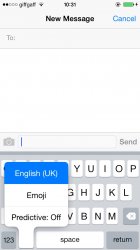
I saw posts where people disable autocorrect to remove predictive text, well now you don't have to
 

Attachments

  • image.jpg
    image.jpg
    74.7 KB · Views: 383
You can also hold and swipe up and down on the predictive text bar to hide it.

You know, I have to say it is very hard to hide that predictive text bar and then get it back up.

I swiped down on it with no problem, but when I was trying to get it back up, it was not popping up. I finally got it back, but I had to slowly place my finger over the gray sliver that is the hidden bar and then swipe up, and that brought back the predictive txt bar.
 
You know, I have to say it is very hard to hide that predictive text bar and then get it back up.

I swiped down on it with no problem, but when I was trying to get it back up, it was not popping up. I finally got it back, but I had to slowly place my finger over the gray sliver that is the hidden bar and then swipe up, and that brought back the predictive txt bar.

I can do it (relatively) easily by just quickly swiping. It can take a few tries, but I don't think that you're meant to hold down on it first.
 
Register on MacRumors! This sidebar will go away, and you'll see fewer ads.