

Become a MacRumors Supporter for $50/year with no ads, ability to filter front page stories, and private forums.

MacRumors

macrumors bot
Original poster


If you installed iOS 27 Beta or iPadOS 27 Beta through Apple's Developer Program, you may decide you want to downgrade because of usability or stability issues. Keep reading to learn how it's done.
How-to-Downgrade-From-iOS-27-Beta-to-iOS-26-Feature.jpg

Apple's beta versions of its major software updates can be buggy, especially the early releases. While that isn't necessarily the case for the latest iOS 27 beta, you may still find apps not working properly, poor battery life, device crashes, and features that don't do what they're supposed to. Fortunately, you can restore your iPhone or iPad to the previous version of iOS.

If you made an archived backup before you installed the iOS 27 beta, you can remove the ‌beta and restore the backup. If you don't have an archived backup that was created before installing the beta, you can still downgrade, but you'll need to set up your device as new or restore from an older compatible backup. Only an archived backup made before installing the beta can be restored after downgrading.

Also, bear in mind that if you've installed watchOS 27 beta on your Apple Watch, you won't be able to use it with your ‌iPhone‌ once you've gone back to iOS 26. And downgrading an Apple Watch to a previous version of watchOS can't be done manually – if you want to remove ‌watchOS 27 beta, you'll have to send your watch in to Apple.

How to Downgrade From iOS 27 Beta or iPadOS 27 Beta

  1. Launch Finder on your Mac. On Windows, open the Apple Devices app (or iTunes if you're using an older setup).
  2. Connect your iPhone or iPad to your computer using a Lightning or USB-C cable.
  3. Put your device into recovery mode. The method of doing this depends on your device, so check the list below these steps to find your model. Apple also provides more information on Recovery mode in this support article.
    restore-ios-device.jpg

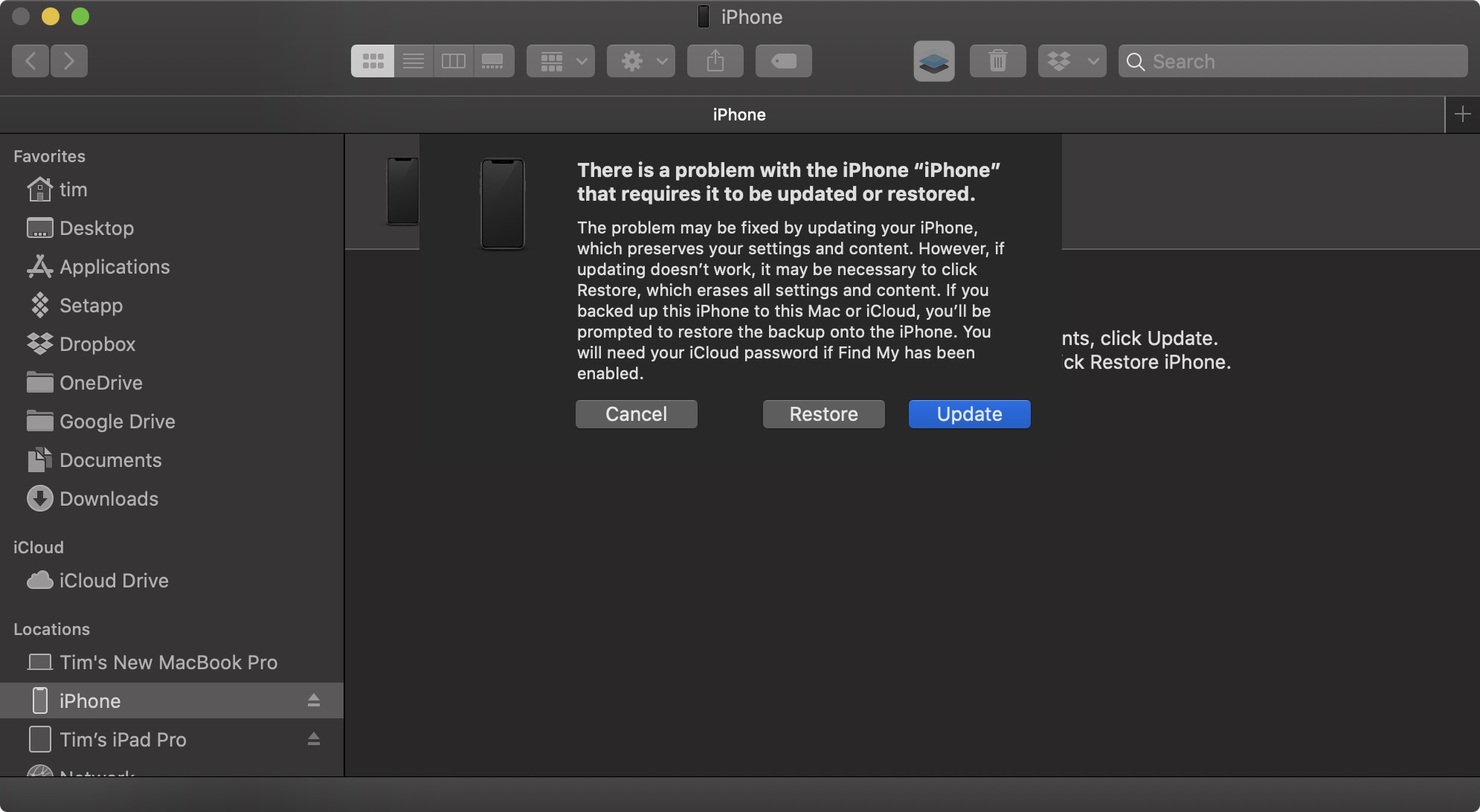
    A dialog will pop up asking if you want to restore your device. Click Restore when prompted. Your computer will erase the device and install the latest publicly available version of iOS or iPadOS that's still being signed by Apple.
  4. Wait while the restore process completes.
How to Enter Recovery Mode on Your iOS Device

  • iPad models with Face ID or a Touch ID power button: Press and quickly release the Volume Up button. Press and quickly release the Volume Down button. Press and hold the Top button until your device begins to restart. Continue holding the Top button until your device goes into recovery mode.
    iPhone XS or later: Press and quickly release the Volume Up button. Press and quickly release the Volume Down button. Then, press and hold the Side button until you see the recovery mode screen.
Once you've followed the above steps, you can restore a backup of your device from iOS 26 or iPadOS 26 using your Mac or iCloud.

Article Link: How to Downgrade From iOS 27 Beta to iOS 26
 
  • Haha
Reactions: Z-4195
On my iPhone 17, iOS 27 public beta has been far superior to 26.5.2. Battery life is great, phone doesn't get hot anymore. A couple small bugs but nothing show stopping. Using it on my main device and no regrets whatsoever.
Agree, been on 27 since dev beta 1.

I came from 26.5.2 and found that from day one 27 was infinitely better.

Some quirks with Siri AI response failures and the animation of the Siri window but if you chose to leave Siri alone it’s a better os than 26 across the board in my opinion.
 
Improved headline:

"You ****ed Up Updating to iOS 27 beta? Here's How to Downgrade to iOS 26"

Come on, MacRumors. Do better! /s
 
  • Haha
Reactions: neotint
iOS 18 is better than both of them
Very sad iPhone 17 didn’t came with iOS 18 🥺
I don’t have much faith that iOS 27 will be as good as iOS 18 when it’s out of beta. Better than iOS 26 but still not as easy going and smooth as 18.
iOS 18 while there is little inherently wrong with it is just boring compared to iOS 26, which again has little inherently wrong with. YMMV.
 
  • Like
Reactions: JosephAW
The iOS 27 beta gave my iPhone 15 Pro a new lease on life. It feels more stable than iOS 26 ever did.

If I remember correctly, 26.3 was the best update for me. Very little lag, didn’t overheat, etc.

Then with iOS 26.4 onward, it was slow, and was hot nearly all the time when it was charging or in use.

Now with the iOS 27 beta, my phone feels nearly brand new — even while in the process of indexing. I’m considering keeping this phone for a fourth year now.
 
It doesn't seem to be widespread, but it happened to me and a couple other users on Reddit. If you have advanced data protection on and you downgrade, there’s a chance that your account can lose the ability to sync most of the iCloud data that you have, including photos, files, passwords. Not even accessing iCloud on web works anymore. Some users have been able to get it to work again by upgrading back to the iOS beta, others, myself included, unfortunately haven’t been so lucky. So if you have ADP enabled, I’d advise against downgrading.
 
So the same kind of issue. I'd recommend talking with Apple Support about it's clearly some sort of a bug, you're the fifth internet user I've found having it.

Based on my own communications with support the data is still there it's just accessing it that doesn't work.
 
Contacted iCloud support after updating, password app and keychain is not compatible with ios26 according to an account manager at iCloud support waiting for a back office call to see if there’s any work around, the only other work around is to go back to ios27 so far
 
Contacted iCloud support after updating, password app and keychain is not compatible with ios26 according to an account manager at iCloud support waiting for a back office call to see if there’s any work around, the only other work around is to go back to ios27 so far
Have you tried going back to iOS 27, has it worked for you? Did you have Advanced Data Protection on?

I'm in the same situation, but returning to iOS 27 hasn't done anything for me, nothing is syncing. Apple Support escalated my issue to engineers and I've been waiting to hear back from them.
 
Have you tried going back to iOS 27, has it worked for you? Did you have Advanced Data Protection on?

I'm in the same situation, but returning to iOS 27 hasn't done anything for me, nothing is syncing. Apple Support escalated my issue to engineers and I've been waiting to hear back from them.
No not as yet waiting for back room support tomorrow at 11am London time also I double check no ADP to confirm advances data switched off
 
No not as yet waiting for back room support tomorrow at 11am London time also I double check no ADP to confirm advances data switched off
For me, I tried going back to iOS 27 as soon as the issue presented itself but it didn't change anything. I then tried to turn off ADP, and it appears as turned off in my account, but it's most likely still on - I requested my data from privacy.apple.com and they specifically only sent me the kind of metadata that Apple still retains even when ADP is on, but no actual file or photo.

I'll be calling Support for my own case tomorrow, but if you find out anything about this bug or you manage to fix please post here if you get the chance.
 
After downgrading, my iPhone won't backup to iCloud because there's an newer backup version available. Can't seem to figure out how to delete the iOS 27 backup from iCloud. When I go to backup under iCloud settings, all I see is a breakdown of all the apps that have backups but nothing about system backups.
 
Register on MacRumors! This sidebar will go away, and you'll see fewer ads.