
Got a tip for us?
Let us know
Become a MacRumors Supporter for $50/year with no ads, ability to filter front page stories, and private forums.
How to enable Activation Lock
- Thread starter 3rdiguy
- Start date
- Sort by reaction score
You are using an out of date browser. It may not display this or other websites correctly.
You should upgrade or use an alternative browser.
You should upgrade or use an alternative browser.
Thepixelsedge
macrumors regular
If you have it turned on your phone, then its on on your watch as well. I believe all you have to do is make sure that "find my iPhone" is turned ON under Settings-->iCloud
Thepixelsedge
macrumors regular
View attachment 583780 Not sure, anyone knows how to get to this screen ?
That screen appears only during the initial setup of your iPhone. As I said above, as long as you have find my iPhone activated on your phone, then activation lock is also activated on your watch.
To verify this you can open the apple watch app on your iPhone and go to the very first option that says "Apple Watch". If activation lock is on you will now see a button to "Mark as Missing" in addition to the name of your watch and the "unpair" button that has always been there.
That screen appears only during the initial setup of your iPhone. As I said above, as long as you have find my iPhone activated on your phone, then activation lock is also activated on your watch.
To verify this you can open the apple watch app on your iPhone and go to the very first option that says "Apple Watch". If activation lock is on you will now see a button to "Mark as Missing" in addition to the name of your watch and the "unpair" button that has always been there.
Ok, so did my upgrade, showing Version 2.0 in my About. However just shows my watch as being paired and the option to Unpair. Does this mean I have to reset my watch and turn it on then?
Thepixelsedge
macrumors regular
Wouldn't hurt to do a reboot of both your watch and phone. But make sure that in your iPhone (not watch app) settings that find my iPhone is turned on under Settings-->iCloud. If you still don't see "mark as missing" in your apple watch app then I'd try unpairing and re-pairing your watch from your iPhone.
ps. also make sure that location services is on for find my iPhone.

ps. also make sure that location services is on for find my iPhone.


mattopotamus
macrumors Pentium
Mine did it automagically. it just popped up a message on the watch saying it was on
likewise it was about 30 minutes after updating.
likewise it was about 30 minutes after updating.
Same here although it did take a while to appear.

Pravda
macrumors 6502a
That screen appears only during the initial setup of your iPhone. As I said above, as long as you have find my iPhone activated on your phone, then activation lock is also activated on your watch.
To verify this you can open the apple watch app on your iPhone and go to the very first option that says "Apple Watch". If activation lock is on you will now see a button to "Mark as Missing" in addition to the name of your watch and the "unpair" button that has always been there.
Thank you

xraydoc
Contributor
Never appeared for me, but turning off FMiP then turning back on triggered it (plus a notification on the watch that it was active).
Never appeared for me, but turning off FMiP then turning back on triggered it (plus a notification on the watch that it was active).
Yes! Thank you. This did it and didn't have to Reboot. Turned Find My Phone OFF then back on and saw this
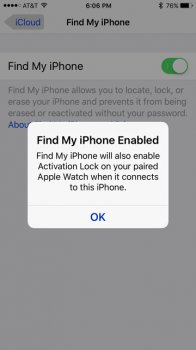 and then got this on my watch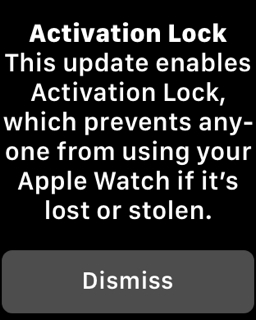
and then double checked the Watch App -> Apple Watch and success. Really appreciate the help.
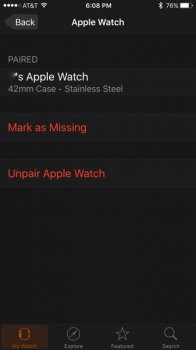

I just did this--^. It worked and I got a msg on watch and mark as missing showed up tooNever appeared for me, but turning off FMiP then turning back on triggered it (plus a notification on the watch that it was active).


FrisbeeK9
macrumors 6502a
I just did this--^. It worked and I got a msg on watch and mark as missing showed up too
I'm also glad I saw this thread. This process above worked for me too. Thanks folks.
