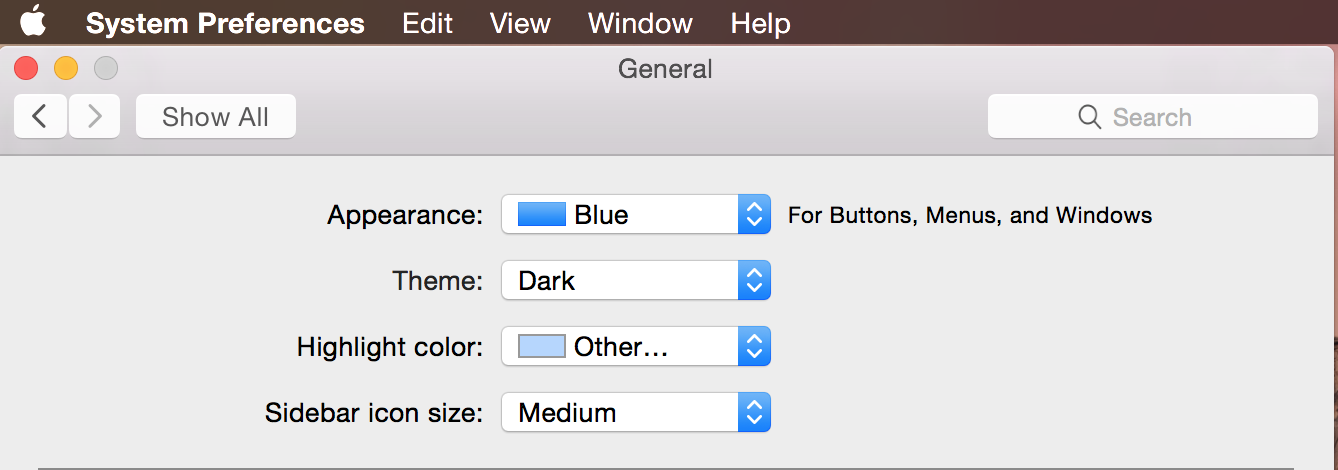
M5RahuL macrumors 68040 Jul 7, 2014 #3 In case you, or someone else looking, didn't get the pic... System Preferences > General > Theme ... click the drop down, and choose Dark
In case you, or someone else looking, didn't get the pic... System Preferences > General > Theme ... click the drop down, and choose Dark
M moabal macrumors 6502a Jul 7, 2014 #4 For some reason, I can't toggle on or off translucent. I tried restarting my Mac. I have dark mode enabled but I would like translucency. Thanks
For some reason, I can't toggle on or off translucent. I tried restarting my Mac. I have dark mode enabled but I would like translucency. Thanks
xaqt93 macrumors 6502a Jul 9, 2014 #5 Can't find Dark Mode Still I went to System Preferences>General...and there is no theme...
w0lf macrumors 65816 Jul 9, 2014 #6 xaqt93 said: I went to System Preferences>General...and there is no theme... Click to expand... Make sure you're on the latest version. Open terminal and enter: Code: sw_vers | grep Build If you don't get "BuildVersion: 14A283o" enter Code: sudo softwareupdate -i -a If that doesn't work reinstall Yosemite.
xaqt93 said: I went to System Preferences>General...and there is no theme... Click to expand... Make sure you're on the latest version. Open terminal and enter: Code: sw_vers | grep Build If you don't get "BuildVersion: 14A283o" enter Code: sudo softwareupdate -i -a If that doesn't work reinstall Yosemite.