Become a MacRumors Supporter for $50/year with no ads, ability to filter front page stories, and private forums.

mwhite

macrumors 6502
Original poster
So, I have a Canon GL-1 and lots of footage on MiniDV cassettes. How would I import that footage onto my Mac mini since Firewire is long gone? Is it still even possible?

Thanks for the knowledge in advance.
 
Oh. So I'm running Tahoe. So, I guess that means I'm out of luck then? 😕
Unfortunately, yes. FireWire support was removed in Tahoe.

I'd suggest either:
  • installing Sequoia on a separate volume on your Mac's storage, you can then use the "Startup Disk" pane in settings to switch between the older OS and your current OS. Sequoia should still get security updates for the next 2 years so you're not opening yourself up to vulnerabilities. I'm planning on doing this once I dig out my MiniDV cameras this year.
  • purchasing an older Mac with a dedicated FireWire port if you're into collecting vintage hardware. Most Macs between 2000 - 2011 had either a FireWire 400 or 800 port.
 
  • Sad
Reactions: mwhite
Unfortunately, yes. FireWire support was removed in Tahoe.

I'd suggest either:
  • installing Sequoia on a separate volume on your Mac's storage, you can then use the "Startup Disk" pane in settings to switch between the older OS and your current OS. Sequoia should still get security updates for the next 2 years so you're not opening yourself up to vulnerabilities. I'm planning on doing this once I dig out my MiniDV cameras this year.
  • purchasing an older Mac with a dedicated FireWire port if you're into collecting vintage hardware. Most Macs between 2000 - 2011 had either a FireWire 400 or 800 port.

I suppose also there are professional services that can do it too. I wonder how much that would run.
 
There are a bunch of USB-A to Firewire cables on Amazon. I wasn't even aware some Firewire devices also support USB over the same connector. Judging by the reviews some customers weren't aware that many or most Firewire devices don't.
 
One thing on the FireWire-to-USB cables you sometimes see on Amazon — they're not protocol adapters. Some FW400 devices happen to have a connector that carries USB pins as pass-through, so those cables only work with that specific subset. A FireWire camera signaling FW400 won't cross to USB no matter what cable's in between.

Cleanest MiniDV route for the money is hunting eBay or Craigslist for a 2010-2012 MacBook Pro or Mac mini with native FW800 — $100-200, runs Sierra with iMovie HD or FCP 7 fine, real-time capture straight to ProRes or DV. Faster than dual-booting Sequoia and cheaper than a service if you have more than a handful of tapes.
 
There are a bunch of USB-A to Firewire cables on Amazon. I wasn't even aware some Firewire devices also support USB over the same connector. Judging by the reviews some customers weren't aware that many or most Firewire devices don't.
DON'T GET ANY OF THOSE! They are pretty much just a scam, or they are only designed to provide an electrical charge to old FireWire iPods (but no syncing).

But yeah, if you're stuck with Tahoe, I recommend you buy an older Mac that DOES have a FireWire port and use that to import the footage. I have a collection of older FireWire-enabled Macs that can get the job done, even an iMac G3 from 2001 running Mac OS 9. But for this case, I highly recommend a 2012 unibody 13" (NON-Retina) MacBook Pro...
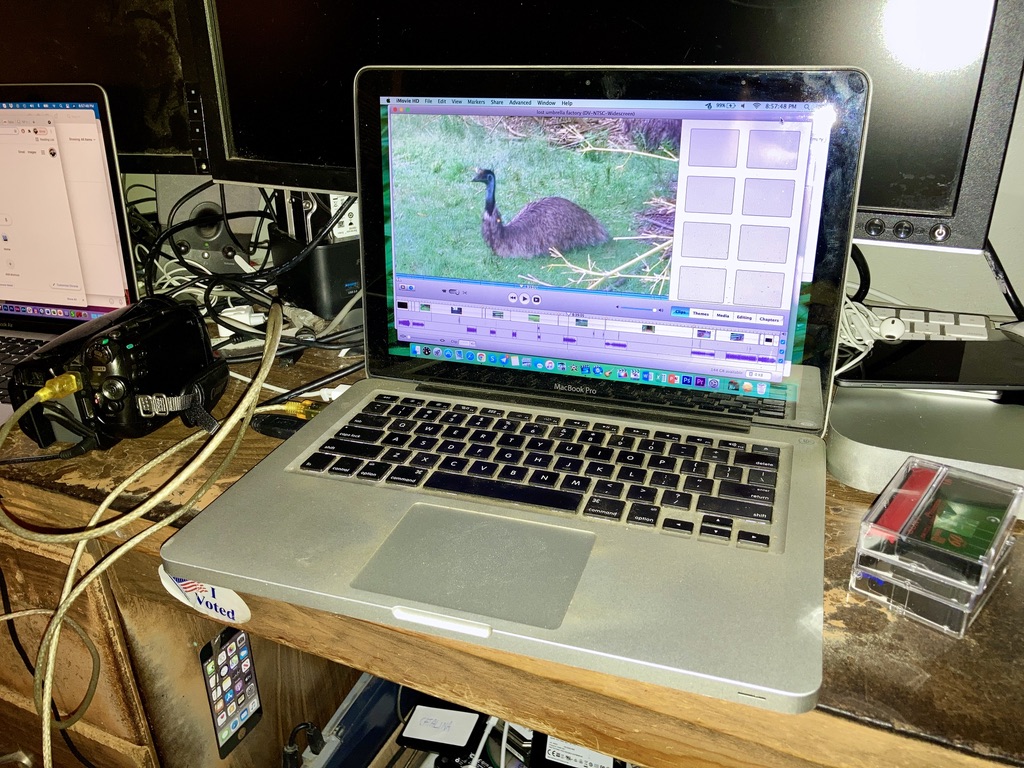
9DB216B3-C05C-4153-AF6E-3597ED0B2457_1_105_c.jpeg

Although the photo shows it running iMovie HD 6, you can also use the QuickTime Player on Mac OS X 10.6 Snow Leopard or greater to capture the DV footage. Additionally, the 2012 unibody 13" MacBook Pro also has a Thunderbolt port and two USB 3.0 ports, allowing you to copy the files to very speedy external storage devices. Alternatively, if you feel like burning the footage to DVD in a creative manner, you can get iDVD (requires a MacOS version up to 10.14 Mojave to run) and burn the footage to disc using that, with the very elegant menus. (Of course you may want to edit the footage first; I'd recommend iMovie HD 6 or iMovie '11 if you're going to edit 4:3 DV footage and you want to add DVD chapter markers.
Heck, I've seen professional video digitizing services have older Macs from the late 2000s and early 2010s set up for the sole purpose of importing, editing and exporting such older video footage to disc with!

 
  • Like
Reactions: SoupyTwist
Register on MacRumors! This sidebar will go away, and you'll see fewer ads.