
I just installed Marverick OS to a new partition while retaining my old OS (Snow Leopard). I like the old display and its style. How do I get the new OS to mimic the old. Here's 2 pic to explain:
1) The old OS can have the colour bar acrossed the title. That becomes very vivid to me. In new OS, its just a tiny dot at the side of title. Is it possible to mimic the old OS?
2) In old OS, after widening the column and close folder, upon open the width of column doesn't change. In new OS, however you widen, it seems to go back to narrow column (maybe default mode) upon opening folder again. This is very irritating as the narrow column doesn't allow me to view the complete title.
Any solution to abv? Tks very much.
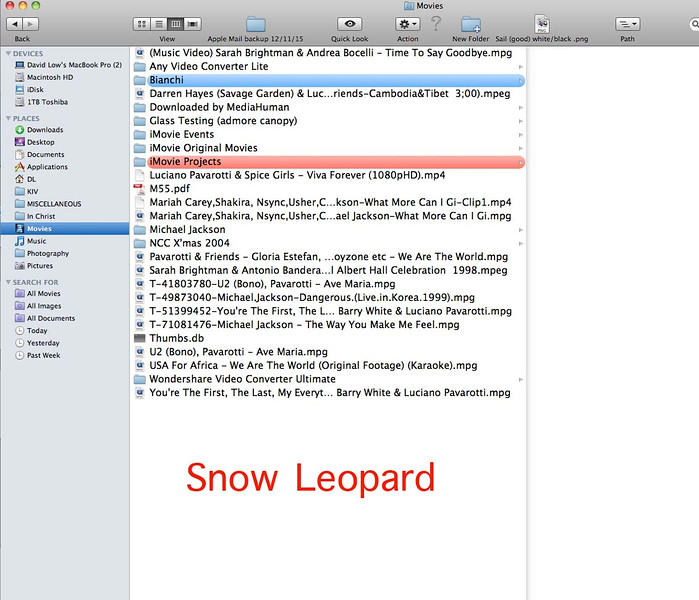
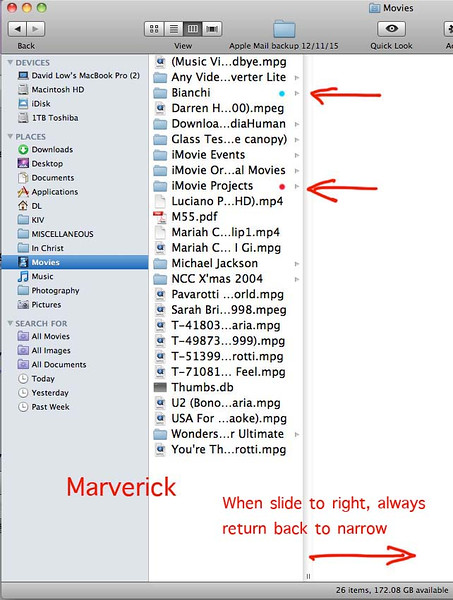
1) The old OS can have the colour bar acrossed the title. That becomes very vivid to me. In new OS, its just a tiny dot at the side of title. Is it possible to mimic the old OS?
2) In old OS, after widening the column and close folder, upon open the width of column doesn't change. In new OS, however you widen, it seems to go back to narrow column (maybe default mode) upon opening folder again. This is very irritating as the narrow column doesn't allow me to view the complete title.
Any solution to abv? Tks very much.


