
Got a tip for us?
Let us know
Become a MacRumors Supporter for $50/year with no ads, ability to filter front page stories, and private forums.
How to mount 2.5" drives in a Mac Pro?
- Thread starter 50thVert
- Start date
- Sort by reaction score
You are using an out of date browser. It may not display this or other websites correctly.
You should upgrade or use an alternative browser.
You should upgrade or use an alternative browser.
I was planning on going with a 2.5" SSD drive, which is why I asked. Looks like there is no aftermarket carrier that will easily adapt a 2.5" drive to the 3.5" bays, and I don't wanna go unplugging things and letting stuff just sit in the case unrestrained.
Time to find a cheap 150GB Raptor. 🙂
Time to find a cheap 150GB Raptor. 🙂

UltraNEO*
macrumors 601
I was planning on going with a 2.5" SSD drive, which is why I asked. Looks like there is no aftermarket carrier that will easily adapt a 2.5" drive to the 3.5" bays...
I take it you didn't use Google much... cause i found cause I found this, possible solution perhaps? ... Though it's not very "technical"
And there's this aftermarket carrier!!
and I don't wanna go unplugging things and letting stuff just sit in the case unrestrained.
Time to find a cheap 150GB Raptor. 🙂
Also if you search the forums you can find a thread about installing four 2.5" drives in the lower optical bay...
This topic has been covered before. Look... someone did it here!!
I take it you didn't use Google... cause I found this, possible solution perhaps? ... Though it's not very "technical"
Also if you search the forums you can find a thread about installing four 2.5" drives in the lower optical bay... This topic has been covered before.
You "took" wrong. Google did not yield the result I was looking for: A clean install of a 2.5" drive into the 3.5" bays. That particular solution is almost worse than just sitting the drive into the bay and hoping it stays connected.
I saw the threads about putting them in the lower optical bay and decided not to go that route as well.
UltraNEO*
macrumors 601
You "took" wrong. Google did not yield the result I was looking for: A clean install of a 2.5" drive into the 3.5" bays. That particular solution is almost worse than just sitting the drive into the bay and hoping it stays connected.
I saw the threads about putting them in the lower optical bay and decided not to go that route as well.
Huh? You can always resort to some DIY..
Just becaise someone used some tape, doesn't mean you can't improvise and improve on their technic.
Buy some sheet metal, M3 spacers and get a drill, make some holes in the sheet metal then mount your
2.5" drive on them. I think a child with a little creativity can manage this.
😕 english?You "took" wrong???
The solution I was looking for doesn't exist: A replacement drive slide that securely mounts 2.5" drives into the 3.5" bays in the Mac Pro. I don't want to just sit the drives in there, tape them to whatever I can, or take up an optical bay I may fill with a Bluray burner at some point.
UltraNEO*
macrumors 601
The solution I was looking for doesn't exist: A replacement drive slide that securely mounts 2.5" drives into the 3.5" bays in the Mac Pro. I don't want to just sit the drives in there, tape them to whatever I can, or take up an optical bay I may fill with a Bluray burner at some point.
I know that... that's why i suggested you be a little creative. Get some sheet metal and make something, secure it to the existing drive sledge - it's not that hard to imagine, just takes some designing.
I was planning on going with a 2.5" SSD drive, which is why I asked. Looks like there is no aftermarket carrier that will easily adapt a 2.5" drive to the 3.5" bays, and I don't wanna go unplugging things and letting stuff just sit in the case unrestrained.
Time to find a cheap 150GB Raptor. 🙂
Buy a new style Velociraptor it will fit perfectly in the 3.5" bay. You then can replace the 2.5" drive in it with an SSD if you choose. Kind of expensive way to do this though, but you will end up with a fast 150GB 2.5" sata drive.
Buy a new style Velociraptor it will fit perfectly in the 3.5" bay. You then can replace the 2.5" drive in it with an SSD if you choose. Kind of expensive way to do this though, but you will end up with a fast 150GB 2.5" sata drive.
Did they recently change the Velociraptor? I was under the impression that it didn't fit because the ports were misaligned?

costabunny
macrumors 68020
Yes, WD now supply the Velociraptor in three configurations : Standard SATA, 2.5" 'naked' and 3.5" Back plane ready http://www.wdc.com/en/products/Products.asp?DriveID=495
The backplane ready 'should' fit straight into a Mac Pro using the standard carriers....
The backplane ready 'should' fit straight into a Mac Pro using the standard carriers....

brand
Suspended
The backplane ready 'should' fit straight into a Mac Pro using the standard carriers....
It does. I have the new 80GB VelociRaptor with the new backplane mount and it slides right in.
costabunny
macrumors 68020
Cool - if only SSD's were'nt becomming cheaper I'd get 4 of those baby's - shame I am gonna wait for a backplane kit for 2.5" and SSD up 🙂
(My 4 Hitachi drives are pretty damned quick now so I cant justify going Raptor)...
:S but it is good news for us Mac Pro users indeed.
(but 300GB for £160 is still a big gradient in my opinion as thats 1.5TB in 7200 speed format)
(My 4 Hitachi drives are pretty damned quick now so I cant justify going Raptor)...
:S but it is good news for us Mac Pro users indeed.
(but 300GB for £160 is still a big gradient in my opinion as thats 1.5TB in 7200 speed format)

Thiol
macrumors 6502a
The solution I was looking for doesn't exist: A replacement drive slide that securely mounts 2.5" drives into the 3.5" bays in the Mac Pro. I don't want to just sit the drives in there, tape them to whatever I can, or take up an optical bay I may fill with a Bluray burner at some point.
We've discussed the 2.5" to 3.5" issue several times here (usually with me asking). This is the cleanest adaptor we've found. Built for the Velociraptor but supposedly good for any 2.5" drive, SATA or SSD.
http://www.maxupgrades.com/istore/i...&product_id=180&CFID=1065021&CFTOKEN=71791031
I was wondering how many posts it would take..😛We've discussed the 2.5" to 3.5" issue several times here (usually with me asking). This is the cleanest adaptor we've found. Built for the Velociraptor but supposedly good for any 2.5" drive, SATA or SSD.
http://www.maxupgrades.com/istore/i...&product_id=180&CFID=1065021&CFTOKEN=71791031
Thiol
macrumors 6502a
I was wondering how many posts it would take..😛
Hehe. Nanofrog should get credit. He was the first one to suggest it!

pjarvi
macrumors 65816
We've discussed the 2.5" to 3.5" issue several times here (usually with me asking). This is the cleanest adaptor we've found. Built for the Velociraptor but supposedly good for any 2.5" drive, SATA or SSD.
http://www.maxupgrades.com/istore/i...&product_id=180&CFID=1065021&CFTOKEN=71791031
You could spend $48 on those, or if you just want some simple 2.5" to 3.5" rails, you could spend $8 on these from Amazon:
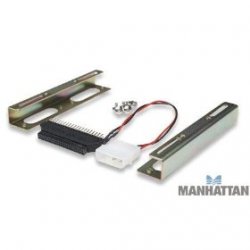
(Edit) That is, unless the hard drive is held in upside down from the screws on the bottom? I don't have a Mac Pro so i'm not sure.
As an Amazon Associate, MacRumors earns a commission from qualifying purchases made through links in this post.
HunterMaximus
macrumors member
A simple adaptor like that won't work. For one thing, the drives are held in by the screws on the bottom, but more importantly, the key here (and the reason the original VelociRaptors didn't work) is that the drives have to line up to the standard SATA placement for 3.5" drives. An adaptor like that would put the connectors roughly in the middle, rather than at the lower left corner (when looking at the back of the drive sitting normally).
The best bet is probably the MaxUpgrades one, unless getting a VelociRaptor and using the sled is appealing (not a cheap idea by any means), or having one custom made (tricky and also probably expensive considering the precision required).
The best bet is probably the MaxUpgrades one, unless getting a VelociRaptor and using the sled is appealing (not a cheap idea by any means), or having one custom made (tricky and also probably expensive considering the precision required).
Thiol
macrumors 6502a
The best bet is probably the MaxUpgrades one, unless getting a VelociRaptor and using the sled is appealing (not a cheap idea by any means), or having one custom made (tricky and also probably expensive considering the precision required).
Just wanted to confirm that the MaxUpgrades adaptor does indeed work well for drives other than the Velociraptor. I was able to get a 2.5" SSD in with one.
Good to know it works for certain. 😀Just wanted to confirm that the MaxUpgrades adaptor does indeed work well for drives other than the Velociraptor. I was able to get a 2.5" SSD in with one.
Thanks. 🙂

The best price I found today for the WD3000BLFS was $308.99, so yes, they're still crazy. 😱 😀 But if you have a true 2.5" backplane, no Mac Pro and the option of MaxUpgrade's mount, you have to have them. 🙁Any good prices on the back-plane ready Velociraptor's? Are the really ~$100 more than the non-back plane ready version? That seems crazy. I could by the MaxUpgrades adapter with the same drive for $50 less.
In the case of the Mac Pro, you have the right idea. Just get the WD3000GLFS and a MaxUpgrades drive mount for it, and pocket the cash. 😛
You won't be disappointed with the performance. 😀 I've gotten spoiled. 😛

rockinrocker
macrumors 65816
You could spend $48 on those, or if you just want some simple 2.5" to 3.5" rails, you could spend $8 on these from Amazon:
View attachment 132339
(Edit) That is, unless the hard drive is held in upside down from the screws on the bottom? I don't have a Mac Pro so i'm not sure.
I tried those clips from Amazon and they don't fit right. there was no way to make 'em work, cheap pieces o' junk.
As an Amazon Associate, MacRumors earns a commission from qualifying purchases made through links in this post.