Become a MacRumors Supporter for $50/year with no ads, ability to filter front page stories, and private forums.

legaleye3000

macrumors 65816
Original poster
I'm using Safari and I need to print the part I highlighted (selected), but I can't figure out how....

Help please .. 🙂
 
Are you on Tiger or Leopard? Here is an app that claims to work on both, but the comments indicate that it's not working on Leopard. Not sure if there are other solutions that do work.

What it does is add a "Print Selection" entry to the "Services" menu of many OS X apps. ("Services" is available through each application's main menu.)
 
I'm on Leopard...

But there's no built in option...? I think in Windows you just right-click your selection and then there is a "selection" option...
 
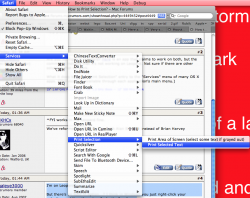
Not built in. Install the program about and then you will find it here

Picture 3.png
 
Installed on Leopard... Click on "Safari" , then "services" then "print selection" then "print selected text" and nothing happend...
 
Installed on Leopard... Click on "Safari" , then "services" then "print selection" then "print selected text" and nothing happend...

I have the same problem...worked in Tiger fine, but not in Leopard and I have the 1.1 release...I have to say this is beyond ridiculous that Apple will not include a "Print Selection" Command...
 
How to Print Selection?

I finally found a way to do Print Selection on Leopard. It is called "Grab." Use Finder Help to find "Grab", and it will show you how to open Grab from your Utilities file. It is rather awkward, and it takes a little getting used to, but it does work. You need to save your selection and then re-open it (in Preview) and print from there.

 
Register on MacRumors! This sidebar will go away, and you'll see fewer ads.