Trying to do the following. Trying to change the default save location for Byword in hopes it gives me access to dropbox. http://bywordapp.com/support/index.html
Since OS X 10.8, when iCloud Documents & Data is enabled in System Preferences, the default save location for document-based apps is always iCloud. To change this, follow the instructions below.
Open Terminal.app (/Applications/Utilities/Terminal.app)
Enter defaults write com.metaclassy.byword NSDocumentSaveNewDocumentsToCloud -bool NO
By "Open Terminal.app" it means run Terminal from the Utilities folder and not open it within Byword.
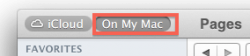
Also, you should be able to access your drop box folder within Byword even without doing that. All the iCloud enabled apps (that I've seen) allow you to choose between iCloud and "On My Mac". Select "On My Mac" and navigate to your drop box folder.
That is just instructions about using the terminal window to change one of the default settings for Byword.
That makes no mention of "saving Terminal.app in utilities", and also makes no mention of Control + O
All you need to do is type the referenced command into a terminal window, press enter, and that's it. There's nothing more that you need to do, as the command just changes your defaults.
Quit the Terminal, and launch Byword.
By "Open Terminal.app" it means run Terminal from the Utilities folder and not open it within Byword.
Also, you should be able to access your drop box folder within Byword even without doing that. All the iCloud enabled apps (that I've seen) allow you to choose between iCloud and "On My Mac". Select "On My Mac" and navigate to your drop box folder.
Thats what I don't get. I have no dropbox folder on my machine. It lives in the cloud on dropbox servers. Obviously I'm confused. Care to enlighten me?
That is just instructions about using the terminal window to change one of the default settings for Byword.
That makes no mention of "saving Terminal.app in utilities", and also makes no mention of Control + O
All you need to do is type the referenced command into a terminal window, press enter, and that's it. There's nothing more that you need to do, as the command just changes your defaults.
Quit the Terminal, and launch Byword.
By "Open Terminal.app" it means run Terminal from the Utilities folder and not open it within Byword.
Also, you should be able to access your drop box folder within Byword even without doing that. All the iCloud enabled apps (that I've seen) allow you to choose between iCloud and "On My Mac". Select "On My Mac" and navigate to your drop box folder.
Forget it. Nothing to see here. I am clearly retarded. I have never had dropbox on my computer or iPhone or iPad. I just always sync to it in the cloud. So that got me. I installed it on my computer and all works fine.