Become a MacRumors Supporter for $50/year with no ads, ability to filter front page stories, and private forums.

inspirations365

macrumors regular
Original poster
Hey guys,

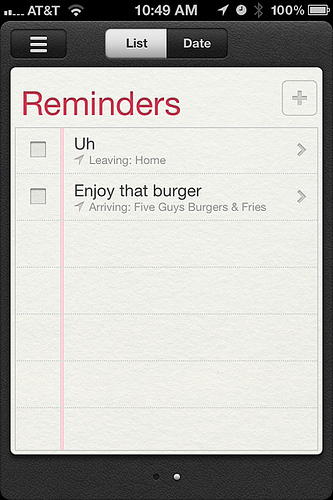
I'm wondering, when I set reminders and want to attach it to a specific location, how do I set the location initially? Like work, home, etc.?
 
I installed the GM last night and no such option appears to exists in Reminders for me. It's just vanished!
 
Do you both have locations services activated in the settings app?

I'm looking at my iPhone 4 running the GM now and locations is there and i've used it to remind me of some work i had to do when i got home from college
 
***FIGURED IT OUT!!!***

I have my mobileme and exchange email setup for work on my iPhone. In the Mail, Contacts, Calendars part of the system preferences, scroll down all the way to the bottom to the Reminders preferences. Mine was set to make tasks by default to my EXCHANGE account. Switching it to "on my iPhone" opened up the location option within the Reminders app!

In the app, tap the upper left 3 line icon, and select "on my iPhone" to keep just that list active.
 
Not quite the issue I was having, but let me explain what I just tried.

I was at one particular location of employment, I have Google as my exchange server. I added that address as a contact to my address book (which was then pushed to my phone). I then set a reminder as a test for when I left that location. My phone did not alert me when I left that location, but it did move the alert to the completed section. Not sure what's going on.

That's why I asked about where to put the location. Do I add that to my address book? I never had an issue with Notifications not asking for a location if I wanted one, just didn't know where to go to add the location to be set in the app. Did that make any sense?

I'm glad you got it working though.
 
***FIGURED IT OUT!!!***

I have my mobileme and exchange email setup for work on my iPhone. In the Mail, Contacts, Calendars part of the system preferences, scroll down all the way to the bottom to the Reminders preferences. Mine was set to make tasks by default to my EXCHANGE account. Switching it to "on my iPhone" opened up the location option within the Reminders app!

In the app, tap the upper left 3 line icon, and select "on my iPhone" to keep just that list active.

Bingo. I didn't understand this till now. Some sync services support reminders that include location and some don't. I had my Exchange account syncing reminders. I turned that off in the settings for that exchange account. Then I turned on reminders syncing in my iCloud account. Now I have location based reminders. Thanks Lopes.

6218026712_93f9fec638.jpg
 
Last edited:
Register on MacRumors! This sidebar will go away, and you'll see fewer ads.