Become a MacRumors Supporter for $50/year with no ads, ability to filter front page stories, and private forums.

oliviacp

macrumors newbie
Original poster
Sep 25, 2025
9
2
Hi everyone,

I am trying to figure out the easiest way to watch my travel videos on my Apple TV to Mac. I’d love to stream them without having to upload them somewhere or transfer them manually.

Any apps, settings, or tips would be really appreciated!
 
Yes, I have an Apple TV device, but for some reason my TV doesn't recognize AirPlay.
As much as I know, it is the computer, that shall recognise appleTV as AirPlay destination:
Screenshot 2025-11-10 at 22.31.05.png
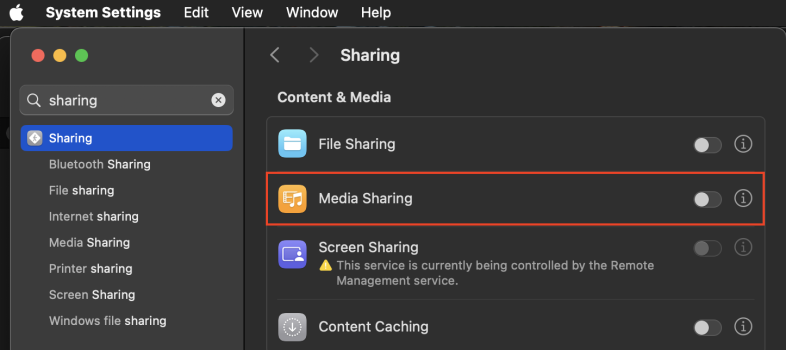
Or, if you want to browse media on Music/TV apps on your Mac from the Computers app on tvOS, then you need to enable Media Sharing on your mac's settings:
Screenshot 2025-11-10 at 22.28.33.png
 
Okay. I'll look into it. Thanks :)
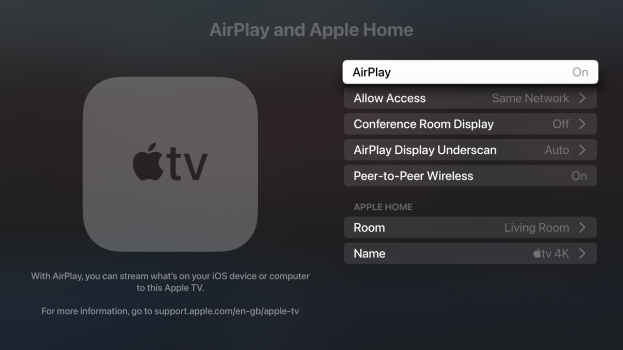
On the appleTV, you need to enable AirPlay, adding to your home is not strictly necessary.
Peer-to-Peer Wireless is also not needed, if in your home network. It may come in handy, if you want to AirPlay eg. in a hotel, without joining the hotel network.
Conference Room Display may help with additional messages explaining how to AirPlay.
Screenshot 2025-11-11 at 22.42.11.png
For the HomeSharing (i.e. browsing on appleTV from the Computers app), you need to have HomeSharing signed in with the same AppleID on both devices, the sender (iPhone/iPad/computer) and the receiver (appleTV).
You will be asked for it, when enabling Media Sharing on your computer. On appleTV, you have separate HomeSharing entry under the Accounts.
This must not be your primary AppleID, connected to a credit card. For example, I use a separate AppleID just for HomeSharing.
 
  • Like
Reactions: oliviacp
In my case, photos and photo albums from my mac are visible, and the pictures in the albums are accessible. But none of the videos show up in the albums in the apple tv.
 
  • Like
Reactions: oliviacp
if your settings for airplay look correct on the Mac and aTV as priitv8 spelled out above and it's still not working, try Rebooting your router, and any wifi gear you have.

I Think every issue I've had with airplay over the years I've used it have been network related.

 
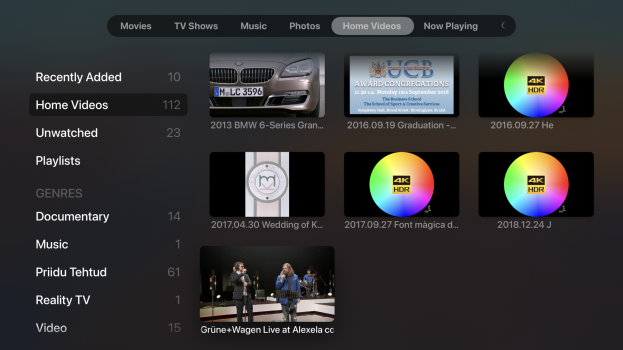
BTW, if you enable home sharing and add your home videos to TV app on your mac, then they will by default be categorised as Home Videos and can be found as such in the Computers app on appleTV (device, not on a smartTV).
 

Attachments

  • Screenshot 2025-11-17 at 00.47.48.png
    Screenshot 2025-11-17 at 00.47.48.png
    1.5 MB · Views: 13
Thanks for the useful advice! Indeed, the problem was mainly due to the network, maybe something with the router.
 
  • Like
Reactions: CharlesShaw
Register on MacRumors! This sidebar will go away, and you'll see fewer ads.