
Got a tip for us?
Let us know
Become a MacRumors Supporter for $50/year with no ads, ability to filter front page stories, and private forums.
How to stream travel videos from Mac to Apple TV?
- Thread starter oliviacp
- Start date
- Sort by reaction score
You are using an out of date browser. It may not display this or other websites correctly.
You should upgrade or use an alternative browser.
You should upgrade or use an alternative browser.

casperes1996
macrumors 604

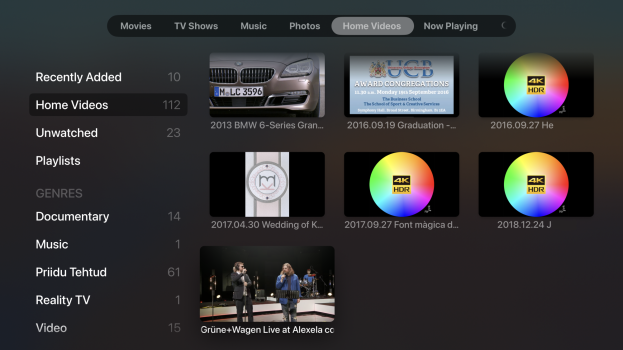
You can use Home Sharing and the Computers app on Apple TV to stream from your Mac.
 support.apple.com
Use Home Sharing to share media from a computer to other devices - Apple Support
Stream content from your computer's iTunes library to other computers, iOS devices, and Apple TVs.

My TV doesn't recognize AirPlay for some reason.You can just AirPlay them over.
Thanks for the advice. I'll definitely check it out.You can use Home Sharing and the Computers app on Apple TV to stream from your Mac.
Use Home Sharing to share media from a computer to other devices - Apple Support
Stream content from your computer's iTunes library to other computers, iOS devices, and Apple TVs.
casperes1996
macrumors 604
Ensure you’re on the same network and that airplay is enabled on the Apple TVMy TV doesn't recognize AirPlay for some reason.
Yes. The network is the same.Ensure you’re on the same network and that airplay is enabled on the Apple TV

CharlesShaw
macrumors 68030
Making sure you saw the second thing @casperes1996 asked, in ATV settings, AirPlay and Apple Home, is AirPlay turned on?My TV doesn't recognize AirPlay for some reason.
Last edited:
Do you have appleTV device or are you using aTV app on your TV?My TV doesn't recognize AirPlay for some reason.
Yes, I have an Apple TV device, but for some reason my TV doesn't recognize AirPlay.Do you have appleTV device or are you using aTV app on your TV?
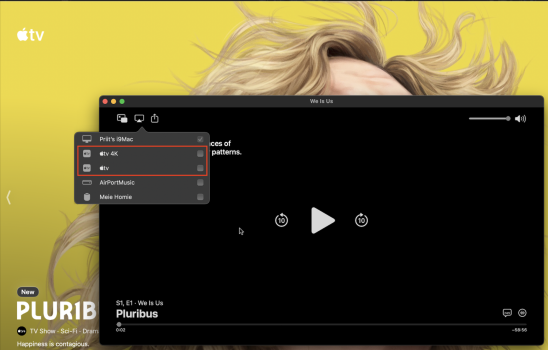
As much as I know, it is the computer, that shall recognise appleTV as AirPlay destination:Yes, I have an Apple TV device, but for some reason my TV doesn't recognize AirPlay.
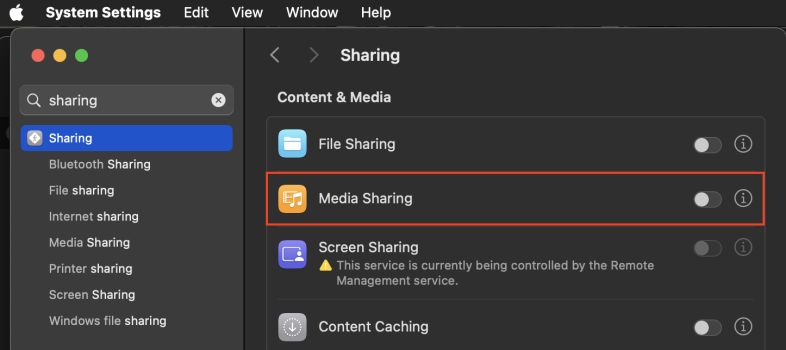
Or, if you want to browse media on Music/TV apps on your Mac from the Computers app on tvOS, then you need to enable Media Sharing on your mac's settings:
Okay. I'll look into it. Thanks 🙂As much as I know, it is the computer, that shall recognise appleTV as AirPlay destination:
View attachment 2578103
Or, if you want to browse media on Music/TV apps on your Mac from the Computers app on tvOS, then you need to enable Media Sharing on your mac's settings:
View attachment 2578100
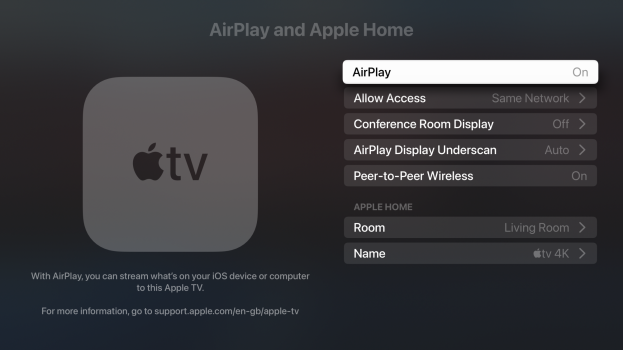
On the appleTV, you need to enable AirPlay, adding to your home is not strictly necessary.Okay. I'll look into it. Thanks 🙂
Peer-to-Peer Wireless is also not needed, if in your home network. It may come in handy, if you want to AirPlay eg. in a hotel, without joining the hotel network.
Conference Room Display may help with additional messages explaining how to AirPlay.
For the HomeSharing (i.e. browsing on appleTV from the Computers app), you need to have HomeSharing signed in with the same AppleID on both devices, the sender (iPhone/iPad/computer) and the receiver (appleTV).
You will be asked for it, when enabling Media Sharing on your computer. On appleTV, you have separate HomeSharing entry under the Accounts.
This must not be your primary AppleID, connected to a credit card. For example, I use a separate AppleID just for HomeSharing.

penelope_bk
macrumors member
I think Elmedia Video Player would be a good option. It also provides a stable connection and supports many formats. There is a useful article with step-by-step instructions https://www.elmedia-video-player.com/stream-mac-to-tv/stream-mac-to-apple-tv/
Thanks for the useful advice! Indeed, the problem was mainly due to the network, maybe something with the router.