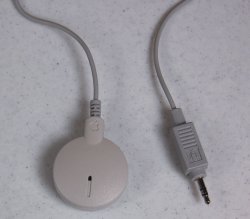
mrsir2009 macrumors 604 Original poster Aug 19, 2011 #1 I found one of these old school Apple mics in my drawer today, I assume it was from my LC3 years and years ago... So how do I test if it works with my MacBook Pro? It fits in my audio jack (its audio IN AND OUT), whats a good way to test it? Attachments snap29.jpeg 88.3 KB · Views: 1,193
I found one of these old school Apple mics in my drawer today, I assume it was from my LC3 years and years ago... So how do I test if it works with my MacBook Pro? It fits in my audio jack (its audio IN AND OUT), whats a good way to test it?
mrsir2009 macrumors 604 Original poster Aug 19, 2011 #3 Damn it didn't work.... It just used the built in mic. And when I select a mic, the built in one is the only option. Dya reckon it'd be broken?
Damn it didn't work.... It just used the built in mic. And when I select a mic, the built in one is the only option. Dya reckon it'd be broken?
S samcolson4 macrumors member Aug 20, 2011 #4 Go into system prefs and click Line In instead of Internal Microphone. Then it should show if it's working or not as long as it's plugged into the optical audio port.
Go into system prefs and click Line In instead of Internal Microphone. Then it should show if it's working or not as long as it's plugged into the optical audio port.
alphaod macrumors Core Aug 20, 2011 #5 It doesn't work because the built-in audio in jack doesn't provide power to the mic.