Become a MacRumors Supporter for $50/year with no ads, ability to filter front page stories, and private forums.

Kometoku

macrumors newbie
Original poster
Hi, everyone

I can turn off the back light on my MacBook and iBook by adjusting the brightness to the minimum, but I can’t do the same on my new iMac. Any idea what’s going wrong with my iMac? Or it is by design the back light cannot be turned off?

Also I found that the brightness of my iMac always stucks at maximum when I start or reboot the machine…hardware problem or software problem?

Thanks.
 
The iMac's display cannot be turned off by using the Brightness keys on the keyboard.

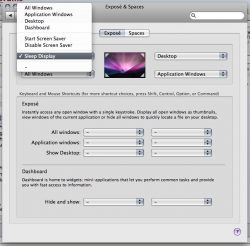
You can turn off the display by assigning a hot corner to "Sleep Display" in System Preferences > Exposé & Spaces > Exposé.
There are also some third party solutions for this. Try a search engine.


Concerning the start up brightness, you can look for the SMC reset procedure for you iMac model on the Apple Support page.
 
Bugger, beat me to it. Oh well, here's a screenshot of the hot corners thing:
 

Attachments

  • Picture 1.png
    Picture 1.png
    114.1 KB · Views: 560
the display backlight also doesnt turn off completely on the MacBooks its just very low (if you look closely you can still see light).

in addition to the screen corners thing in Leopard you can also hit control+shift+eject to turn off the screen.
 
Hi,

I have an very irritating problem with this:

Thanks for the tip on CTRL, SHIFT and Eject, but when I do this. The screen suddenly turns itself on again, and the login box accurs.

I have configured this in security, that you have to log on to the computer every time you reactivate the computer, though this problem described above is really irritating.
 
Control + Shift + Eject

I do this all the time because I use my MacBook Pro like a desktop now. It puts the display off while leaving the computer running without sleeping. With that I know people can't get in because it requires the password to bring the display back. Also it allows me to use LogMeIn to get back to access my computer.
 
Register on MacRumors! This sidebar will go away, and you'll see fewer ads.