Become a MacRumors Supporter for $50/year with no ads, ability to filter front page stories, and private forums.

Pani

macrumors member
Original poster
My browser continually freezes. Obviously, I avoid the sites I know will make it do that. But there are so many, I never know. Neither the escape key, or control, alt, delete will free it. I am forced to just turn the computer off, and I know that can't be good for it. Is there, by any chance, another way to turn it off I am missing? Thanks!
 
Press the apple symbol on the far upper left of your screen and select force quit. You need to establish why you have so many freezes though because somethings not quite right there.
 
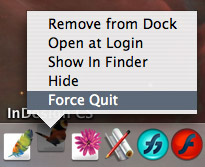
when you right click the browser button on your dock, there should be a "force quit" option.
dock_force_quit.jpg

or, when the focus is on desktop, click that apple logo on the left end of menu bar, there should be another "force quit" item.
mac.osx.quit-3.gif
 
Register on MacRumors! This sidebar will go away, and you'll see fewer ads.