Become a MacRumors Supporter for $50/year with no ads, ability to filter front page stories, and private forums.
I use a 1TB Time Capsule today as a complete iTunes media server and, of course, for Time Machine backup. Just set your iTunes database location as the time Capsule disk (set in iTunes preferences) and copy your iTunes folder to that location. Set all your macs to have iTunes use the library located in the folder. This works well with a caveat... if you are doing a Apple TV wireless sync you may have some playback issues if you are simultaneously trying to stream video to the Apple TV. A workaround is to connect a ethernet cable to the mac connected to Apple TV.

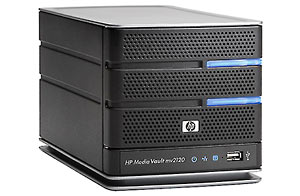
I connect a second HD to a USB hub connected to the Time Capsule to regularly back up data on the TC server. This solution is also hundreds of dollars cheaper than the HP server, has a much smaller footprint, work on a Mac without having to use Windows first and looks a hell of a lot better than this HP thing.

These systems will copy your music to the server so it appears as a shared library in iTunes. This allows all of your computers to sync to one library, and maintain a playable backup. You dont need to modify the settings in itunes in any way. You can also bring a laptop offsite and still have your media.

These are pretty slick devices and shouldnt be blown off because its windows. HP has actually enxtended WHS (windows 2003) with a series of addins. This is a computer, not a desktop router
 
I for one would be interested in what you have to say in a more detailed format. I am looking to set up a music and video jukebox of the content I own in the near future, and I am currently considering different options on how to set that up. The only current hardware I have is my early 08 BlackBook, so I need to buy everything (except the ripping software which I run on Win XP). I am trying to eliminate any hardware reliance on Windows, so an all Mac solution (at least one which does not require a Windows interface like this HP Media Server) would be preferable to me; however I do not oppose standalone NAS solutions.

Disclaimer: I for one hate when people generalize and say something sucks or no one should get it, simply because it doesn't necessarily meet their personal needs. So I'm not going to do that here. If you like this HP server, and want it, and think you're making a smart buy, then go for it. If you're looking for suggestions, continue reading.

That said....
I would suggest that anyone who only has Macs and is looking for some of the features that this HP has to consider a different route.

If you have access to an unused Mac that isn't too old, and has modern I/Os, I would start there.

If you don't have an unused machine, and you need to stay at this "low" price point that the HP has, I'd suggest getting a Mac Mini. $99 will get you a 1TB multi I/O drive from MicroCenter.

Giving you all the reasons in this post would take forever, but here are just a few.

-Using an older Mac, or a new Mac Mini, with only 10.4 or better, you will have no need for a monitor, keyboard or mouse (after initial setup). You will have to have 10.5 on at least one networked (client) Mac, and you will be able to Remote desktop into the Server Mac to control it.

-For using it as an iTunes server, simply leave iTunes w/sharing enabled at all times, and Mac/PCs on your network will be able to play any and all music on it. Using Remote Desktop, you can access the server to get into iTunes to go to the ITMS to make purchases to download directly to it. If you already have the music elsewhere, simply use File Sharing to copy the music to it to build the library. You can even use iTunes for video purchasing and management, but it won't be available to the other Macs through iTunes Sharing. However there is a very simple solution to this I can explain another time.

-I've even ripped DVDs to hard drive, placed the resulting Video_TS folders into an organized folder structure, and then used File Sharing from as many as 6 simultaneous Macs on my network to access 6 different DVD rips through their respective Apple DVD Player software. Voila!! A hard drive based DVD jukebox network server.

-blah blah blah

The moral of this story is this. If you are a Mac owner, it would be wise to use a Mac running Mac OS as a media server, because you will have better opportunity to take advantage of all the various features and abilities of the Mac OS to do almost anything.

That's not to say you couldn't use a PC in a Mac environment to do the same. But I would ask, what sense does that make if the person only has Macs in the first place?

If enough people are interested and request it, I could take the time to start a thread that gets into more of the details, in/outs, of what I've said above.

Good luck to all of you wanting to jump into this niche of the market!!!

 
network drobo

I appreciate the Drobo can be shipped populated but, (and I've never really looked at them in great detail because of the cost) but doesn't a Drobo connect to a computer, rather than in to the network?

- D

For $199 you get the drobo network adapter which supports up to 2 individual drobo units. BTW, an empty drobo is 499.
 
I'm waiting to see this in action before I give my verdict. On the surface, I think it looks really promising, and I think $700 list is probably a reasonable price point.

I think the big news is that HP has gone out of their way to make a device that will work well with PCs and Macs. Who else is supporting Time Capsule besides Apple?
 
There seem to be at least a half dozen similar boxes on the market these days. Some are very expensive and others are poorly rated for their speed.

For devices priced similarly to this HP MediaSmart, I read, for instance that the Drobo with its network adapter is slow. I read a review that said the new WD Sharespace is slow.

My personal experience with an Apple AEBS and airdrive showed that to be pitifully slow; almost unusable.

What kind of speed do you all expect from this HP? Will it beat the Drobo and Sharespace?
 
I built my own WHS box back when WHS was still in beta. I run different operating systems on my network, Vista 32bit on my HTPC, Vista x64 and OSX on my main desktop.

The advantages to the server is it backups all your windows machines for you and you can do bare metal restores quickly.
It now backs up OSX using time machine.

It can run a variety of addins to add all sorts of new features. You can add hard drives of any size whereas raid limits you to drives of the same size.
And you can have your shares duplicated onto two drives to protect against a drive failing and taking your data with it.
All drives become part of a single storage pool, which I love as I have 1.7tb of movies. This one I don't have to have some on one drive, some on another and another and have to search across all of them.

I stream HD movies to my HTPC without a hiccup.

I keep my itunes library on the server and just point itunes to it. I can sync my ipod across the network. I don't keep music or photos locally on my desktop. Everything is on the server.

I'm about to buy 2 more 1TB drives to add to the pool. Install and click add. Done.

Data transfer speeds on my network are limited by the hard drive speeds. I get 50-60MB/s. Though others with faster drives get a sustained 100MB/s.
 
It should be noted that the iTunes server can only handle audio (I'm pretty sure it is based off of the open source Firefly project -- which can be found on a number of existing NAS solutions like ReadyNAS and Drobo).

So in other words, you can't use the thing to serve AppleTV units their music, movies, photos, etc.? I fail to see how this is an improvement over getting an old PowerMac and plugging in a Sata card and connecting a couple of Terrabyte drives and hooking it up with a Gigabit network connection. You can then run the actual iTunes software and serve any number of AppleTV units, Airport Expresses (via Airtunes for either one) and even sync your iPods and iPhones (a USB 2.0 card might be needed depending on the PowerMac model). It can also double as an Internet terminal or even a full blown extra computer.

This is basically what I've done with the PowerMac described in my signature. It cost about $800 plus the price of a used PowerMac digital audio. It would be about $100 less now and include two 1TB drives instead. I leave it on 24/7 and do all my home shopping, e-mail, messaging, skype, word processing, etc. on it now as well. Both its hard drives and DVD burner is over 2x faster than the brand new MBP I bought in October. 3D is about 1/2 the speed, but still quite usable for most tasks and even older games. And before someone suggests a MacMini, the hard drive is 2x faster than any FW400 drive can go (let alone the slow internal HD a Mini has), all storage is internal, I could (and did) add an internal fast DVD-RW drive, etc., all making it a better server than a Mac-Mini. The 9800 Pro can drive dual-headless displays including one full digital DVI one and the total cost is still less than an entry level iMac (and those would need external FW800 drives to even come close to the internal Sata I have here; my MBP's external FW800 drive is still about 30% slower than the PowerMac's Sata drives.) I can even boot OS9 for even older Mac games if I want. I have Tiger and Leopard installed as well. With a 2nd $50 Sata card, I could easily add two more internal Sata drives as well (plenty of space left in this tower; despite the "3 internal drive" claims, there's actually space for at least 4, if not 6 drives from what I can see).
 
HP have already confirmed they'll be making the software available for series 1 home servers :)

What sucks is that I have a "regular" home server (my own hardware, not HP). HP wont be selling the enabling software to make my mac's time machine work with my WHS box.

The email I sent the HP PR rep said that the WHS support was a client software-only solution, so in theory it will work with any WHS box, HP or not.
 
What are you using on this drive, ntfs, fat32 etc?

The drive is Mac formatted (HFS+). MacOS X handles the file sharing.

Most folks don't realize there is no functional difference between MacOS and MacOS Server. The OS is the same. The only difference is additional apps (tools) bundled with the 'Server' version that are very, very handy for enterprise network management.

Regular old MacOS X is Unix based with full Unix functionality (and then some). More than adequate for home use. I use the built-in SMB (Windows networking), AFP, SSH & yes, NFS capability in MacOS X to share the 1 TB drive across my wired and wireless networks. I can remote in with Remote Desktop (or VNC) to do anything I need. Of course it also includes a Web server (Apache), Python, Ruby, Java and AppleScript/Automator so I could utilize those tools (although I don't).

The Mac mini is a great solution for this type of thing, as well as being a far more powerful and fully functional computer. In addition to being a server, it's connected directly to the TV so I can use the built in "Front Row" media software to play all my media, in HD (for content that is HD).

To give HP credit, they have put together a convenient bundle of tools/services that should make it easy for many folks to setup and manage a home server - until Windoze inexplicably hiccups, as it always does, then god help 'em.

I do agree with some ideas coming through in the postings here however... Apple should be slapped in the face for not coming up with a "home media server," say 2 years ago (based on the Mac mini IMHO), especially because they're supposed to be THE media savvy computer company.
 
So in other words, you can't use the thing to serve AppleTV units their music, movies, photos, etc.? I fail to see how this is an improvement over getting an old PowerMac and plugging in a Sata card and connecting a couple of Terrabyte drives and hooking it up with a Gigabit network connection. You can then run the actual iTunes software and serve any number of AppleTV units, Airport Expresses (via Airtunes for either one) and even sync your iPods and iPhones (a USB 2.0 card might be needed depending on the PowerMac model). It can also double as an Internet terminal or even a full blown extra computer.

This is basically what I've done with the PowerMac described in my signature. It cost about $800 plus the price of a used PowerMac digital audio. It would be about $100 less now and include two 1TB drives instead. I leave it on 24/7 and do all my home shopping, e-mail, messaging, skype, word processing, etc. on it now as well. Both its hard drives and DVD burner is over 2x faster than the brand new MBP I bought in October. 3D is about 1/2 the speed, but still quite usable for most tasks and even older games. And before someone suggests a MacMini, the hard drive is 2x faster than any FW400 drive can go (let alone the slow internal HD a Mini has), all storage is internal, I could (and did) add an internal fast DVD-RW drive, etc., all making it a better server than a Mac-Mini. The 9800 Pro can drive dual-headless displays including one full digital DVI one and the total cost is still less than an entry level iMac (and those would need external FW800 drives to even come close to the internal Sata I have here; my MBP's external FW800 drive is still about 30% slower than the PowerMac's Sata drives.) I can even boot OS9 for even older Mac games if I want. I have Tiger and Leopard installed as well. With a 2nd $50 Sata card, I could easily add two more internal Sata drives as well (plenty of space left in this tower; despite the "3 internal drive" claims, there's actually space for at least 4, if not 6 drives from what I can see).

Uh, you lost me with all the "data" :rolleyes:

I use a G4 Mini as an iTunes server specifically for my Apple TV and I don't have a problem using USB for my external - let alone would I worry about FW. The Mini will do the same exact thing you are describing, and for a lot less than "$800 PLUS the price of a PowerMac". The only drawback is the internal drive slots but I'll be first to say I'm not out to spend over a grand just for that "feature". Daisy-chaining a couple hard drives is not a big deal.

And I am not trying to shoot down your post but the Mini definitely can be recommended for doing such a job. Bottom line is Apple is dropping the ball faster than Terrell Owens with all this media crap. They should have had such a piece of hardware to do all this for awhile now but instead we get crippled offerings (there's no reason why the Time Capsule can't have an internal iTunes server - none whatsoever).
 
Can this thing work as an airport base station?

Airport is a proprietary Apple tech / trademarked product. An airport base station in a strict sense is only a router. So no, this is not a router.

Why do we need all these separate boxes though? Is it unrealistic to expect something that merges TimeCapsule and :apple:TV and all sorts of server features in one box?

It is not unreasonable to expect. It is called a computer. Depending on what model you get, is has such convenient connections as IDE/SATA/USB/FW/serial/parallel... Heck, it even has has wide range of video connection such as VGA/DVI/HDMI/DisplayPort/S-Video... It has a great UI, like Windows Media Center or Front row or something... It can share with any other computer and even outside your local network...

What I am getting at is that combining all these devices into some sort of "snazzy" "purpose-built" device is more or less going to be a piece of software for a normal computer. That is all that this HP is: a computer with a purpose-built OS meant exclusively for server-ing, and marketed only as such.
 
I have some mixed information about the iTunes server functionality. Some have said it works as a shared library, which isn't enough for me (you can't sync iPods or edit file information, right?).

If I set multiple computers' both Mac and Windows iTunes to store library on the same location on the MediaSmart server, does it work nicely? Does adding new music and videos work like the library was local? When new files are added to the server, is iTunes library on the other computers updated automatically with the new files? How about using the server iTunes library on two computers at the same time (when both are trying to save playcounts etc. to same xml-file)?

And how about iPhoto? I have same questions about it...
 
Uh, you lost me with all the "data" :rolleyes:

I use a G4 Mini as an iTunes server specifically for my Apple TV and I don't have a problem using USB for my external - let alone would I worry about FW. The Mini will do the same exact thing you are describing, and for a lot less than "$800 PLUS the price of a PowerMac". The only drawback is the internal drive slots but I'll be first to say I'm not out to spend over a grand just for that "feature". Daisy-chaining a couple hard drives is not a big deal.
[...]

The point is that SATA blows USB and FW out of the water in terms of transfer speed (especially good when you are moving, say, video files around...) not to mention all those external drives each have independent PS's, meaning lots of cable clutter, as well as the fact that internal HDD's are a good bit cheaper than external. And as per your defending the mini: lets see you add more SATA drives to it. You can hook up all sorts of external, but the fact is that the Mini is not really "expandable" at all if you are looking for the performance aspect.

Also, you would be silly to rig a PowerMac to do this, unless you had one or could get one cheap. Just part together a PC. Much cheaper. Not OSX (could hackintosh I guess) but the latest Windows Server Edition is amazing (and actually much better written than Vista/XP...)
 
Uh, you lost me with all the "data" :rolleyes:

I use a G4 Mini as an iTunes server specifically for my Apple TV and I don't have a problem using USB for my external - let alone would I worry about FW. The Mini will do the same exact thing you are describing, and for a lot less than "$800 PLUS the price of a PowerMac". The only drawback is the internal drive slots but I'll be first to say I'm not out to spend over a grand just for that "feature". Daisy-chaining a couple hard drives is not a big deal.

You seem to be assuming an iTunes only server application. The HP article here suggests doing things like backing up computers over the network to the server. That's where internal sata is going to be 2-3x faster than any USB 2.0 or FW400 drive that the Mini could utilize.

While you may have an old Mini G4, if you're comparing to the current new models, a brand new Mac Mini with a piddly 120GB slow hard drive costs $799 brand new. That's $50 more than the HP server in this thread costs with TWO 750GB hard drives. My PowerMac example included two 1TB drives for about $900-1000 total if done again today (and that's with all the extra crap like CPU upgrades and graphics cards that aren't needed to just use it as a server). In other words, you aren't done shopping yet for your Mini (add another $200-300 for drives and you're at $1000-1100 for the SuperDrive model or $800-900 for the Combo Drive model).

If I were assembling a basic server using a used PowerMac and assuming I got another Digital Audio Dual 553 G4 for anywhere from $50-$200 (I've seen them go for $50 on eBay and $200 is on the very high side), threw in a gig of memory for $60, a Sata controller for $50, two 1TB drives for $100 each and a DVD-RW drive for $40, you'd have a complete system for $400-$550 total that IMO makes a better server than a Mac Mini with external drives using USB 2.0 or FW400 and costs half of the HP example here. With the upgrades I did, it's very snappy and can be used as full computer with almost any productivity software save video editing or 3D pro applications. Of course, that's just using something I'm familiar with. There are lots of used Macs out there that could be utilized for home server duty.


And I am not trying to shoot down your post but the Mini definitely can be recommended for doing such a job. Bottom line is Apple is dropping the ball faster than Terrell Owens with all this media crap. They should have had such a piece of hardware to do all this for awhile now but instead we get crippled offerings (there's no reason why the Time Capsule can't have an internal iTunes server - none whatsoever).

Apple could do a lot of things to make both iTunes and AppleTV more useful from adding a web browser or TV Show RENTALS (or even just a visualizer) to AppleTV to letting you sync from more than one computer per device to make it simpler to update it on-the-go without having to have your desktop around. Apple does what they feel like doing and while it's often for no other reason than to suck as much money out of you as possible, it can also be for no apparent logical reason what-so-ever. Sometimes, it just seems like they don't care about their own products.
 
That idea is actually a pretty horrible way to mimic the HP device.

You would be better off just buying a four drive enclosure instead of using a USB hub to connect four different external drives.

But then again, using the USB hub and different drives would be the average consumer way of thinking.

Have a look here.

Or Here
 
The MediaSmart Server is 9.8" tall. Are you thinking about the HP Media Vault, which is a lot smaller?

gx662aa_300.jpg

Apologies, you are correct, but I wasn't thinking of the MediaVault. Don't know what I was thinking of TBH. Either way under 10" still isn't bad for something that is fairly versatile
 
I have to wonder if this MediaSmart Server constitutes a "computer." If so, is it a violation of OSX's EULA to use it for OSX backups.

This License does not allow the Apple Software to exist on more than one computer at a time, and you may not make the Apple Software available over a network where it could be used by multiple computers at the same time.

It seems the MediaSmart would violate the EULA on two counts. Assuming it's a computer it violates the "more than one computer" bit and as a server it violates the network bit. Note that it doesn't say the software "is used by multiple computers" but "could be used."

Of course, Apple does grant this in the EULA.

You may make one copy of the Apple Software (excluding the Boot ROM code and other Apple firmware that is embedded or otherwise contained in Apple-labeled hardware) in machine-readable form for backup purposes only.

But, you can make backups that are not on separate computers or available on networks and so it's unclear whether the second part relieves any pressure from the first.
 
I have to wonder if this MediaSmart Server constitutes a "computer." If so, is it a violation of OSX's EULA to use it for OSX backups.


It seems the MediaSmart would violate the EULA on two counts. Assuming it's a computer it violates the "more than one computer" bit and as a server it violates the network bit. Note that it doesn't say the software "is used by multiple computers" but "could be used."

Of course, Apple does grant this in the EULA.


But, you can make backups that are not on separate computers or available on networks and so it's unclear whether the second part relieves any pressure from the first.

I assume that the HP server can only be 'seen' by Time Machine, just as it can see a Time Capsule or External Hard Drive.

I don't believe Time Machine software is actually installed on the Server.

Prepared to be corrected, though.

- D
 
I assume that the HP server can only be 'seen' by Time Machine, just as it can see a Time Capsule or External Hard Drive.

I don't believe Time Machine software is actually installed on the Server.

Prepared to be corrected, though.

- D

Yeah, I don't think Time Machine is installed on the server but if the server is used to hold Time Machine backups then "[Apple's] Software...[exists] on more than one computer at a time." I, also, am prepared to be corrected. I'm just throwing this out there for some interesting discussion if there's any to be had at all.
 
Windows = no

That's my review. It runs Windows so the answer to whether I will buy it is no.

HP's hardware is great. It is at least on par with Apple's hardware quality wise. Looks wise no but they live in a PC world.

The problem is Windows. If they had come out with this running Linux, I would say I would give it a very possible maybe.

But Windows makes it a absolutely no. As in absolute no movement when the temperature is absolute zero. Why? Viruses.

I do not buy anything that can be hit with a virus or hacked into when I boot up the computer, create a quality password (16 plus digits of upper and lower case letters and numbers in combinations that don't exist in any dictionary). That kind of quality password. I guarantee that it will get a virus without me doing anything. So the answer is no.

NEXT!
 
What sucks is that I have a "regular" home server (my own hardware, not HP). HP wont be selling the enabling software to make my mac's time machine work with my WHS box.

The email I sent the HP PR rep said that the WHS support was a client software-only solution, so in theory it will work with any WHS box, HP or not.

It has been possible for awhile now to get time machine to work with WHS. Just not officially supported. But there are addons and tutorials that show how to do this.

I have some mixed information about the iTunes server functionality. Some have said it works as a shared library, which isn't enough for me (you can't sync iPods or edit file information, right?).

If I set multiple computers' both Mac and Windows iTunes to store library on the same location on the MediaSmart server, does it work nicely? Does adding new music and videos work like the library was local? When new files are added to the server, is iTunes library on the other computers updated automatically with the new files? How about using the server iTunes library on two computers at the same time (when both are trying to save playcounts etc. to same xml-file)?

And how about iPhoto? I have same questions about it...

I don't really understand the need for itunes sharing as a media server on WHS.

What I do is store my library on the server. I then point itunes both in OSX and windows to it. I can play all the music, videos, whatever and sync the ipods.
itunes doesn't automatically update itself anyways. You have always had to manually "add to library".

Windows and OSX will both save their own library files. So using itunes in one OS will not update the play counts and such for the other. I don't know how this would work using the same operating systems but I would think both would then pull from the same library.

That's my review. It runs Windows so the answer to whether I will buy it is no.

HP's hardware is great. It is at least on par with Apple's hardware quality wise. Looks wise no but they live in a PC world.

The problem is Windows. If they had come out with this running Linux, I would say I would give it a very possible maybe.

But Windows makes it a absolutely no. As in absolute no movement when the temperature is absolute zero. Why? Viruses.

I do not buy anything that can be hit with a virus or hacked into when I boot up the computer, create a quality password (16 plus digits of upper and lower case letters and numbers in combinations that don't exist in any dictionary). That kind of quality password. I guarantee that it will get a virus without me doing anything. So the answer is no.

NEXT!

You must think that windows computers just run around getting viruses automatically. No, it will not get a virus without doing anything. The way these things get infected is by the user. People run stupid crap they shouldn't be. I have never had a virus in my life. Anyone with half a brain hasn't. Unless you are on the server and you just have to check your email there and you just have to look at the video of dancing bunnies that you got from some guy called hotboy69, but hey, bunnies are cute. So now you have a virus.

There is no substitute from smart computing habits, no matter the OS.

You can create a quality password. In fact it's required.
Hacked? Your forget it was the OSX laptop that was hacked first in the hacker challenge last year. Just buy safari going to a certain webpage a user was able to take control of the machine. And the user of the laptop didn't have to do anything other than get duped into going to that website. Which is more common than getting a virus.
 
Any idea how noisy this beast is?

Personally, I'd be very wary of running this as a NAS. I wouldn't fancy leaving too elaborate an OS (yes that's you, Windows) to manage my files.

Something designed solely for the purpose of serving files, please.
 
Register on MacRumors! This sidebar will go away, and you'll see fewer ads.