Hey folks — I’m an indie macOS developer and I recently launched a utility called PopStack that I think many of you might find useful.
In was born out of my frustrations with "Stacks" on the mac Desktop (clumsy to use, seems to be resource intensive with lots of files, opening stacks gives me a mental overload I don't want to deal with 😅).
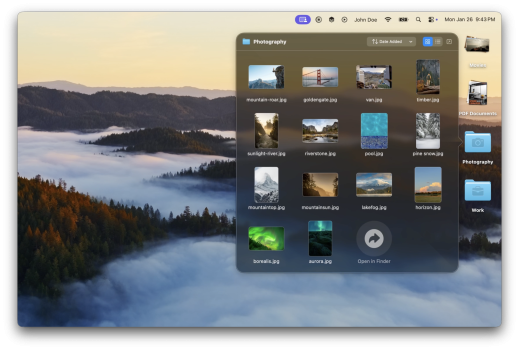
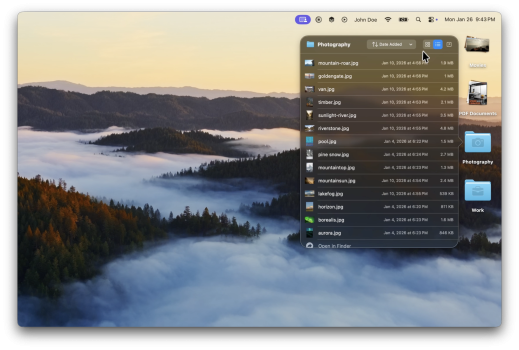
In short, PopStack gives you Dock-style folder popovers right on your desktop, letting you click a folder and instantly see its contents in a sleek grid or list view — without multiple Finder windows. It also has optional auto-sort rules for organizing desktop clutter and smart icons that preview what’s inside a folder at a glance (to mimic stacks). Built natively in Swift, it’s designed to feel fast and lightweight.
You can find more about it (and a demo video) here: https://popstack.us
I’d love honest feedback from power users and daily Mac folks — particularly on:
Thanks in advance for checking it out and for any feedback! 🙏
In was born out of my frustrations with "Stacks" on the mac Desktop (clumsy to use, seems to be resource intensive with lots of files, opening stacks gives me a mental overload I don't want to deal with 😅).
In short, PopStack gives you Dock-style folder popovers right on your desktop, letting you click a folder and instantly see its contents in a sleek grid or list view — without multiple Finder windows. It also has optional auto-sort rules for organizing desktop clutter and smart icons that preview what’s inside a folder at a glance (to mimic stacks). Built natively in Swift, it’s designed to feel fast and lightweight.
You can find more about it (and a demo video) here: https://popstack.us
I’d love honest feedback from power users and daily Mac folks — particularly on:
- Whether this workflow actually feels more productive than macOS' Stacks
- What improvements or features would make it indispensable
- Any UI/interaction quirks you notice right away
Thanks in advance for checking it out and for any feedback! 🙏