
Swift Craft Launcher - A Native Swift Minecraft Launcher for macOS
Hi everyone,
I would like to share a macOS app I have been working on: Swift Craft Launcher, a modern Minecraft launcher built natively with Swift.
The goal is to make Minecraft management feel more like a real Mac app: clean, responsive, organized, and comfortable to use over long sessions. Instead of treating the launcher as only a Play button, Swift Craft Launcher brings together resource browsing, modpack management, game instances, accounts, skins, servers, worlds, and advanced launch settings in one native desktop experience.

Why I built it
Minecraft on macOS can be surprisingly fragmented once you start using mods, modpacks, multiple versions, different loaders, and custom launch settings. Players often end up switching between websites, folders, configuration files, and several tools just to keep everything working.
Swift Craft Launcher tries to make that workflow calmer and more coherent. It is designed around the idea that managing Minecraft should feel as polished as using a good native Mac utility.
Native Swift macOS experience
The app is built with Swift and designed around macOS conventions. Sidebars, lists, dialogs, settings, and detail views are intended to feel familiar on the Mac, with a clear structure and low visual noise.
For me, the native part matters. A launcher is something players may keep open, revisit often, and use for maintenance tasks, so responsiveness and system-level consistency make a real difference.
Resource discovery
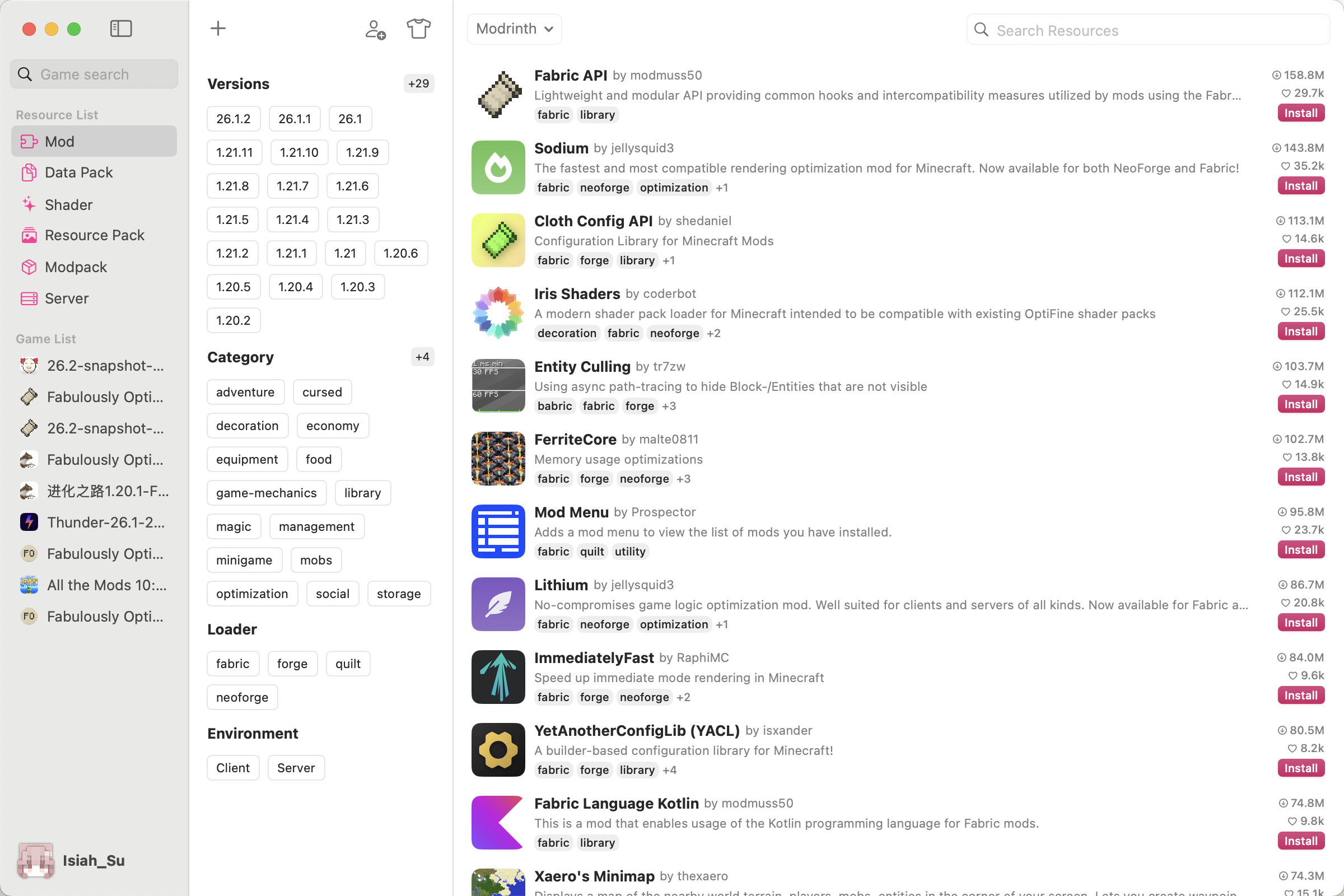
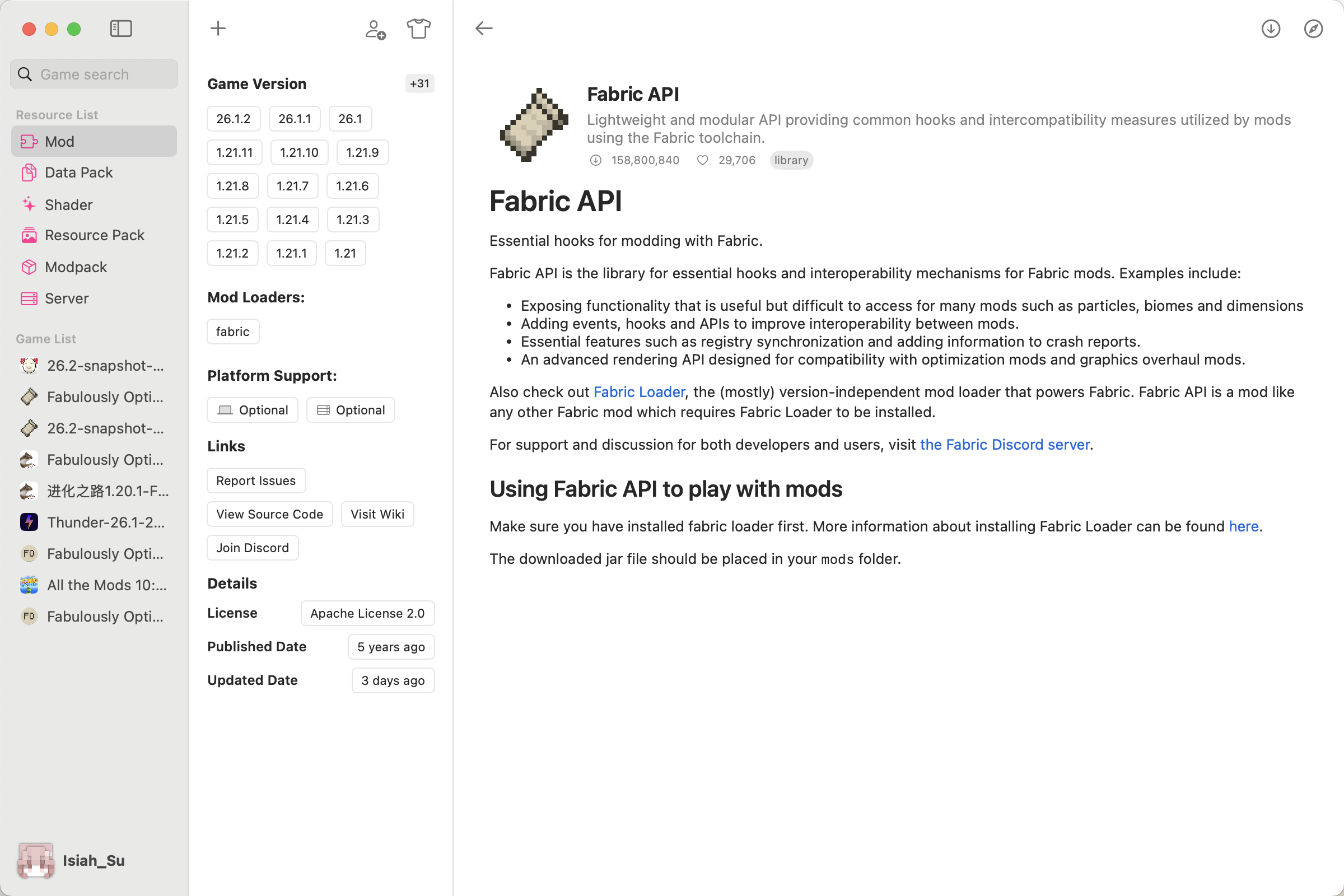
Swift Craft Launcher includes a resource browser for Minecraft content such as mods, modpacks, shaders, resource packs, data packs, and servers. Resources can be filtered by version, loader, category, environment, and keywords, with detail pages for descriptions, dependencies, compatibility, and installation state.
Instances and modpacks
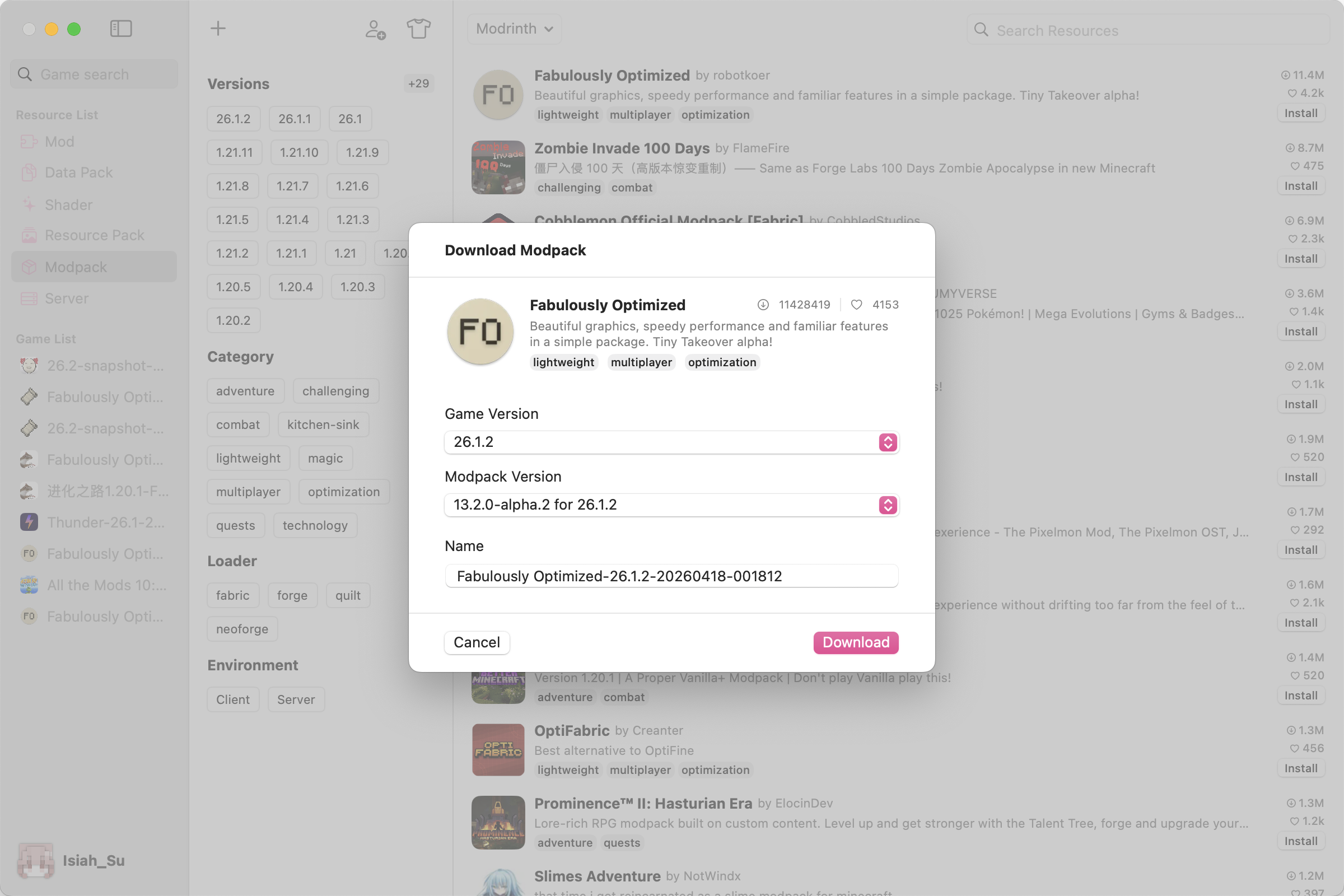
The launcher supports creating separate game instances, selecting Minecraft versions, installing loaders, downloading modpacks, importing from other launchers, and exporting an existing setup as a modpack.
This makes it easier to keep vanilla survival, Fabric setups, Forge modpacks, server-specific clients, and personal custom environments separate from each other.

Accounts, skins, servers, and worlds
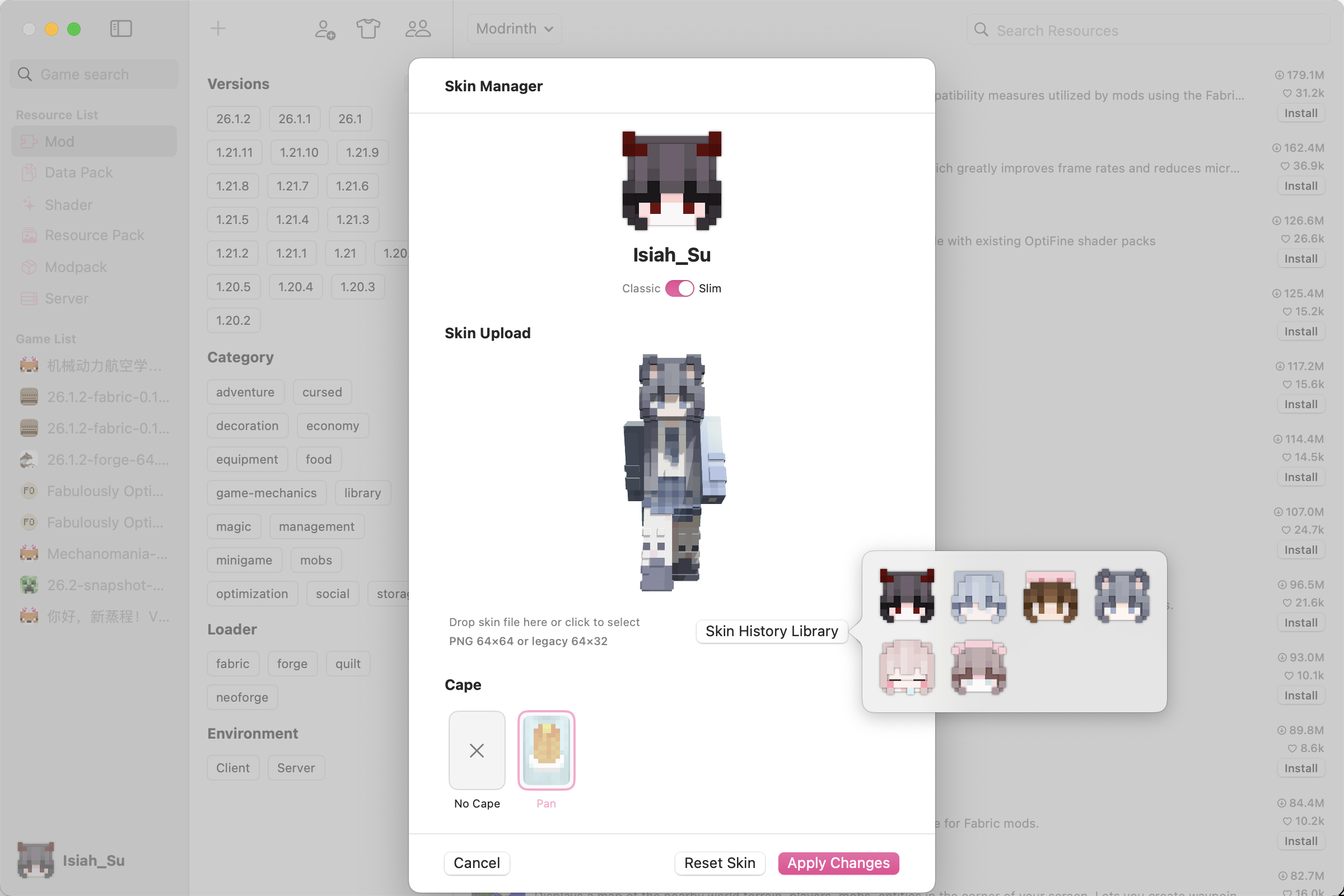
Swift Craft Launcher also includes account setup, skin management, cape selection, skin history, server entries, and world details. These are everyday features, but keeping them in one place makes the launcher feel more complete.
Advanced launch settings
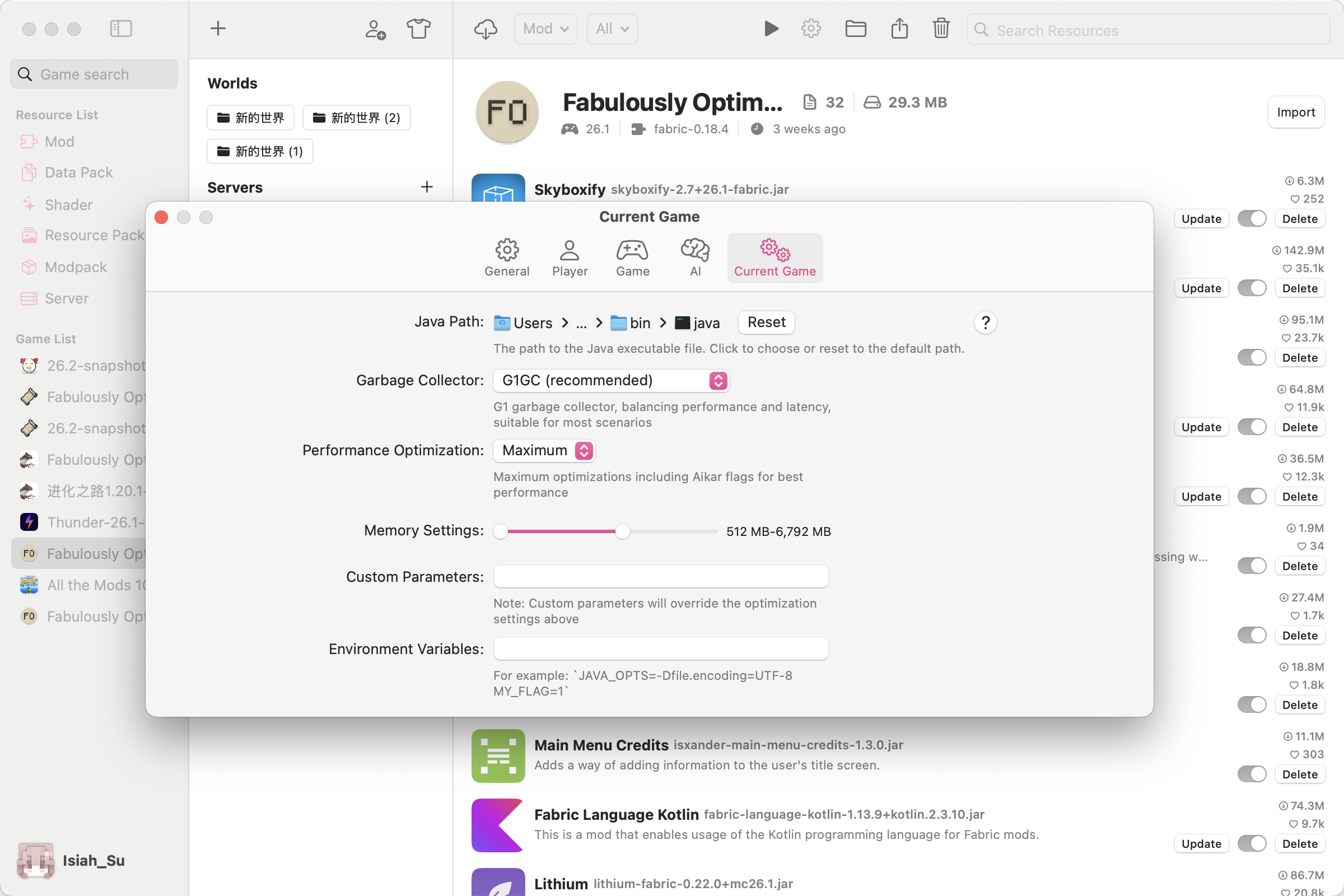
For users who like to fine-tune their Minecraft environment, the app includes settings for Java paths, memory allocation, JVM arguments, environment variables, game directories, compatibility options, crash analysis, cache cleanup, appearance, language, and system proxy configuration.
Who it is for
In short
Swift Craft Launcher is a native Swift Minecraft launcher for macOS, built to make resource browsing, instance management, skins, servers, and launch configuration feel more organized and more Mac-like.
I would be interested to hear feedback from Mac users here. If you play Minecraft on macOS, what do you wish launchers handled better?
Note: Swift Craft Launcher is an independent project and is not affiliated with Mojang, Microsoft, or Apple.
Hi everyone,
I would like to share a macOS app I have been working on: Swift Craft Launcher, a modern Minecraft launcher built natively with Swift.
The goal is to make Minecraft management feel more like a real Mac app: clean, responsive, organized, and comfortable to use over long sessions. Instead of treating the launcher as only a Play button, Swift Craft Launcher brings together resource browsing, modpack management, game instances, accounts, skins, servers, worlds, and advanced launch settings in one native desktop experience.
Why I built it
Minecraft on macOS can be surprisingly fragmented once you start using mods, modpacks, multiple versions, different loaders, and custom launch settings. Players often end up switching between websites, folders, configuration files, and several tools just to keep everything working.
Swift Craft Launcher tries to make that workflow calmer and more coherent. It is designed around the idea that managing Minecraft should feel as polished as using a good native Mac utility.
Native Swift macOS experience
The app is built with Swift and designed around macOS conventions. Sidebars, lists, dialogs, settings, and detail views are intended to feel familiar on the Mac, with a clear structure and low visual noise.
For me, the native part matters. A launcher is something players may keep open, revisit often, and use for maintenance tasks, so responsiveness and system-level consistency make a real difference.
Resource discovery
Swift Craft Launcher includes a resource browser for Minecraft content such as mods, modpacks, shaders, resource packs, data packs, and servers. Resources can be filtered by version, loader, category, environment, and keywords, with detail pages for descriptions, dependencies, compatibility, and installation state.
Instances and modpacks
The launcher supports creating separate game instances, selecting Minecraft versions, installing loaders, downloading modpacks, importing from other launchers, and exporting an existing setup as a modpack.
This makes it easier to keep vanilla survival, Fabric setups, Forge modpacks, server-specific clients, and personal custom environments separate from each other.
Accounts, skins, servers, and worlds
Swift Craft Launcher also includes account setup, skin management, cape selection, skin history, server entries, and world details. These are everyday features, but keeping them in one place makes the launcher feel more complete.
Advanced launch settings
For users who like to fine-tune their Minecraft environment, the app includes settings for Java paths, memory allocation, JVM arguments, environment variables, game directories, compatibility options, crash analysis, cache cleanup, appearance, language, and system proxy configuration.
Who it is for
- Mac users who play Minecraft and want a native launcher experience
- Players who manage mods, modpacks, and multiple game versions
- Players who maintain several instances for different servers or play styles
- Users who prefer a clean macOS-style app instead of a web-style launcher
In short
Swift Craft Launcher is a native Swift Minecraft launcher for macOS, built to make resource browsing, instance management, skins, servers, and launch configuration feel more organized and more Mac-like.
I would be interested to hear feedback from Mac users here. If you play Minecraft on macOS, what do you wish launchers handled better?
Note: Swift Craft Launcher is an independent project and is not affiliated with Mojang, Microsoft, or Apple.
