F Flac macrumors regular Original poster Feb 2, 2015 #1 The button on the top right doesnt work. Is there a way I can capture without using the power button?
The button on the top right doesnt work. Is there a way I can capture without using the power button?
sunking101 macrumors 604 Feb 2, 2015 #2 Flac said: The button on the top right doesnt work. Is there a way I can capture without using the power button? Click to expand... Use Assistive Touch.
Flac said: The button on the top right doesnt work. Is there a way I can capture without using the power button? Click to expand... Use Assistive Touch.
F Flac macrumors regular Original poster Feb 2, 2015 #3 It seems like there is no option for capture in assistance touch for iPhone 4.
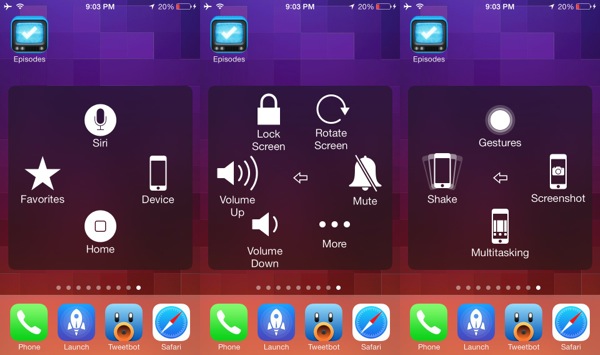
sunking101 macrumors 604 Feb 2, 2015 #4 Flac said: It seems like there is no option for capture in assistance touch for iPhone 4. Click to expand... Yes there is. Press assistive touch, then device, then more, then screenshot.
Flac said: It seems like there is no option for capture in assistance touch for iPhone 4. Click to expand... Yes there is. Press assistive touch, then device, then more, then screenshot.
BrettApple macrumors 65816 Feb 2, 2015 #5 Exactly as posted above. Just adding a visual. I'm assuming you're at least on iOS 5 or later. So you should have that option. Unless you just so happen to have it on iOS 4 still 🙂 Assistive touch is under Settings - General - Accessibility - Assistive touch (near the bottom).
Exactly as posted above. Just adding a visual. I'm assuming you're at least on iOS 5 or later. So you should have that option. Unless you just so happen to have it on iOS 4 still 🙂 Assistive touch is under Settings - General - Accessibility - Assistive touch (near the bottom).
F Flac macrumors regular Original poster Feb 2, 2015 #6 Mine is 5.1.1 and it doesn't have the 'more option'. when i tap on 'device' it shows shake, lock screen etc but not 'capture screen'
Mine is 5.1.1 and it doesn't have the 'more option'. when i tap on 'device' it shows shake, lock screen etc but not 'capture screen'
sunking101 macrumors 604 Feb 2, 2015 #7 Flac said: Mine is 5.1.1 and it doesn't have the 'more option'. when i tap on 'device' it shows shake, lock screen etc but not 'capture screen' Click to expand... That's strange....
Flac said: Mine is 5.1.1 and it doesn't have the 'more option'. when i tap on 'device' it shows shake, lock screen etc but not 'capture screen' Click to expand... That's strange....