Become a MacRumors Supporter for $50/year with no ads, ability to filter front page stories, and private forums.

appleguy

macrumors 6502
Original poster
Ok I have updated to mobileme ok.
I am trying to upload a photo from my iPhone 3G
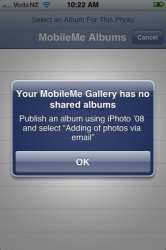
I get the message saying I need to create a shared album bla bla bla
but I have.
I decided to watch the guided tour again. and when he is setting it up, his iphoto has a mobileme icon in the bottom instead of Web Gallery

I can still create a web gallery and see it when I log in to me.com via a website. I just cant upload from my phone

Has anyone else suffered this?
 
Try setting up a web gallery at me.com instead of in iPhoto

Nope that doesnt work..
Been trying to save a screen shot as well of the error message so I can post it here. I get the snap as if it takes a photo but it doesnt save it...😡
 
The Message

Finally got screen capture to work
 

Attachments

  • photo.jpg
    photo.jpg
    36 KB · Views: 135
In your MobileMe Gallery create a new Alblum.

Make sure you check the box "Adding of photos via email or iPhone".

That should do the trick.
 
I had not used this feature yet until I saw this Thread. I just created an album and then sent a photo from my iPhone and it stored it on MM. I then used the URL to look at my phone with IE.

It appears to be no way to have security on this feature. Is there no way to restrict who can see my albums?

Also, is there any way to have it Sync with my iPhone (kind of like Contacts) so I would not have to manually send each photo to the Albumn?
 
I had not used this feature yet until I saw this Thread. I just created an album and then sent a photo from my iPhone and it stored it on MM. I then used the URL to look at my phone with IE.

It appears to be no way to have security on this feature. Is there no way to restrict who can see my albums?

Also, is there any way to have it Sync with my iPhone (kind of like Contacts) so I would not have to manually send each photo to the Albumn?

YEAP.
are you doing through iphoto? or the web?
 
You can set up a password on your web gallery to limit users.

The way I use iPhoto now is I subscribe to the web gallery I created in the web app. You can set it so you allow uploads, which lets you send photos from iPhoto to the gallery. So, now I have mine set up so my friends can upload photos from iPhone/email and we can share pictures. Pretty neat.

The only way I know right now to sync with the iPhone is through iTunes. You can just select that gallery to sync. Or you can put a bookmark on your iPhone homescreen to the gallery.
 
You can set up a password on your web gallery to limit users.

The way I use iPhoto now is I subscribe to the web gallery I created in the web app. You can set it so you allow uploads, which lets you send photos from iPhoto to the gallery. So, now I have mine set up so my friends can upload photos from iPhone/email and we can share pictures. Pretty neat.

The only way I know right now to sync with the iPhone is through iTunes. You can just select that gallery to sync. Or you can put a bookmark on your iPhone homescreen to the gallery.

I use Windows so I don't have iPhoto. Maybe Apple will port it to Windows (like iTunes). In the help it said you could Sync with iPhoto. Also, could not find the Passord Option in MobileMe. Maybe that is an iPhoto option as well.
 
Register on MacRumors! This sidebar will go away, and you'll see fewer ads.