I purchased the pro version of enabler..and I was wondering if i need to open up the app in order to activate trim or do i just leave "on" switch and quit app.
Could someone answer this question? thank you.
I purchased the pro version of enabler..and I was wondering if i need to open up the app in order to activate trim or do i just leave "on" switch and quit app.
Could someone answer this question? thank you.
I'd like to see where they said that having no trim is a good idea on an M4. M4's had some issues with very early firmware but have been fine ever since.
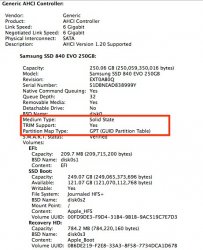
That is incorrect. TRIM also works fine on SSD drives connected to a PCIe SSD card as my Samsung 250GB EVO connected to an Apricorn card and used as a start-up and Applications drive confirms. The SSD runs at SATAIII speed, BTW.
Further, it also works fine on SSDs connected to the cables in the optical drive area. I have one SATAII SSD there and another SATAII SSD in one of the four regular backplane board sockets, the two striped in RAID0 to get SATAIII speeds from these older SATAII drives. TRIM works fine on this RAID0 pair.
If the firmware has been tested by others before me and it seems fine I always update.
Never had a problem with the M4's in the many MBP's Ive fitted them in and a half dozen fitted to Mac Pro's. Kingston on the other hand is a different story. 😡