Become a MacRumors Supporter for $50/year with no ads, ability to filter front page stories, and private forums.

iSaint

macrumors 603
Original poster
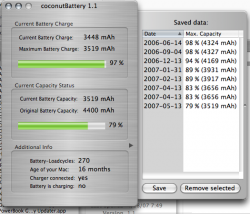
Is this ok for my 1.67 Powerbook?

Picture 2.png

edit: new screenshot, sorted by date
 
When your battery charge capacity has been reduced that fast it means you ran through cycles fast and not properly. did you allow the battery to drain before you place it on charge?

From my experience when you place rechargeable on charge before it completes it loses its capacity...sorry fella.

I'm still running my ibook G4 with a 89% capacity.


Bless
 
Thanks 2nyRiggz.

I run it down completely once a month for sure. Most days, when I wake up, I read the news, MR, have coffee with the computer unplugged for 20-30 minutes, then take it to work and plug it in. It charges back to full in 20 minutes or so, then stays plugged in the rest of the day. That includes when I go home and work in the evenings as well.

I ran my iBook battery down in less than two years. I'm doing better with the Powerbook. I try to read the instructions (guidelines), but apparently I don't get it.
 
Sounds like you're doing things correctly. 270 cycles is starting to get up there though, so your capacity is dropping. Not much you can do about that.
 
My MBP is at 84% capacity after about 9 months and only 71 cycles? Whats goin on...sorry to hijack the thread!
I do a full calibrate every month aswel...like the OP i mostly use it on battery for half hour or so...it stays plugged in and on for a week or so usualy aswel.
 
The only thing I would guess is that it's better to use the battery more often than you are. e.g. unplug your computer for 20 minutes or so each day while your using it, then plug it back in for charging.
 
Like everyone said iSaint you are doing it correct so you have nothing to worry about. I barely take my ibook out but I do drain it twice a month just to make sure.


Bless
 
Register on MacRumors! This sidebar will go away, and you'll see fewer ads.