

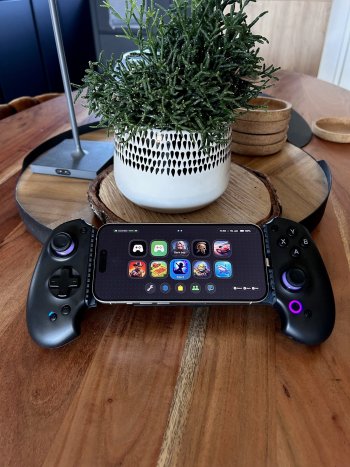
Hello everyone, last year I bought an iPad Mini and started gaming on it. I bought a telescopic controller and the experience was lacking that handheld console feeling. I searched for apps that give that handheld console feeling but couldn't find something with universal support. I decided to develop my own gaming launcher. It's called LudiHub.
What is LudiHub? It's a centralized gaming hub/launcher where you can add your installed games, emulators, roms and whatever shortcut you want. It has full universal controller and touch support and is customizable. You can add games using two ways, the simple way is long-pressing an installed game in your Home Screen and share it to LudiHub. LudiHub takes care of creating the icon with image and title and prompts you to add a shortcut name. You enter the name of the "Open App" shortcut you created in the shortcuts app. You can use various shortcuts, for example Delta Emulator supports deep links, those can be opened as URLs and RetroArch has an "Open Game" shortcut. All of those are compatible with LudiHub. The second way is the manual way in the app. The manual way is for games no longer available in the AppStore, ROMs etc. You can also customize the bottom menu buttons to map them to your favourite apps.
When you connect your controller, the app recognizes it and shows you an indicator on top with battery status and the navigation information depending on the controller. On the right side you see the date, time and iPad's battery status. The Launcher comes with two pre-configured but removable web shortcuts for Game Pass and GeForce Now.
I also built in 6 different color themes which adapt to dark and light mode. You can also choose your custom wallpaper which gives you an option to activate a crystal clear glass design that refracts the background colors or keep the toggle off for a frosted glass optic.
The App Costs 4.99€ and is a one time purchase. No subscription, No ads or data collection.
You can download the app here: https://apps.apple.com/app/ludihub/id6757743623
More information here: https://ludihub.app
If you experience any issues or bugs, please report them using the contact support E-Mail Address from the website.
Looking forward for your feedback.
Update: The App is now Universal and supports the iPhone at no additional cost!
Last edited:

