
Become a MacRumors Supporter for $50/year with no ads, ability to filter front page stories, and private forums.

ludihubdev

macrumors newbie
Original poster
IMG_1759.jpg

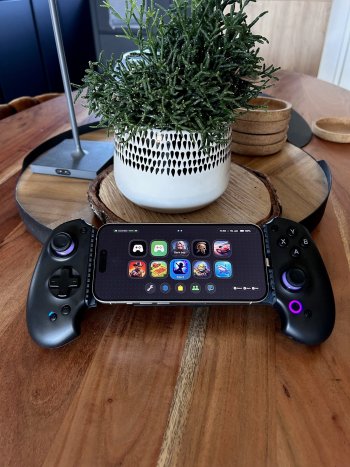
Hello everyone, last year I bought an iPad Mini and started gaming on it. I bought a telescopic controller and the experience was lacking that handheld console feeling. I searched for apps that give that handheld console feeling but couldn't find something with universal support. I decided to develop my own gaming launcher. It's called LudiHub.

What is LudiHub? It's a centralized gaming hub/launcher where you can add your installed games, emulators, roms and whatever shortcut you want. It has full universal controller and touch support and is customizable. You can add games using two ways, the simple way is long-pressing an installed game in your Home Screen and share it to LudiHub. LudiHub takes care of creating the icon with image and title and prompts you to add a shortcut name. You enter the name of the "Open App" shortcut you created in the shortcuts app. You can use various shortcuts, for example Delta Emulator supports deep links, those can be opened as URLs and RetroArch has an "Open Game" shortcut. All of those are compatible with LudiHub. The second way is the manual way in the app. The manual way is for games no longer available in the AppStore, ROMs etc. You can also customize the bottom menu buttons to map them to your favourite apps.

When you connect your controller, the app recognizes it and shows you an indicator on top with battery status and the navigation information depending on the controller. On the right side you see the date, time and iPad's battery status. The Launcher comes with two pre-configured but removable web shortcuts for Game Pass and GeForce Now.

I also built in 6 different color themes which adapt to dark and light mode. You can also choose your custom wallpaper which gives you an option to activate a crystal clear glass design that refracts the background colors or keep the toggle off for a frosted glass optic.

The App Costs 4.99€ and is a one time purchase. No subscription, No ads or data collection.

You can download the app here: https://apps.apple.com/app/ludihub/id6757743623

More information here: https://ludihub.app

If you experience any issues or bugs, please report them using the contact support E-Mail Address from the website.

Looking forward for your feedback.

Update: The App is now Universal and supports the iPhone at no additional cost!
 
Last edited:
Congrats with the launch! Great game launcher which we needed as Apple Games didn't offer what we had hoped. Can't wait for the Universal (iPhone) support to become available to try it out with my Backbone One controller.
 
Congrats with the launch! Great game launcher which we needed as Apple Games didn't offer what we had hoped. Can't wait for the Universal (iPhone) support to become available to try it out with my Backbone One controller.
The iPhone version is currently in beta test phase. Added support for backbone and other generic MFi controllers. At the moment the app supports only extended controllers who use the Xbox or PlayStation configuration. A user reported that his backbone didn’t work properly so I added support for it. After receiving feedback I started working on folders so users can create game folders in the launcher to organize their game collection. The folders are planned for a later release. If you need help with setting everything up feel free to use the setup guide which includes a video
 
Last edited:
  • Like
Reactions: tknzn and pacorob
The folders and customization for the footer launchers works great.
Also the latest way to add games is so much easier. I really can recommend this game launcher which is a great alternative for Apple Games app to truly create your game launcher for both App Store games (both online former once) and open emulator games from Delta and Provenance and use in landscape as a mobile Switch/PSP like gaming unit with my Backbone One controller.

Tip for Backbone One controller users: create an Automation (when 'Backbone is opened' > open LudiHub app) in the Apple Shortcuts app that always opens the LudiHub app when you open the Backbone app (via the controller button) so you can easily go back to the launcher even when pressing 1 sec vs 2 seconds (as I set LudiHub to launch in Apple Settings > Gamecontroller > shortcut) since Backbone doesn't allow changing this.
 
  • Like
Reactions: ludihubdev
The folders and customization for the footer launchers works great.
Also the latest way to add games is so much easier. I really can recommend this game launcher which is a great alternative for Apple Games app to truly create your game launcher for both App Store games (both online former once) and open emulator games from Delta and Provenance and use in landscape as a mobile Switch/PSP like gaming unit with my Backbone One controller.

Tip for Backbone One controller users: create an Automation (when 'Backbone is opened' > open LudiHub app) in the Apple Shortcuts app that always opens the LudiHub app when you open the Backbone app (via the controller button) so you can easily go back to the launcher even when pressing 1 sec vs 2 seconds (as I set LudiHub to launch in Apple Settings > Gamecontroller > shortcut) since Backbone doesn't allow changing this.
I'm happy it works for you! Today the next version launcher with even more features for new and power users.
 
The game launcher is so good and the fact you can scrap the background images of most games (that are available on Steam and have images in SteamgridDB) makes your iPhone really like a handheld game console works great with my iPhone 14 and Backbone One controller. Also cool that latest version also support local music.
 
  • Like
Reactions: ludihubdev
The game launcher is so good and the fact you can scrap the background images of most games (that are available on Steam and have images in SteamgridDB) makes your iPhone really like a handheld game console works great with my iPhone 14 and Backbone One controller. Also cool that latest version also support local music.
Thank you for the support. Yes I implemented new features the community requested and refined the whole experience. Here is a summary of the current version and a video:

Universal controller support - works with any controller brand, including battery status display and button navigation. You can even map your controller's home button in iOS settings to launch LudiHub directly when you press the controller’s home button

Add any game - installed iOS games, custom shortcuts for games no longer on the App Store, or deep links for emulator ROMs. LudiHub auto-detects supported deep links and offers to paste them automatically when adding an emulator game. Installed iOS games can be easily shared from the home screen to LudiHub. LudiHub currently supports deep links from the following emulators: Gamma, Delta, Provenance, ManicEmu, JoyEmu and MeloNX

SteamGridDB integration - scrape game artwork automatically using your personal API key, including hero images shown as backgrounds when selecting a game

Full customization - built-in themes, custom wallpapers, color accents, per-game icon/name/image editing, compact layout on iPhone, and even built-in menu music (replaceable with your own MP3)

Organization - favorites tab, collections/folders, alphabetical or recently played sorting, customizable bottom menu buttons

iCloud backups - manual cloud backup and restore, device-specific to handle iPhone/iPad game differences


  • Like
Reactions: pacorob
Thank you for the support. Yes I implemented new features the community requested and refined the whole experience. Here is a summary of the current version and a video:

Universal controller support - works with any controller brand, including battery status display and button navigation. You can even map your controller's home button in iOS settings to launch LudiHub directly when you press the controller’s home button

Add any game - installed iOS games, custom shortcuts for games no longer on the App Store, or deep links for emulator ROMs. LudiHub auto-detects supported deep links and offers to paste them automatically when adding an emulator game. Installed iOS games can be easily shared from the home screen to LudiHub. LudiHub currently supports deep links from the following emulators: Gamma, Delta, Provenance, ManicEmu, JoyEmu and MeloNX

SteamGridDB integration - scrape game artwork automatically using your personal API key, including hero images shown as backgrounds when selecting a game

Full customization - built-in themes, custom wallpapers, color accents, per-game icon/name/image editing, compact layout on iPhone, and even built-in menu music (replaceable with your own MP3)

Organization - favorites tab, collections/folders, alphabetical or recently played sorting, customizable bottom menu buttons

iCloud backups - manual cloud backup and restore, device-specific to handle iPhone/iPad game differences


View attachment 2613356
I don't play games on my Mac but this looks really well-made and slick. Good job.
 
Register on MacRumors! This sidebar will go away, and you'll see fewer ads.