
Got a tip for us?
Let us know
Become a MacRumors Supporter for $50/year with no ads, ability to filter front page stories, and private forums.
I need a file renamer
- Thread starter npriess
- Start date
- Sort by reaction score
You are using an out of date browser. It may not display this or other websites correctly.
You should upgrade or use an alternative browser.
You should upgrade or use an alternative browser.

miles01110
macrumors Core


yetanotherdave
macrumors 68000

John Doe 57
macrumors 65816
miles01110
macrumors Core
Automator doesn't have nearly the amount of options that Name Mangler does, and Renamer4Mac isn't free and also doesn't do as good a job.

Tumbleweed666
macrumors 68000
Automator doesn't have nearly the amount of options that Name Mangler does, and Renamer4Mac isn't free and also doesn't do as good a job.
jumping in here as I have similar req, unfortunately name mangler doesnt seem to have a random rename - I dont mind if the renamed files have consecutive names say File00001, File00002, etc, as long as its random which files get assigned those in the first place, eg fileA->File00007, FileB->File00002 , FileC->File00042 etc....
There are some PC apps that will do this and I'm thinking I may have to do it that way.
miles01110
macrumors Core
What's the difference between having them be "random" and renaming them in order (yes, I know the definition of random vs. ordered, but why is it important in your case)? Try Automator- I can't tell how the "Get Finder Items" sorts the files.
Tumbleweed666
macrumors 68000
What's the difference between having them be "random" and renaming them in order (yes, I know the definition of random vs. ordered, but why is it important in your case)? Try Automator- I can't tell how the "Get Finder Items" sorts the files.
This is a common requirement, its for a photo frame. Many digital photo frames don't have a random slide show feature, they simply show the pictures in filename order. Mine does have random order, but only up to 1,500 files, after that it shows in name order. I am approaching the 1,500 mark. Also, the random function isnt that great anyway, its shows some pictures far more often that you'd expect, whereas what I'd like is it to show each picture just once in a random order before restarting.
An obvious way around this is to randomly rename the files so that when they are shown in name order by the frame, its random because the original alphabetical order has been changed to another random one.
I haven't used automator but looking at it on the Apple web site it doesn't seem to have a randomise ability because its only doing things you would do manually.
I am surprised this capability doesn't exist on Mac so I am visualizing a script that would do this rename and may have a go at learning scripting on Mac. Or perhaps use one of several windows apps that can do this and put the SD card in a reader on PC and do it that way.
miles01110
macrumors Core
This is a common requirement, its for a photo frame.
Ah.
I haven't used automator but looking at it on the Apple web site it doesn't seem to have a randomise ability because its only doing things you would do manually.
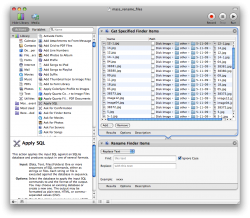
Here's a screen shot of what I see when I drag a bunch of pictures into Automator. Does it look like they're in any sort of order to you?
Attachments

ID_Field_Blank
macrumors regular
Hey, I'm not sure if this would work but have you tried using automator to sort them into one long list. Then getting it to get all the files ending in 1 and renaming those 1-100 (or however many ther are), then get all the files with a 2 at the end and rename those 101-200 (or however many there are) and repeating all the way up to 0?
This would produce a semi random list, but could be repeatd to make it more random.
I think to do this you could use:
1. get finder items
2. rename finder items and end in consecutive numbers
3. find finder items and navigate to the file, select name ending in (one in this case)
4. rename finder itesm
5. repeat steps 3 and 4 until you've chosen the end number to be everything from 2 through 0.
Just a thought.
This would produce a semi random list, but could be repeatd to make it more random.
I think to do this you could use:
1. get finder items
2. rename finder items and end in consecutive numbers
3. find finder items and navigate to the file, select name ending in (one in this case)
4. rename finder itesm
5. repeat steps 3 and 4 until you've chosen the end number to be everything from 2 through 0.
Just a thought.

angelwatt
Moderator emeritus
You could rename with random by using a bash script. I'm not at a Mac (or Linux) to try it though so be sure to test it on a test directory of images.
Just copy and paste the above into a text file and give it a name such as "image_rename_random" and it doesn't need an extension. Save the file inside the image directory you're wanting to effect. Open Terminal, use the cd command to go to the directory where you saved the script. You may need to give the script execution permissions first that is easily done with the following command.
Then simply enter in,
and it'll run the script hopefully. The random here should work up to about 32,000. Something similar to this is likely possible with AppleScript as well.
Code:
#!/bin/bash

# Get all jpg files
files = $(ls *.jpg)
# Loop through files
for file in $files
do
  # assign random name
  mv $file $RANDOM.jpg
done
Code:
chmod u+x image_rename_random
Code:
./image_rename_randomTumbleweed666
macrumors 68000
Ah.
Here's a screen shot of what I see when I drag a bunch of pictures into Automator. Does it look like they're in any sort of order to you?
Its hard to tell, they could be in date/time order (they all have identical dates), are they?
Hey, I'm not sure if this would work but have you tried using automator to sort them into one long list. Then getting it to get all the files ending in 1 and renaming those 1-100 (or however many ther are), then get all the files with a 2 at the end and rename those 101-200 (or however many there are) and repeating all the way up to 0?
This would produce a semi random list, but could be repeatd to make it more random.
I think to do this you could use:
1. get finder items
2. rename finder items and end in consecutive numbers
3. find finder items and navigate to the file, select name ending in (one in this case)
4. rename finder itesm
5. repeat steps 3 and 4 until you've chosen the end number to be everything from 2 through 0.
Just a thought.
Thanks I can see that would work but is a lot more work than I was hoping for.
You could rename with random by using a bash script. I'm not at a Mac (or Linux) to try it though so be sure to test it on a test directory of images.
Just copy and paste the above into a text file and give it a name such as "image_rename_random" and it doesn't need an extension. Save the file inside the image directory you're wanting to effect. Open Terminal, use the cd command to go to the directory where you saved the script. You may need to give the script execution permissions first that is easily done with the following command.Code:#!/bin/bash # Get all jpg files files = $(ls *.jpg) # Loop through files for file in $files do # assign random name mv $file $RANDOM.jpg done
Then simply enter in,Code:chmod u+x image_rename_random
and it'll run the script hopefully. The random here should work up to about 32,000. Something similar to this is likely possible with AppleScript as well.Code:./image_rename_random
Thanks, someone published something very similar to that in another thread and I was looking at modifying it so it would pick all the files out of a a series of nested folders (the script I had didn't do that) and also (presumably) check to see if that random name exists first in case of a duplicate. Or is that unlikely enough not to worry about? ... If I have say 2,000-3,000 names I think the odds are quite high there will be a duplicate - probably close to a certainty I'd guess.
Its annoying when there are apps that do this at the drop of a hat on windows ..... grrrr .... I'd like to do it on Mac but it may be easier just to stick the SD card in a reader and put it in my PC :-(
I'll give one of these scripts a go - what is the command that would list all the files underneath a given folder and within all nested folders? having a quick google it would seem to be ls -R * ? UPDATE Quicker to try it, I see it is 🙂

i.shaun
macrumors 6502a
renamer4mac isn't free?
What the heck, I use it for free. I've paid for a few apps like keyboard maestro, snapz pro x (but i won't pay them for an update), app zapper, steel, virtual dub, but I have not paid for renamer4mac.
unless of course they made a newer version with more features.
What the heck, I use it for free. I've paid for a few apps like keyboard maestro, snapz pro x (but i won't pay them for an update), app zapper, steel, virtual dub, but I have not paid for renamer4mac.
unless of course they made a newer version with more features.
angelwatt
Moderator emeritus
I believe, if memory serves, that it use to be free, but has since been enhanced and deemed worthy a price tag. I think I use to use it when it was free as well, but now use Name Mangler in its place.renamer4mac isn't free?
That was something I wanted to test. The documentation I read for $RANDOM said it would give a different number for each instantiation, but I don't know how reliable that may be.Thanks, someone published something very similar to that in another thread and I was looking at modifying it so it would pick all the files out of a a series of nested folders (the script I had didn't do that) and also (presumably) check to see if that random name exists first in case of a duplicate. Or is that unlikely enough not to worry about? ... If I have say 2,000-3,000 names I think the odds are quite high there will be a duplicate - probably close to a certainty I'd guess.