
Got a tip for us?
Let us know
Become a MacRumors Supporter for $50/year with no ads, ability to filter front page stories, and private forums.
iBook clamshell 466SE as music Plex client?
- Thread starter r6mile
- Start date
-
- Tags
- ibook g3 clamshell
- Sort by reaction score
You are using an out of date browser. It may not display this or other websites correctly.
You should upgrade or use an alternative browser.
You should upgrade or use an alternative browser.


Can you change the security type to WPA instead of WPA2 on your router? More than likely that is all thats not allowing you to connect.
I can only change it to WPA/WPA2, which I have done, and the iBook recognises the network as 'WPA personal', but an error comes up after I enter the password. I've looked up the issue and apparently sometimes it works if you change the setting from 'b/g/n' to 'b/g', but unfortunately I don't have that option on by Virgin Media Superhub.
[doublepost=1460825379][/doublepost]One thing I have noticed is that the speaker on the computer (which I know is mono) sounds very grainy. This is not really an issue as I will have it plugged in to a set of TDK speaker I have, but I presume this might have to do with the speaker degrading over time (I am under no illusion that they will sound good 15 years after they were made!).

647156
Cancelled
I never got a clamshell to work with a Virgin Media Superhub 2 either except by creating a separate "guest" network on it which was unencrypted and locked to the MAC address of the AirPort Card (which made me think the issue might be the automatic WPA/WPA2 setting that they offer, and it not correctly being just WPA for the clamshell) - it works with a BT Home Hub 5 though as that allows a network to be set to WPA and b/g (both settings were required for it to work).

Hughmac
macrumors 603
Some of the older Airport cards will only connect to WEP encrypted networks, but if you upgrade the firmware (only possible in OS 9) it should connect to WPA.
I also remember a trick something like putting a $ or 0 (zero) in front of the network password sometimes works.
I have the firmware somewhere - if you like I'll track it down for you.
Cheers 🙂
Hugh
I also remember a trick something like putting a $ or 0 (zero) in front of the network password sometimes works.
I have the firmware somewhere - if you like I'll track it down for you.
Cheers 🙂
Hugh
Some of the older Airport cards will only connect to WEP encrypted networks, but if you upgrade the firmware (only possible in OS 9) it should connect to WPA.
I also remember a trick something like putting a $ or 0 (zero) in front of the network password sometimes works.
I have the firmware somewhere - if you like I'll track it down for you.
Cheers 🙂
Hugh
Thanks, though the Airport card is already on the latest firmware 9.52. It's obviously an issue with my ISP modem/router.
I never got a clamshell to work with a Virgin Media Superhub 2 either except by creating a separate "guest" network on it which was unencrypted and locked to the MAC address of the AirPort Card (which made me think the issue might be the automatic WPA/WPA2 setting that they offer, and it not correctly being just WPA for the clamshell) - it works with a BT Home Hub 5 though as that allows a network to be set to WPA and b/g (both settings were required for it to work).
This actually would be a good workaround, except that on my Virgin Media Superhub 3 there is no way to do Mac filtering only for the guest network - it applies across the board, and I don't want to have to be doing MAC filtering for all other devices just to get the iBook to connect. It also prevents me from doing the main thing which I wanted to use the iBook for, which is playing files over iTunes homesharing. The Edimax USB dongle should arrive today, it was cheap enough and hopefully should work fine.

Dronecatcher
macrumors 603
I had a similar problem with my Clamshell in OS9 - it would see my WPA (mixed b/g) network and ask for the password but always error out. I gave in and set up a separate hidden WEP network for older devices.I can only change it to WPA/WPA2, which I have done, and the iBook recognises the network as 'WPA personal', but an error comes up after I enter the password.
647156
Cancelled
OS 9.x will never work with WPA - WPA only works on OS X 10.3.9 with AirPort update 4.2, or later OS X versions.I had a similar problem with my Clamshell in OS9 - it would see my WPA (mixed b/g) network and ask for the password but always error out. I gave in and set up a separate hidden WEP network for older devices.
As for the firmware thing, you should find your AirPort Card says "128 bits" on the label on the back for it to work with WPA, I believe there were some older ones that don't say that and they are the ones that would need updating.
Dronecatcher
macrumors 603
That's what I'd always understood but was surprised it could see it and ask for the password too - it's enough to give one the impression it should work 🙂OS 9.x will never work with WPA - WPA only works on OS X 10.3.9 with AirPort update 4.2, or later OS X versions.
So I just received the Edimax adapter, installed the 10.4 drivers, and connected to my router using the Edimax Wireless utility, but I'm only getting a self-assigned IP, I can't go on the internet and it's not seeing my network drives (both of which work fine over Ethernet). Any ideas?
In the end, I've decided to purchase a second-hand 4th gen Airport Extreme for £35 to replace my Virgin Media Superhub (which I'll put in modem mode only). The router itself is frustrating enough, but this iBook wifi business has finally provided an incentive to supplement it with an Airport Extreme. Hopefully this will finally allow the iBook to connect!

bobesch
macrumors 68020
Here's how it works with my Clamshell:So I just received the Edimax adapter, installed the 10.4 drivers, and connected to my router using the Edimax Wireless utility, but I'm only getting a self-assigned IP, I can't go on the internet and it's not seeing my network drives (both of which work fine over Ethernet). Any ideas?
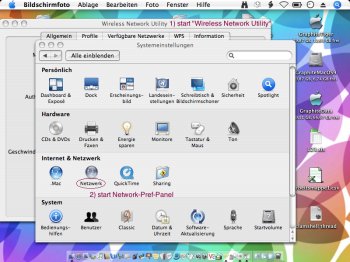
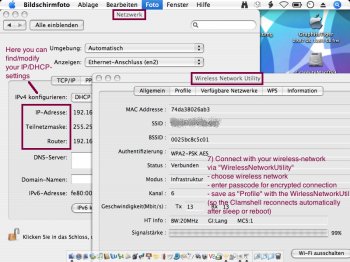
1) Start Edimax "Wireless Network Utility"; choose and connect to your wireless network; enter password for encrypted connection; save settings as profile
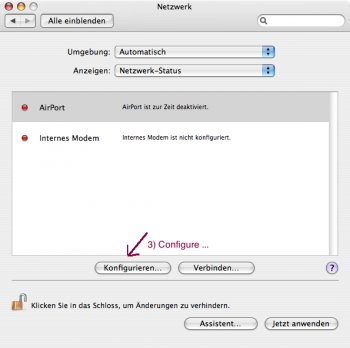
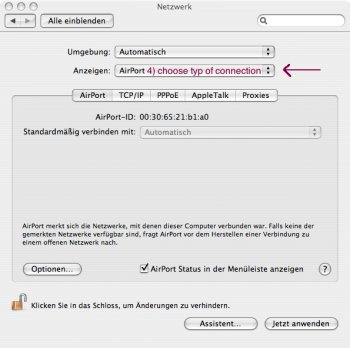
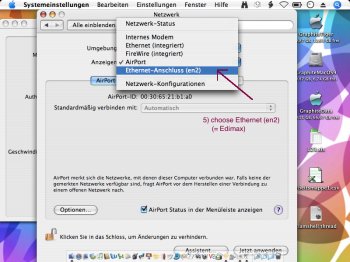
2) go to SystemSettings - Network-Pref-Pane; choose the "Ethernet (en2)" connection, which is the Edimax (you may also switch-off Airport, since you don't need/use it. On faster machines with "newer" Airport card you may connect to wifi with the edimax and share that connection via Airport, but I didn't test that yet...)
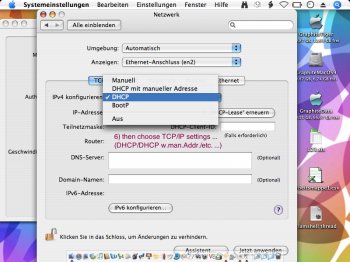
3) Choose the TCP/IP-settings for the "Ethernet(en2)" connection (DHCP with manual/automatic address etc.)
4) Now your clamshell ought to be connected to your network and the router. Otherwise modify IP-adresses or renew "DHCP-Lease"
That's it.
[doublepost=1460976043][/doublepost]
I guess you may be fine with your old router too, but I also have some bad memories about tricky router settings that drove me mad.In the end, I've decided to purchase a second-hand 4th gen Airport Extreme for £35 to replace my Virgin Media Superhub (which I'll put in modem mode only). The router itself is frustrating enough, but this iBook wifi business has finally provided an incentive to supplement it with an Airport Extreme. Hopefully this will finally allow the iBook to connect!
You should give native MacOS9 a try too. Unfortunately to create a/more separate partition(s) you'll have to erase your drive. I've bought an external firewire400-housing to create an external bootable drive for SuperDuper!-images.
If you happen to attach an mSATA-drive make sure that you plan and create partitions before you start to rebuild the system. It can't be done later without loosing all data again.
And make sure to use an external firewire-connected disk (or another Tiger-PPC in Target-mode) for bootable images, since booting from USB might not work AFAIK)
If you also create partitions on that external firewire-connected drive, make sure, you don't do that with an intel-machine's resettings, since the standards for bootable drives has changed from PPC to intel-Macs.
As for native MacOS9 I had good fun trying to max-out the options and fit the clamshell to still existing network options, like VNC, FTP, webDAV, email, office etc. with the help and good advice of many nice folks here at PPC-MR-forum. Many Thanks!(https://forums.macrumors.com/thread...ions-for-mac-os9.1960993/page-2#post-22717102)
Attachments
Last edited:
Here's how it works with my Clamshell:
1) Start Edimax "Wireless Network Utility"; choose and connect to your wireless network; enter password for encrypted connection; save settings as profile
2) go to SystemSettings - Network-Pref-Pane; choose the "Ethernet (en2)" connection, which is the Edimax (you may also switch-off Airport, since you don't need/use it. On faster machines with "newer" Airport card you may connect to wifi with the edimax and share that connection via Airport, but I didn't test that yet...)
3) Choose the TCP/IP-settings for the "Ethernet(en2)" connection (DHCP with manual/automatic address etc.)
4) Now your clamshell ought to be connected to your network and the router. Otherwise modify IP-adresses or renew "DHCP-Lease"
That's it.
View attachment 627422
[doublepost=1460976043][/doublepost]
I guess you may be fine with your old router too, but I also have some bad memories about tricky router settings that drove me mad.
Thanks a lot for your very comprehensive reply! I'm pretty sure that is the procedure I followed on the iBook, except that I got a self-assigned IP and couldn't connect to the internet (nor see my other computers on the network). When I tried to manually enter an IP address, OS X said I was connected to the internet but when I tried to load page it didn't work. I was still able to connect fine using the ethernet, and my (temporarily) unprotected guest network both using the Edimax device and the original Airport card. I'll give it another go when I get home this evening.
bobesch
macrumors 68020
At work, I have a router for LAN access which is also the the "router-ip-dress", a server, which is the DHCP-server and a separate WLAN-access-point. So I need to have a manual addressing. In addition, there's a MAC-filter for security reasons. Maybe any special configuration makes it necessary you also choose manual addressing instead of DHCP...Thanks a lot for your very comprehensive reply! I'm pretty sure that is the procedure I followed on the iBook, except that I got a self-assigned IP and couldn't connect to the internet (nor see my other computers on the network). When I tried to manually enter an IP address, OS X said I was connected to the internet but when I tried to load page it didn't work. I was still able to connect fine using the ethernet, and my (temporarily) unprotected guest network both using the Edimax device and the original Airport card. I'll give it another go when I get home this evening.
Hey guys,
Just thought I would update. I collected my 4th-gen Airport Extreme, set it up as WPA/WPA2, and the iBook connects out of the box using the original Airport card! Very pleased that it was simple and that Apple devices, even if from different decades, can work so well together. I guess I will now return the Edimax adapter since I have no use for it now!
Just thought I would update. I collected my 4th-gen Airport Extreme, set it up as WPA/WPA2, and the iBook connects out of the box using the original Airport card! Very pleased that it was simple and that Apple devices, even if from different decades, can work so well together. I guess I will now return the Edimax adapter since I have no use for it now!
I guess I will now return the Edimax adapter since I have no use for it now!
Good. I did warn you that Edimax sucks on OSX and now you see why.