- Mac Mini with macOS Sierra
- iCloud Drive 2TB
I have problems with the iCloud Drive sync. Bought 2 TB before christmas, and it started to sync.
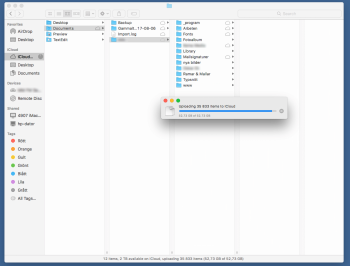
Look at the attachment. It has been like this for a couple of days now. Have restarted, have chmod:ed all files in the Documents folder to 777, but nothing seems to help. No 'bird' or 'cloudd' process is running. If I do a restart the item counter change a couple of thousand up or down, but nothing more happens.
It seems stuck. As you can see only some of the folders have cloud icons on them. What does that mean?
Last resort seems to log out and in to iCloud. That *may* work, but is there anything else I can do? Last time I did that (on another Mac and account) the sync process started over and I really don't want that (there are funnier things to do than to listen on a fan working at max for a couple of days)...
Please help 🙁
- iCloud Drive 2TB
I have problems with the iCloud Drive sync. Bought 2 TB before christmas, and it started to sync.
Look at the attachment. It has been like this for a couple of days now. Have restarted, have chmod:ed all files in the Documents folder to 777, but nothing seems to help. No 'bird' or 'cloudd' process is running. If I do a restart the item counter change a couple of thousand up or down, but nothing more happens.
It seems stuck. As you can see only some of the folders have cloud icons on them. What does that mean?
Last resort seems to log out and in to iCloud. That *may* work, but is there anything else I can do? Last time I did that (on another Mac and account) the sync process started over and I really don't want that (there are funnier things to do than to listen on a fan working at max for a couple of days)...
Please help 🙁