Become a MacRumors Supporter for $50/year with no ads, ability to filter front page stories, and private forums.

whsbuss

macrumors 601
Original poster
I share a reminder list with my co-worker setup via iCloud. Whenever we add, update, make complete, or delete from this list the other person gets a notification email. So I setup a rule in iCloud Mail to toss them onto the trash. Here's the dilemma:

With the rule set for "subject contains" and my rule Shared (name of ths list) it works, but so does any email with shared in the subject line. So I thought I clarify the rule with "subject contains" Shared list which is what is contained within the subject line. For example, the email says:

"Project X" added to "Shared" list

Problem is it never works. Seems the "subject contains" rule only works with a single word and not phrases. Has anyone encountered this?
 
So I thought I clarify the rule with "subject contains" Shared list which is what is contained within the subject line. For example, the email says:

"Project X" added to "Shared" list

Shared list

is not the same as

"Shared" list

If the quotes are in the email subject, they need to be in the rule text.
 
I tried that too. Actually in Mavericks mail the rule MUST have it exactly as "Shared" list. But iCloud rules doesn't work with Shared list or "Shared" list.

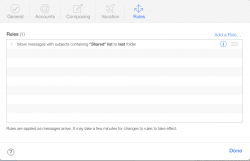
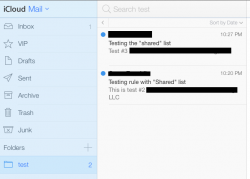
I did a test rule in iCloud.com and it worked OK for me. Check the subject line, make sure there aren't maybe 2 spaces? When matching a phrase, the rule has to be pretty much exact (seems to ignore case, but otherwise very specific). Ideally just copy & paste the text from an existing message subject line.
 

Attachments

  • Screen Shot 2014-06-02 at 10.28.15 PM.png
    Screen Shot 2014-06-02 at 10.28.15 PM.png
    34.8 KB · Views: 160
  • Screen Shot 2014-06-02 at 10.29.07 PM copy.png
    Screen Shot 2014-06-02 at 10.29.07 PM copy.png
    32 KB · Views: 131
I did a test rule in iCloud.com and it worked OK for me. Check the subject line, make sure there aren't maybe 2 spaces? When matching a phrase, the rule has to be pretty much exact (seems to ignore case, but otherwise very specific). Ideally just copy & paste the text from an existing message subject line.

No additional spaces. But after 30 minutes the "Shared" list does now work. I also checked with an email with Make a shared project does not get trashed, and it does not!

Usually iCloud mail rules take effect within a few minutes. Never 30 minutes. Must be all the iOS8 beta testers. Thanks for the reply.
 
Follow Up

Well this morning the rules stopped working again. Something is not right
 
Register on MacRumors! This sidebar will go away, and you'll see fewer ads.