Hello
I recently purchased a MacBook Air and set it up, then I create a new user profile so I could overwrite the original user profile with a back up from time machine.
I noticed earlier today on my Mac mini (and then iPhone and iPad) that all of the tabs open on my MBA showed up as open on NULL.
And the tab showing as open on Liam's MacBook Air was the tab I had open on the original profile before I rewrote the profile with a time machine back up.
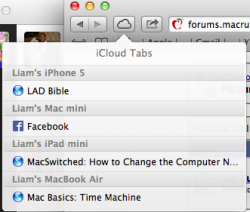
The iCloud tabs look like this from my MacBook Air, see attachment.
Is there anyway I can get rid of the 2nd 'Liam's MacBook Air'?
I recently purchased a MacBook Air and set it up, then I create a new user profile so I could overwrite the original user profile with a back up from time machine.
I noticed earlier today on my Mac mini (and then iPhone and iPad) that all of the tabs open on my MBA showed up as open on NULL.
And the tab showing as open on Liam's MacBook Air was the tab I had open on the original profile before I rewrote the profile with a time machine back up.
The iCloud tabs look like this from my MacBook Air, see attachment.
Is there anyway I can get rid of the 2nd 'Liam's MacBook Air'?