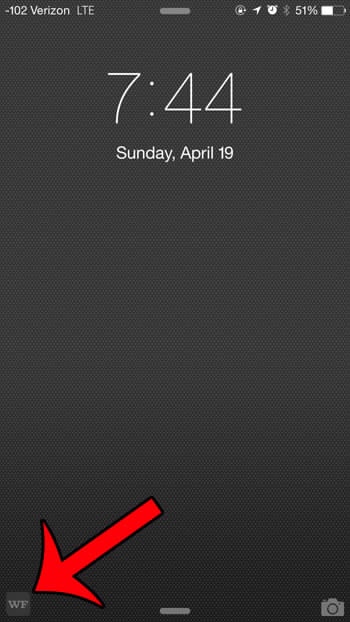
Glennster macrumors 6502 Original poster Mar 29, 2017 #1 Since updating to 10.3 have noticed an icon that appears on my lock screen. What is this? How can I get rid of it?
Since updating to 10.3 have noticed an icon that appears on my lock screen. What is this? How can I get rid of it?
willmtaylor macrumors G4 Mar 29, 2017 #2 Glennster said: Since updating to 10.3 have noticed an icon that appears on my lock screen. What is this? How can I get rid of it? Click to expand... That's an extremely vague "description." Could you provide more info or better yet a screenshot? My off the cuff guess would be Handoff or Suggested Apps.
Glennster said: Since updating to 10.3 have noticed an icon that appears on my lock screen. What is this? How can I get rid of it? Click to expand... That's an extremely vague "description." Could you provide more info or better yet a screenshot? My off the cuff guess would be Handoff or Suggested Apps.
C C DM macrumors Sandy Bridge Mar 29, 2017 #4 Glennster said: Since updating to 10.3 have noticed an icon that appears on my lock screen. What is this? How can I get rid of it? Click to expand... Can be part of handoff, or proactive suggestions, or something similar to that.
Glennster said: Since updating to 10.3 have noticed an icon that appears on my lock screen. What is this? How can I get rid of it? Click to expand... Can be part of handoff, or proactive suggestions, or something similar to that.
Goatllama macrumors 6502a Mar 29, 2017 #6 Looks like the answer can be found here: https://discussions.apple.com/thread/7668772
willmtaylor macrumors G4 Mar 29, 2017 #7 Glennster said: This is an example of what I'm seeing: Click to expand... Thank you. Much more helpful. As mentioned a couple of times already, it's a feature of iOS 10 called "suggested apps." You. Can google it or search Apple's iOS 10 page for it. To disable:
Glennster said: This is an example of what I'm seeing: Click to expand... Thank you. Much more helpful. As mentioned a couple of times already, it's a feature of iOS 10 called "suggested apps." You. Can google it or search Apple's iOS 10 page for it. To disable:
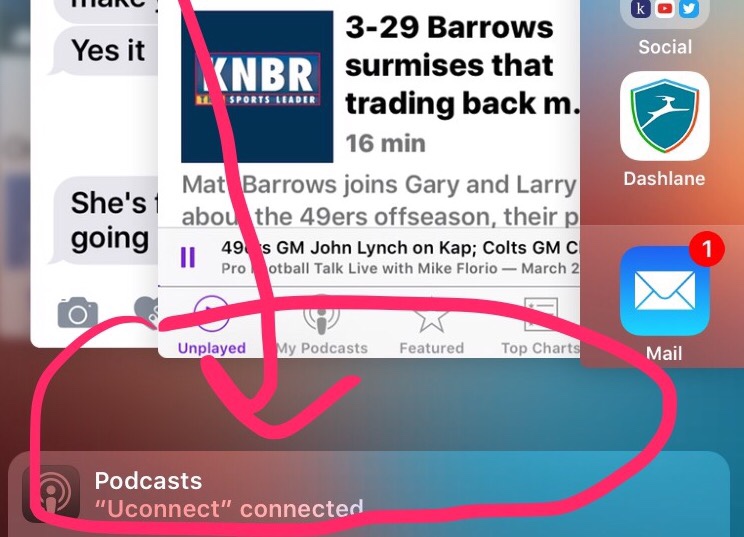
Glennster macrumors 6502 Original poster Mar 30, 2017 #8 Just noticed an icon is still appearing, however only when connected to Bluetooth. The icon that was showing was the Podcasts.
Just noticed an icon is still appearing, however only when connected to Bluetooth. The icon that was showing was the Podcasts.
willmtaylor macrumors G4 Mar 30, 2017 #9 Glennster said: Just noticed an icon is still appearing, however only when connected to Bluetooth. The icon that was showing was the Podcasts. Click to expand... Did you follow the steps above?
Glennster said: Just noticed an icon is still appearing, however only when connected to Bluetooth. The icon that was showing was the Podcasts. Click to expand... Did you follow the steps above?
Glennster macrumors 6502 Original poster Mar 30, 2017 #10 willmtaylor said: Did you follow the steps above? Click to expand... I did but the Siri aspect wasn't even on so not sure exactly what the issue is. Here is a screen shot direct from my phone:
willmtaylor said: Did you follow the steps above? Click to expand... I did but the Siri aspect wasn't even on so not sure exactly what the issue is. Here is a screen shot direct from my phone:
C C DM macrumors Sandy Bridge Mar 30, 2017 #11 Glennster said: I did but the Siri aspect wasn't even on so not sure exactly what the issue is. Here is a screen shot direct from my phone: Click to expand... Perhaps something from a similar recent discussion at https://forums.macrumors.com/thread...quick-launch-bar-at-bottom-of-screen.2036000/ might be of some help. Reactions: Glennster
Glennster said: I did but the Siri aspect wasn't even on so not sure exactly what the issue is. Here is a screen shot direct from my phone: Click to expand... Perhaps something from a similar recent discussion at https://forums.macrumors.com/thread...quick-launch-bar-at-bottom-of-screen.2036000/ might be of some help.