Become a MacRumors Supporter for $50/year with no ads, ability to filter front page stories, and private forums.

GreggC

macrumors newbie
Original poster
Hi guys,
I updated to Yosemite a few week ago and I noticed something very annoying.
When a folder opens to select a icon for upload the icon is so small I have a hard time seeing it.
For example,
I'm logged into youtube and want to upload a video,
I click upload and finder opens defaulted to the download folder, heres my problem, the icons are too small.
Can anyone smarter than me help ??
How do I make the icons larger when selecting a folder.
Thanks Guys.
 
That works for any other folder I open.
But when I open a folder associated with
retrieving a pic or doc for upload the icons
are tiny and theres no way I can see to
make them bigger.
Another example,
On another forum Im on I wanted to change
my signature pic, I went to the control panel,
selected edit signature, clicked choose pic and
when the picture folder opened the icons are very small.
I just can't see a way to make them larger.
 
That works for any other folder I open.
But when I open a folder associated with
retrieving a pic or doc for upload the icons
are tiny and theres no way I can see to
make them bigger.
Another example,
On another forum Im on I wanted to change
my signature pic, I went to the control panel,
selected edit signature, clicked choose pic and
when the picture folder opened the icons are very small.
I just can't see a way to make them larger.

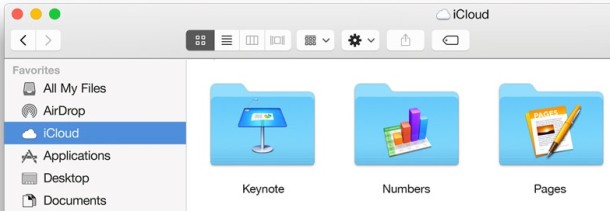
I'm still using Snow Leopard 10.6.8, so I may be wrong about this...In the pic below you'll see that the button with the 4 squares in the Finder toolbar is depressed, you need to do that when you're selecting a pic in a Finder file selection dialog and it will switch the view to icon view and and it will display the larger icons. Hope that works in your situation.

os-x-yosemite-finder-buttons-610x211.jpg
 
Yeah,
I've tried those views, however I prefer the icon view, Im just stumped as to why I can't adjust the size.
This started with Yosemite.
A bit frustrating.....theres got to be an answer.
 
Yeah,
I've tried those views, however I prefer the icon view, Im just stumped as to why I can't adjust the size.
This started with Yosemite.
A bit frustrating.....theres got to be an answer.

I don't think this is new with Yosemite as I can't adjust the size of the file icons in the file selection dialog on Snow Leopard either.
 
I don't think this is new with Yosemite as I can't adjust the size of the file icons in the file selection dialog on Snow Leopard either.

I updated from Maverick, the icon displayed during the selection process for an upload were the same size as when I would open a folder anytime.
It was a non issue until I updated to Yosemite.
 
I updated from Maverick, the icon displayed during the selection process for an upload were the same size as when I would open a folder anytime.
It was a non issue until I updated to Yosemite.

Edited out, never mind, misunderstood the question.
 
Register on MacRumors! This sidebar will go away, and you'll see fewer ads.