Become a MacRumors Supporter for $50/year with no ads, ability to filter front page stories, and private forums.

yoyo5280

macrumors 68000
Original poster
Hey,

I like film. Making it that is. I have started to film and edit events happening at school (I used to volunteer. Not they are asking me) and I enjoy it so much but I have some problems that are driving me INSANE😡

PROBLEM A)
If I see iMovie pop up another "remaining time: 45 mins" just to render a bloody effect on a clip I will chuck my mac off the balcony
Yes, My mac mini is not exactly known for speedy...anything. And know that I have less free time to edit in, waiting for some stupid audio effect to load is driving me insane. I need a new computer but I am on a really really really tight budget. Like my school. As you can probably imagine, they don't pay me. Neither do my parents.
What is the best computer (used or new) to buy for good video editing? Is there anyway it could be, I don't know, a mac perhaps?

PROBLEM B)
I hate my partner
He volunteers himself to help me with the filming and editing,not that much of a problem. But he has no taste, pays no attention to quality, brags, and uses a brick he calls a PC. AGG. How do I say I want to try a Solo project next time?
 
As for your problems with the slow render times, it's obviously because you're trying to use a Mac Mini. You can do a lot with it, but it ain't gonna be pretty or fun. My MacBook just cannot handle the kind of HD video editing I'm trying to force it to, so I just ordered a new iMac (the one with the 256MB video card, not the base model).

I would say that for serious hobbyists, nothing short of an iMac will do. For those aiming to be a true professional, a Mac Pro is in order. I'm a serious hobbyist, so I'm getting the iMac.

Biggest problem you're facing here is the lack of a graphics card. The integrated graphics chip with shared system memory is just... it's "no." No good, no good, no good for video editing. Want to go beyond cheesy iMovie creations of cut-transition-sound effect? Gotta go iMac, in my opinion.

Don't get me wrong, I edited and put together a 30+ minute video with my MacBook... but it was often difficult, and rendering was slow. That was with SD, so HD is just not gonna go well. A 4 minute video took over 1 hour 45 minutes to complete.

Get an iMac, best one you can afford. Grab a Firewire external HDD too, if you can, and work with your video files on that drive (can't use USB, especially for HD). Max out the RAM on your iMac, preferably through a third-party for cheaper than Apple's prices. And make sure you have a good solid camera, like the Canon HV20/30.

As for your partner... Just tell him that you want to create a project from beginning to end all by yourself. It's the truth.

P.S. When you say "movie," I assume you meant to say "video." Film and video are entirely different things; film is a physical format that resembles a large VHS tape reel. Video is a format that can take many physical forms, from miniDV to HDD to Blu-ray/DVD (never get a compact disc based camcorder). They're make-up is very different. Contrast, hue, saturation, and frame rate can all separate film from video. If you get a camcorder that can record at 24p (framerate), you're one step closer to looking like film.

Looking like film when using video means a ton of effort for a little result. You could spend over an hour on a 25 second scene trying to make it look like real film, and still not be happy with it.
 
ARIGATZ!

That was just the sort of answer I was almost hoping for. Deeply sorry about using Movie rather than video..

So the iMac you recommend is probably the 2.66GHz one with RAM from new egg?

Could it be possible to look for a used macbookpro with specs similar to the iMacs. In my apartment. I don't have much desk space and I still, when I get a new computer, hope to have my Mini set up for my sisters use.

Thankyou for your help
ありがとう😉
 
for a tight budget, definitely go used.

when people say "you can't do video editing on that machine" remember that when imovie / fcp was introduced it was being run on G3s! it's obviously just a matter of what you are willing to deal with with render times/etc.

i would reccomend a used, later model G5 or a used macbook pro. both will give you comparable performance, and will be more than capable for serious hobbyist video editing.

i have an older macbook pro myself, and i wouldnt hesitate to throw HD editing at it having used it for SD a number of times.
 
Hang on... does iMovie actually use the graphics card to render its effects? Is it not all CPU-driven? People talking about buying Mac Pros for using Final Cut seem to comment about only upgrading the graphics card if you want to use Motion (for 3D effects) as the rest is CPU/RAM dependent.

If you can get to a store with an iMac and your video clips maybe they will let you test out a new iMac with them and see how you feel the speed improvement is.

Is your Mac Mini a G4 or Intel? What speed? What RAM?

Do you have a rough amount in mind that you're considering spending?
 
Is your Mac Mini a G4 or Intel? What speed? What RAM?G4 1.25GHz with 1GB RAM

Do you have a rough amount in mind that you're considering spending? about ¥100,000 which is like $1,000 plus or minus a little.

^^answers in bold^^
 
Yeah, the G4 isn't going to render anything fast. Any computer using an intel chip is going to blow the doors off a G4. Grabbing a refurb off the Apple site is probably the best way to go.


Lethal
 
iMovie is completely CPU based. The graphics chip will not matter at all. In fact, so is Final Cut, so if you upgraded it still wouldn't matter what GPU you had.

If you are on a budget, I would reccommend picking up either a refurb Macbook or Mac Mini. Go for at least a Core 2 Duo and throw the maximum amount of RAM in there. Both will run iMovie or even Final Cut Express very well.
 
There is a very common misconception that a graphics card makes a huge difference in video editing. The truth is, unless you are doing 3-d animation, Motion, Color, or Adobe After Effects, the graphics card will NOT HELP IN ANY WAY. Performance for everything else (yes even Final Cut, and Photoshop, and Compressor) is ENTIRELY CPU, HARDDRIVE, AND RAM BASED. I am running Final Cut Studio 2 on my Macbook, editing HDV without a hitch. It is wonderfully quick. You should know what your budget is and obviously work within it, just keep in mind the facts about video editing and you will be able to make a good judgement call. You will see huge improvements with plenty of Ram and Intel Dual Core chips.
 
ARIGATZ!

That was just the sort of answer I was almost hoping for. Deeply sorry about using Movie rather than video..

So the iMac you recommend is probably the 2.66GHz one with RAM from new egg?

Could it be possible to look for a used macbookpro with specs similar to the iMacs. In my apartment. I don't have much desk space and I still, when I get a new computer, hope to have my Mini set up for my sisters use.

Thankyou for your help
ありがとう😉

No need to apologize for saying "movie" 🙂. We often interchange the use of "film," "movie," and "video" in popular vernacular, but for video editors, they are not all the same thing by any means.

I do recommend the 256MB video card iMac. If you can go higher, do it. The 24" displays are much higher quality than the 20", but the added size makes it bulkier and take up more space, and the cost goes up significantly.

If you want to get a little more bang for your buck, leave the iMac at its base configuration, and buy 4GB of RAM from a cheap dealer online. Then, install it yourself; cheaper than Apple by a long shot. Also, buy a firewire external hard drive if you want to reduce the loading times.

EDIT: Sorry, I didn't notice that you mentioned only 'iMovie" as your editor. Do you have Final Cut Studio? If you aren't using any sort of motion graphics program like After Effects or Motion, you really don't need much of a graphics card at all. However, the integrated graphics on the Macbooks/Mac Minis will not allow Color to run, and some other major color grading programs will fail to run or crash.

P.S. どういたしまして!
 
I am using iMovie, but I am thinking (or was before I realized how much my mac mini sucked at this) of getting final cut express


finish post later. I have to go!😎
 
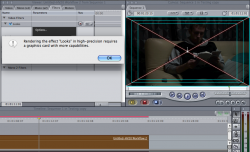
This is why you shouldn't try to squeeze by with something like a MacBook. Look at what I got when I tried to apply some effects from Magic Bullet:
 

Attachments

  • Picture 3.png
    Picture 3.png
    206.3 KB · Views: 167
Question on dvd camera

Hi, I read your answer on video setup.
Would you advise me, a total video novice, what kind of camera would be the best to buy for making 30-45 minutes teaching video, that is of course compatible with my mac. I have a 3 year old Macbook. Are all cameras nowadays compatible with mac?
Also Is the imovie a good enough editing program?
I noticed that you emphasize using imac, would external memory do the same? This is not going to be a fancy video, but it has to have good sound since I will be teaching singing.
Thanks in advance


As for your problems with the slow render times, it's obviously because you're trying to use a Mac Mini. You can do a lot with it, but it ain't gonna be pretty or fun. My MacBook just cannot handle the kind of HD video editing I'm trying to force it to, so I just ordered a new iMac (the one with the 256MB video card, not the base model).

I would say that for serious hobbyists, nothing short of an iMac will do. For those aiming to be a true professional, a Mac Pro is in order. I'm a serious hobbyist, so I'm getting the iMac.

Biggest problem you're facing here is the lack of a graphics card. The integrated graphics chip with shared system memory is just... it's "no." No good, no good, no good for video editing. Want to go beyond cheesy iMovie creations of cut-transition-sound effect? Gotta go iMac, in my opinion.

Don't get me wrong, I edited and put together a 30+ minute video with my MacBook... but it was often difficult, and rendering was slow. That was with SD, so HD is just not gonna go well. A 4 minute video took over 1 hour 45 minutes to complete.

Get an iMac, best one you can afford. Grab a Firewire external HDD too, if you can, and work with your video files on that drive (can't use USB, especially for HD). Max out the RAM on your iMac, preferably through a third-party for cheaper than Apple's prices. And make sure you have a good solid camera, like the Canon HV20/30.

As for your partner... Just tell him that you want to create a project from beginning to end all by yourself. It's the truth.

P.S. When you say "movie," I assume you meant to say "video." Film and video are entirely different things; film is a physical format that resembles a large VHS tape reel. Video is a format that can take many physical forms, from miniDV to HDD to Blu-ray/DVD (never get a compact disc based camcorder). They're make-up is very different. Contrast, hue, saturation, and frame rate can all separate film from video. If you get a camcorder that can record at 24p (framerate), you're one step closer to looking like film.

Looking like film when using video means a ton of effort for a little result. You could spend over an hour on a 25 second scene trying to make it look like real film, and still not be happy with it.
 
Hi, I read your answer on video setup.
Would you advise me, a total video novice, what kind of camera would be the best to buy for making 30-45 minutes teaching video, that is of course compatible with my mac. I have a 3 year old Macbook. Are all cameras nowadays compatible with mac?
Also Is the imovie a good enough editing program?
I noticed that you emphasize using imac, would external memory do the same? This is not going to be a fancy video, but it has to have good sound since I will be teaching singing.
Thanks in advance

Id go for MiniDV or maybe even the webcam in the macbook for short teaching videos. MiniDV cameras are much cheaper


If you are not going to be doing very fancy editing and shiz then iMovie is a great program. It just has a limit.
 
minidv

So minidv would be compatible with mac? Using firewire or ??
Or do you know a good brand of web cam?
Thanks
Inga

Id go for MiniDV or maybe even the webcam in the macbook for short teaching videos. MiniDV cameras are much cheaper


If you are not going to be doing very fancy editing and shiz then iMovie is a great program. It just has a limit.
 
MiniDV will most defiantly work with iMovie

It also sounds like you have iBook. Not macbook. Macbook has a built in camera. If yours does not just go to any electronic store and look for mac compatble webcams.
 
macbook

no I have a macbook from 2005. I had no idea that it had a webcam. I have to check that out!😕
MiniDV will most defiantly work with iMovie

It also sounds like you have iBook. Not macbook. Macbook has a built in camera. If yours does not just go to any electronic store and look for mac compatble webcams.
 
powerbook

yes they called it powerbook back then. It has imovie 5.0.1
Do you think that is going to pose a problem in editing? Would maybe be wise to get a newer imovie? Is my powerbook going to hack it to edit videos like that? I see many are recommending getting a imac.🙂
The macbook was released in 2006. You have iBook. iBook does not have a webcam.
 
powerbook

yes they called it powerbook back then. It has imovie 5.0.1
Do you think that is going to pose a problem in editing? Would maybe be wise to get a newer imovie? Is my powerbook going to hack it to edit videos like that? I see many are recommending getting a imac.
The macbook was released in 2006. You have iBook. iBook does not have a webcam.
 
PowerBook, Macbook PRO, Macbook, and iBook are very very different computers yet so similar in a way.

Back then (2005) apple used PowerPC processors. The laptops where called iBook and Powerbook. Then when apple used Intel processors they changed the laptops a lil bit and changed the names.


iBook--->Macbook
Powerbook---->Macbook Pro


That needs to be clarified. Your powerbook probably has similar specs to my macmini. It will do alright but loading effects will take ages...if your not going to use effects don't worry. If you are upgrade to macbook or iMac.
 
Register on MacRumors! This sidebar will go away, and you'll see fewer ads.