
to start off this post, i want to clearly note the following,
1, AI has been used for most of the software/firmware modification side of this,
I am mainly a hardware guy, i know schematics, circuits. soldering, all that, i am not a programmer, i tried learning coding, arduino's. bios mods, but i could never fully understand it,
2, The firmware attached in this post, serves as an example, all serials and other machine unique information has been removed, if you flash any of these images as is, your machine likely will not work,
This post will also be updating as time goes on, there are many things i would like to do/test on this iMac but spare time varies XD,
Alright so now with that out of the way, let's get some basic info regarding the 14,2 and 15,1 iMac's,
iMac 14,2 27 inch late 2013, Underneath this is a relatively standard Z87 platform
cpu support is only 2013 release haswel chips, such as i5 4560. i5 4660, i7 4770/4771, and potentially i7 4770K
Shipped with 755M, 775M, and 780m mobile kepler GPU's,
iMac 15,1 27 inch late 2014, Also an standard Z87 platform underneath,
This system shipped with 2014 refresh haswel cpu's, such as i5 4590, i5 4690, and i7 4790K,
This system shipped with mobile radeon R9 290 series gpu's,
Disabling write protect on the bios chip so you can flash bios from software,
Sadly, apple write protect's the bios, and only unlocks if it get's an official signed update from apple,
So for the first bios flash, you will need to whip out a hardware programmer, sadly i have not been able to get the bios chip to program in circuit, using a pogo-pin bios clip,
i think on the 2011's you can just use a clip, but for me. i had to desolder the bios and manually program it, which is doable with leaded solder and a cheap c210 clone soldering station.
The rough idea of this mod came from this macrumors thread it did not apply 1:1, as that lead to a brick of the machine,
but it did allow to get an idea of how apple did things, and thank's to AI's ability to understand pure machine code...
module PchSpiRuntime with GUID: 77693C87-A21A-441F-9CC6-054982CDDBB7
stock PR0 = 0x80010000 PR1 = 0x860F018E PR2 = 0x9FFF0632
replaced PR1 = 0x00000000 PR2 = 0x00000000,
Leave PR0 = 0x80010000 unchanged, as This seems to be the ME region of the bios, and that seemed to cause a brick,
after the initial ME update, you won't have to touch that region again anyways,
Now i understand people don't want to touch AI where possible so for folk who don't know what any of that means...
with UEFIPatch 0.28 you can make a patches.txt file and get it to automatically do that for you,
add the following to a patches.txt file
Put your dumped bios, and UEFIPatch.exe and the .TXT inside of a folder.
and then run that in CMD with
Then after you flash that file back to your iMac, you can write future bios updates from software, with the exception of the ME region in the bios file,
Undervolting/overclocking on 14,2/15,1 iMac's
This "hack" likely works on both the 15,1 and the 14,2 as it's the same platform. and honestly i don't see why this would not work on any other pre T2 apple platform in some capacity,
Inside PowerMgmtDxe, with GUID F7731B4C-58A2-4DF4-8980-5645D39ECE58, there is an instruction to disable the overclocking mailbox, and this bit can only be set once,
"or eax, 0x00100000" what this does is, it clears the overclocking bit, and then set's it to be perma disabled,
replacing that to "and eax, 0xFFEFFFFF" will prevent it from locking the overclocking bit,
and thus will allow you to overclock/undervolt the cpu in throttlestop,
Unsure about any OSX utility that can write MSR bits for overclocking, but you can do it on Linux too,
Just like the write protection patch, we can "automate" this with UEFITool 0.28,
Make another text file. idk call it OC.txt and put the following text in it
same as before, bios+UEFIPatch.exe+txt inside of a folder, and run
I do intend to try and make an "permament" overclocking utility for macs, but we'll see if my prompting+AI is good enough for that,
The gist of it is. first dial in software what the cpu can do, then program those settings into the firmware, which then ensures it works on OSX/Windows/Linux without the need of software,

Getting an 4790k to boot in a 14,2??
This is still experimental, and need's work, I managed to get the 4790k booting with only 2 transplants from 15,1 firmware into the 14,2's.
1. CpuInitPei and CpuPei from both PEI volumes, this is likely the main reason the imac does not post, as 2013 firmware already has 4790k Microcode,
2. Intel ME 9.0.6.1492 from 15,1 transplated to the 14,2. replacing the existing 9.0.5.1367 firmware.
i just did this for good measure knowing how annoying ME can be on newer intel platforms.. (Coffeetime)
Doing just those 2, resulted in the machine posting and working,
however. it hits a PP0/EDP power limit even in single core tasks, and unless you disable PP0 in throttlestop, it will be slower than 4771.
I am still working on fixing this issue, i think it is because the 2013 rom is still missing some updated modules,
since CpuInitDxe PowerMgmtDxe PowerMgmtSmm and CpuS3Pei are still original 2013 revision,
There is no tutorial yet for this as it's not done, but for those who know their way around UEFIPatch, get a 2014 bios and move over the relevant modules,

Apple lied to you, your fan isnt "2700 rpm"
The actual fan speed limit may be way higher, To keep things short, apple has a dynamic "fan speed" allowance, if your imac always runs cool. the max fan speed you can set in mac's fan control will be like 2700,
if your mac runs a bit hotter often, you can occasionally see 2800-3000-3200 show up as a max slider option, i noticed this changing each time i rebooted windows after benchmarking so i dug into it,
You can manually command an minimum fan speed to the SMC despite what the reported max is. and it will just do it,
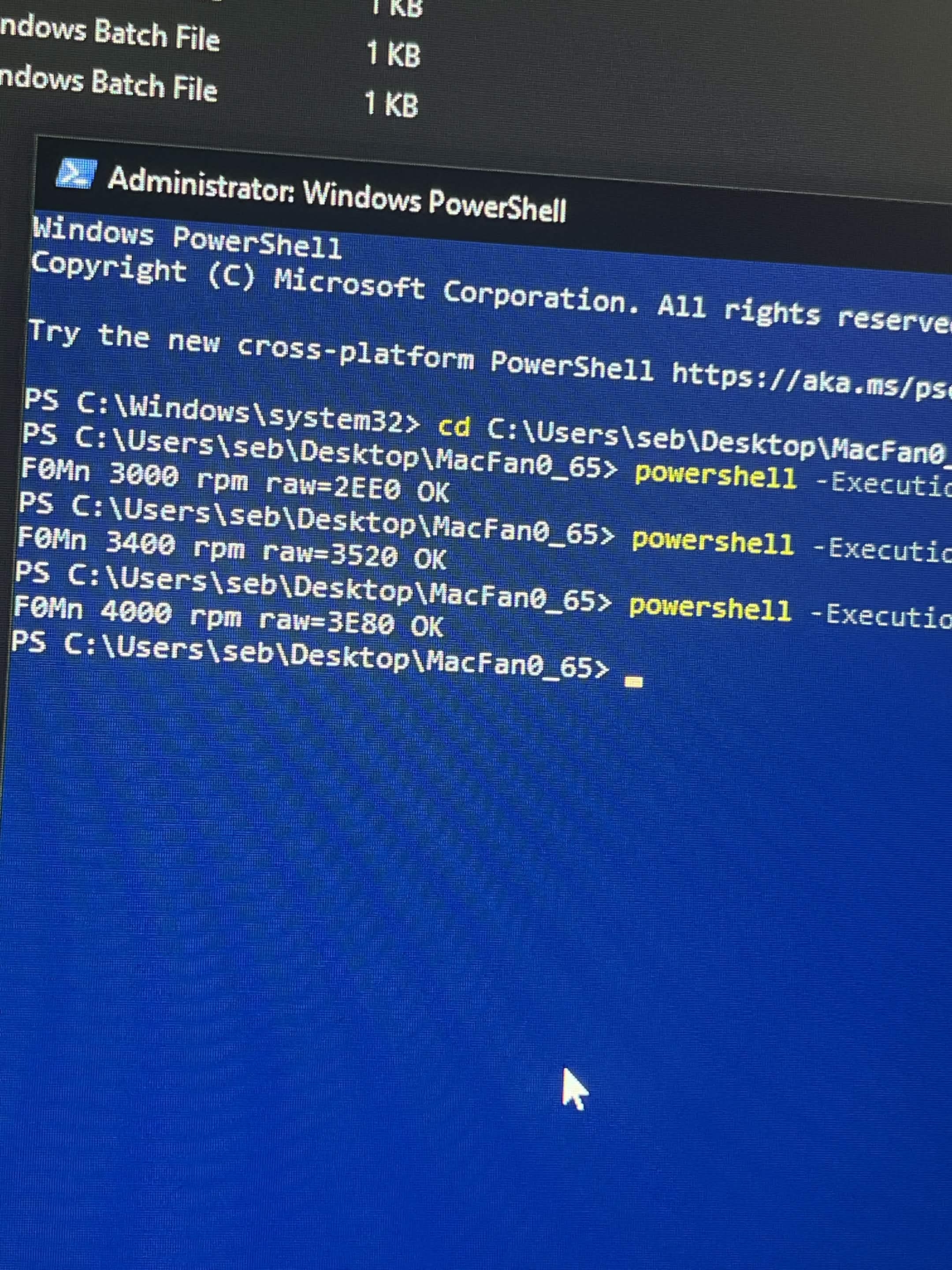
I've made a little "batch" program that benchmarks your fan's capabilities, and then allows you to set the speed to what you want,
I don't really know what to call it so i just called it MacFanOverdrive,
now, this likely will only be usefull for iMac's, MacMini, and maybe Trashcan mac pro? as i noticed on macbooks there is no such "dynamic" allowance,
it will only work on Pre T2 mac's, and you might have to disable System Integrity Protection depending on which mac you have, i did not have to do it on 2 of my test machines here...
i only tested this on a 14,2 imac and on windows.. i will get into Mac os soon, but until then, try smcfancontrol on mac os?
Mind you, some fans go to 4200. but other fans only do 3700, it seems to depend on what OEM is used, Delta fans typically go faster,

bonus segment! GPU overclocking beyond what software does?
I have not done much mods myself yet except initial research, as i am working on CPU stuff first,
The GPU's vbios is inside the main bios of the imac, and you can fully edit it like any other kepler gpu, once you got software write permissions to the bios chip, testing vbios mods will be quick and easy,
You cannot change voltage from software but you should be able to tweak voltages from the vbios,
The 755M 775M 780M all use the same VRM and cooler,
The 755M is roughly a 50 watt
The 775M is roughly a 100 watt
The 780M is roughly a 110-120watt
So for the 755M owners you should have a lot of thermal+power headroom to play with,
in my limited testing for 780m, if you are using the fan hack and got good paste, you have plenty of thermal headroom too, but power budget is constrained,
The imac PSU claims it's 300Watts max, so that's 100watts for cpu. 100 for gpu. and rest for your hungry LCD,
I don't think it would blow up before protecting itself, but be mindfull of your powerbudget, 755m can oc more on cpu and gpu,
780m will be more constrained,
ATTACHED TO THIS POST, i have 2 cleaned bios roms, you cannot flash these roms as is. they are cleaned from any identifiers,
1 is experimental 4790k support, + write protect off + OC enabled,
2 is Write protect off, + OC enabled,
if you feel lazy, or are not sure how to properly mod your bios, just dump your iMac bios, upload an copy + the example bios to any competent AI, and ask it to transplant your machine unique ID's over to the example rom,
1, AI has been used for most of the software/firmware modification side of this,
I am mainly a hardware guy, i know schematics, circuits. soldering, all that, i am not a programmer, i tried learning coding, arduino's. bios mods, but i could never fully understand it,
2, The firmware attached in this post, serves as an example, all serials and other machine unique information has been removed, if you flash any of these images as is, your machine likely will not work,
This post will also be updating as time goes on, there are many things i would like to do/test on this iMac but spare time varies XD,
Alright so now with that out of the way, let's get some basic info regarding the 14,2 and 15,1 iMac's,
iMac 14,2 27 inch late 2013, Underneath this is a relatively standard Z87 platform
cpu support is only 2013 release haswel chips, such as i5 4560. i5 4660, i7 4770/4771, and potentially i7 4770K
Shipped with 755M, 775M, and 780m mobile kepler GPU's,
iMac 15,1 27 inch late 2014, Also an standard Z87 platform underneath,
This system shipped with 2014 refresh haswel cpu's, such as i5 4590, i5 4690, and i7 4790K,
This system shipped with mobile radeon R9 290 series gpu's,
Disabling write protect on the bios chip so you can flash bios from software,
Sadly, apple write protect's the bios, and only unlocks if it get's an official signed update from apple,
So for the first bios flash, you will need to whip out a hardware programmer, sadly i have not been able to get the bios chip to program in circuit, using a pogo-pin bios clip,
i think on the 2011's you can just use a clip, but for me. i had to desolder the bios and manually program it, which is doable with leaded solder and a cheap c210 clone soldering station.
The rough idea of this mod came from this macrumors thread it did not apply 1:1, as that lead to a brick of the machine,
but it did allow to get an idea of how apple did things, and thank's to AI's ability to understand pure machine code...
module PchSpiRuntime with GUID: 77693C87-A21A-441F-9CC6-054982CDDBB7
stock PR0 = 0x80010000 PR1 = 0x860F018E PR2 = 0x9FFF0632
replaced PR1 = 0x00000000 PR2 = 0x00000000,
Leave PR0 = 0x80010000 unchanged, as This seems to be the ME region of the bios, and that seemed to cause a brick,
after the initial ME update, you won't have to touch that region again anyways,
Now i understand people don't want to touch AI where possible so for folk who don't know what any of that means...
with UEFIPatch 0.28 you can make a patches.txt file and get it to automatically do that for you,
add the following to a patches.txt file
Code:
77693C87-A21A-441F-9CC6-054982CDDBB7 10 P:8E010F86:00000000
77693C87-A21A-441F-9CC6-054982CDDBB7 10 P:3206FF9F:00000000and then run that in CMD with
UEFIPatch.exe Yourbios.bin patches.txt -o ProtectOffBios.binThen after you flash that file back to your iMac, you can write future bios updates from software, with the exception of the ME region in the bios file,
Undervolting/overclocking on 14,2/15,1 iMac's
This "hack" likely works on both the 15,1 and the 14,2 as it's the same platform. and honestly i don't see why this would not work on any other pre T2 apple platform in some capacity,
Inside PowerMgmtDxe, with GUID F7731B4C-58A2-4DF4-8980-5645D39ECE58, there is an instruction to disable the overclocking mailbox, and this bit can only be set once,
"or eax, 0x00100000" what this does is, it clears the overclocking bit, and then set's it to be perma disabled,
replacing that to "and eax, 0xFFEFFFFF" will prevent it from locking the overclocking bit,
and thus will allow you to overclock/undervolt the cpu in throttlestop,
Unsure about any OSX utility that can write MSR bits for overclocking, but you can do it on Linux too,
Just like the write protection patch, we can "automate" this with UEFITool 0.28,
Make another text file. idk call it OC.txt and put the following text in it
F7731B4C-58A2-4DF4-8980-5645D39ECE58 10 P:0D00001000F60602480F44C2:25FFFFEFFFF60602480F44C2same as before, bios+UEFIPatch.exe+txt inside of a folder, and run
UEFIPatch.exe OriginalBios.bin OC.txt -o OCunlockedbios.binI do intend to try and make an "permament" overclocking utility for macs, but we'll see if my prompting+AI is good enough for that,
The gist of it is. first dial in software what the cpu can do, then program those settings into the firmware, which then ensures it works on OSX/Windows/Linux without the need of software,
Getting an 4790k to boot in a 14,2??
This is still experimental, and need's work, I managed to get the 4790k booting with only 2 transplants from 15,1 firmware into the 14,2's.
1. CpuInitPei and CpuPei from both PEI volumes, this is likely the main reason the imac does not post, as 2013 firmware already has 4790k Microcode,
2. Intel ME 9.0.6.1492 from 15,1 transplated to the 14,2. replacing the existing 9.0.5.1367 firmware.
i just did this for good measure knowing how annoying ME can be on newer intel platforms.. (Coffeetime)
Doing just those 2, resulted in the machine posting and working,
however. it hits a PP0/EDP power limit even in single core tasks, and unless you disable PP0 in throttlestop, it will be slower than 4771.
I am still working on fixing this issue, i think it is because the 2013 rom is still missing some updated modules,
since CpuInitDxe PowerMgmtDxe PowerMgmtSmm and CpuS3Pei are still original 2013 revision,
There is no tutorial yet for this as it's not done, but for those who know their way around UEFIPatch, get a 2014 bios and move over the relevant modules,
Apple lied to you, your fan isnt "2700 rpm"
The actual fan speed limit may be way higher, To keep things short, apple has a dynamic "fan speed" allowance, if your imac always runs cool. the max fan speed you can set in mac's fan control will be like 2700,
if your mac runs a bit hotter often, you can occasionally see 2800-3000-3200 show up as a max slider option, i noticed this changing each time i rebooted windows after benchmarking so i dug into it,
You can manually command an minimum fan speed to the SMC despite what the reported max is. and it will just do it,
I've made a little "batch" program that benchmarks your fan's capabilities, and then allows you to set the speed to what you want,
I don't really know what to call it so i just called it MacFanOverdrive,
now, this likely will only be usefull for iMac's, MacMini, and maybe Trashcan mac pro? as i noticed on macbooks there is no such "dynamic" allowance,
it will only work on Pre T2 mac's, and you might have to disable System Integrity Protection depending on which mac you have, i did not have to do it on 2 of my test machines here...
i only tested this on a 14,2 imac and on windows.. i will get into Mac os soon, but until then, try smcfancontrol on mac os?
Mind you, some fans go to 4200. but other fans only do 3700, it seems to depend on what OEM is used, Delta fans typically go faster,
bonus segment! GPU overclocking beyond what software does?
I have not done much mods myself yet except initial research, as i am working on CPU stuff first,
The GPU's vbios is inside the main bios of the imac, and you can fully edit it like any other kepler gpu, once you got software write permissions to the bios chip, testing vbios mods will be quick and easy,
You cannot change voltage from software but you should be able to tweak voltages from the vbios,
The 755M 775M 780M all use the same VRM and cooler,
The 755M is roughly a 50 watt
The 775M is roughly a 100 watt
The 780M is roughly a 110-120watt
So for the 755M owners you should have a lot of thermal+power headroom to play with,
in my limited testing for 780m, if you are using the fan hack and got good paste, you have plenty of thermal headroom too, but power budget is constrained,
The imac PSU claims it's 300Watts max, so that's 100watts for cpu. 100 for gpu. and rest for your hungry LCD,
I don't think it would blow up before protecting itself, but be mindfull of your powerbudget, 755m can oc more on cpu and gpu,
780m will be more constrained,
ATTACHED TO THIS POST, i have 2 cleaned bios roms, you cannot flash these roms as is. they are cleaned from any identifiers,
1 is experimental 4790k support, + write protect off + OC enabled,
2 is Write protect off, + OC enabled,
if you feel lazy, or are not sure how to properly mod your bios, just dump your iMac bios, upload an copy + the example bios to any competent AI, and ask it to transplant your machine unique ID's over to the example rom,
Attachments
Last edited:

