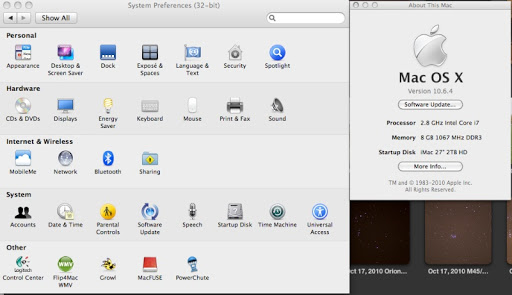
mtbdudex macrumors 68040 Original poster Nov 6, 2010 #1 My iMac 27" i7 2009, went to sys prefs and opened it, noticed it said "32-bit", what the heck does that mean? I thought 64 bit OS? Or, always there and I'm getting senile in my older age? Did my iMac re-start into some "32-bit safe mode"??
My iMac 27" i7 2009, went to sys prefs and opened it, noticed it said "32-bit", what the heck does that mean? I thought 64 bit OS? Or, always there and I'm getting senile in my older age? Did my iMac re-start into some "32-bit safe mode"??
Hellhammer Moderator emeritus Nov 6, 2010 #2 Finder > Applications > Right-click System Preferences > Show Info > Uncheck "Open in 32-bit mode"
mtbdudex macrumors 68040 Original poster Nov 6, 2010 #3 Hellhammer said: Finder > Applications > Right-click System Preferences > Show Info > Uncheck "Open in 32-bit mode" Click to expand... thank you
Hellhammer said: Finder > Applications > Right-click System Preferences > Show Info > Uncheck "Open in 32-bit mode" Click to expand... thank you